Best Password Generator 2026: Free Generators From Google, Bitwarden, 1Password, LastPass and NordPass Compared
Searches for "best password generator" and "free password generator" have more than tripled. We compared the free generators from Google, Apple, Bitwarden, 1Password, LastPass and NordPass with Kriptano – options, privacy, and what happens after you click "generate".
Which is the best password generator? Searches for that question grew by about 300% in the United States over the last five years, and “password generator free” by 350%. The good news: almost every free password generator from a reputable company produces strong passwords. The differences are in the details – how many options you get, whether the password ever leaves your device, and what you do with it next. We compared seven free generators so you can pick the right one in a minute.
Contents
- What makes the best password generator
- How we tested each password generator
- The free password generators we compared
- Kriptano: a free password generator built for sharing
- Which free password generator should you use?
- Search trends: generators everyone is looking for
- Red flags: when a free password generator is not safe
- After you generate: share it safely
- Best password generator – FAQ
What makes the best password generator
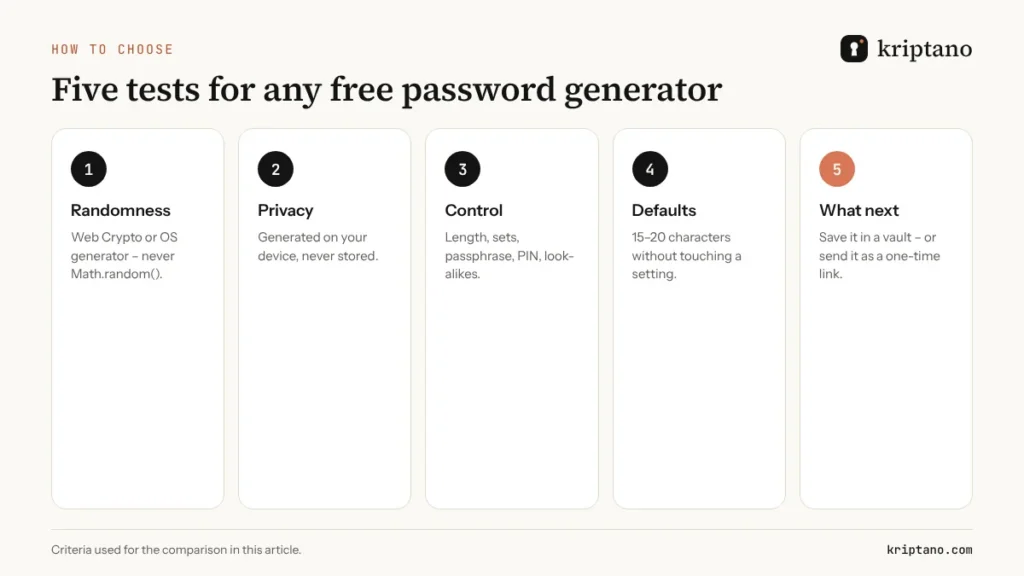
Before comparing brands, it helps to agree on the criteria. A password generator has one job – to produce passwords an attacker cannot predict – and a handful of features that make it pleasant or painful to use. These are the five tests we applied:
- Randomness: a cryptographically secure source (Web Crypto or the operating system), no
Math.random(), no bias. - Privacy: the password is generated on your device and never stored by the provider.
- Control: adjustable length, character sets, passphrases, PINs and an option to avoid look-alike characters.
- Defaults: a strong result without touching any setting – ideally 15–20 characters.
- What comes next: saving the password in a vault or handing it to another person without leaving copies in email or chat.
Randomness is the non-negotiable part; if you want to see how it works under the hood, our guide to the random password generator explains CSPRNGs and the modulo trap. The rest is about fit: a developer needs an API, an office manager needs bulk generation, and most people just need a strong default.
How we tested each password generator
To find the best password generator for different needs, we opened each free generator in a fresh browser profile, generated passwords with the default settings, and then went through every option the page or app offers. We checked whether the generator still worked offline, whether the default length met the NIST minimum of 15 characters, and how many clicks it took to get a passphrase, a PIN or a list of passwords.
We did not test the password managers’ vaults, autofill or pricing – only the generators and the step that follows: saving or sharing the password. That keeps the comparison fair, because a free password generator and a full password manager do different jobs. The best password generator is the one that fits the job in front of you.
The free password generators we compared
We looked at the generators people actually search for: Google’s suggestion in Chrome, Apple’s automatic strong passwords, the web generators of Bitwarden, 1Password, LastPass and NordPass, and the Kriptano password generator. The comparison is based on the vendors’ public generator pages and documentation in November 2026.
Google Password Manager (Chrome)
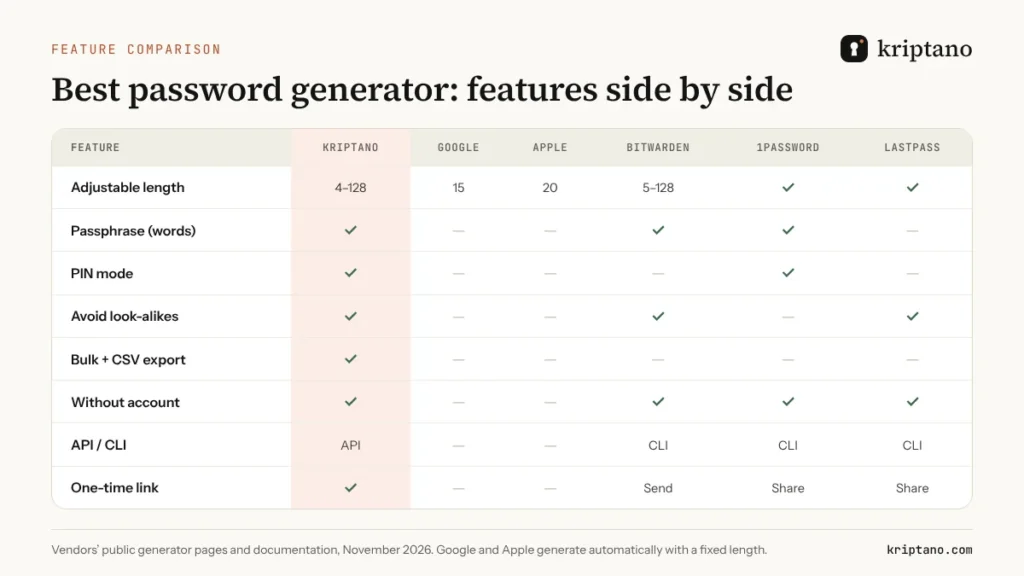
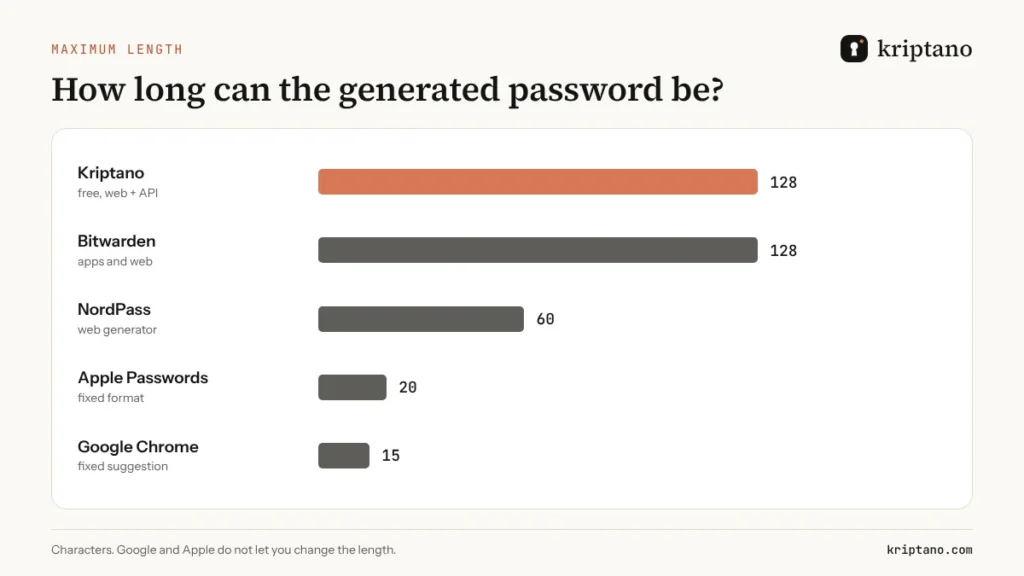
When you create an account in Chrome, it offers to suggest a strong password and saves it in Google Password Manager. It is the easiest free password generator there is – you do not even have to open a page. The trade-off is control: the suggestion is a 15-character password with no length or character options, it needs Chrome and a Google account, and there is no passphrase mode. Our article on the Google password generator goes into detail. Best password generator for: people who sign up on sites in Chrome and want zero effort.
Apple Passwords
Safari and the Passwords app create 20-character passwords in groups separated by hyphens – easy to type on a phone, about 71 bits of entropy by Apple’s own figure. Like Google’s, it is automatic and fixed: excellent for your own Apple devices, not designed for creating a password to give to someone else. Best password generator for: iPhone, iPad and Mac users who stay in Apple’s ecosystem.
Bitwarden
Bitwarden’s generator is one of the most configurable: length from 5 to 128 characters, minimum numbers and symbols, avoid ambiguous characters, plus passphrases of 3 to 20 words and a username generator. It is available in all Bitwarden apps and as a free web page. Interest has exploded – “bitwarden password generator” searches rose about 900% in the US and 1,250% in Germany. For sharing, Bitwarden Send creates links from a Bitwarden account. Best password generator for: people who want many options and open-source software.
1Password
1Password offers three modes – random, memorable (words) and PIN – plus a “smart password” that adapts to a site’s rules when you use the browser extension. The free web generator works without an account. Sharing a generated password to someone else happens through 1Password item sharing, from an account. Best password generator for: 1Password users who need PINs and memorable passwords.
LastPass
The LastPass web generator lets you choose the length, character types and two handy modes: “easy to say” (no numbers or symbols) and “easy to read” (no ambiguous characters such as l, 1, O and 0). It shows a strength indicator, but according to independent comparisons the web version has no passphrase mode. Best password generator for: passwords you have to read out or type by hand.
NordPass, Norton and Avast
NordPass’s free web generator produces passwords from 8 to 60 characters, with 20 as the default, and recommends at least 14. Norton and Avast offer similar free pages. Searches for “nord password generator” rose about 1,250% in the US – brand generators ride on the popularity of their password managers. They all do the basics well; none of them is designed for handing a password over to someone else. Best password generator for: existing customers of those brands.
Kriptano: a free password generator built for sharing
We built the Kriptano password generator because generating a password was never the hard part for our users – getting it to a client, colleague or new employee was. So the generator does everything the others do and then hands the password straight to an encrypted one-time link.
- Every mode: random passwords from 4 to 128 characters, passphrases from 3 to 20 words (English, German, Croatian/Serbian/Bosnian and Slovenian lists), PINs without easy patterns and pronounceable passwords.
- Fine control: minimum numbers and symbols, your own symbol list, exclude characters, avoid look-alikes, start with a letter, no repeats or sequences.
- Strength test: check an existing password locally and, if you want, against Have I Been Pwned with k-anonymity.
- Bulk and API: up to 100 passwords at once with TXT/CSV download, and a free API on every plan.
- Send as one-time link: one click moves the password into Kriptano, where it is encrypted in your browser and deleted after the first opening.
Everything runs locally with crypto.getRandomValues(), nothing is stored, and the page keeps working offline once it has loaded. Try it right here:
Generated in your browser – never sent to the server.
More options
The strength test runs only in your browser. The breach check sends only the first 5 characters of the password’s SHA-1 hash to Have I Been Pwned (k-anonymity) – never the password.
Generated locally in your browser with the Web Crypto API (crypto.getRandomValues). Passwords are never sent to our server or stored – only your settings are remembered in this browser.
Which free password generator should you use?
There is no single best password generator for everyone – there is a best one for each situation. Use this as a quick decision guide to the best password generator for each situation:
| Situation | Best choice | Why |
|---|---|---|
| Signing up on a website in Chrome | Google’s suggestion | Zero effort, saved automatically |
| iPhone, iPad or Mac user | Apple Passwords | Built in, synced through iCloud Keychain |
| You already use a password manager | Its built-in generator | Saves the password in your vault at once |
| Password for someone else | Kriptano | Generate and send as a one-time link |
| Many accounts at once | Kriptano bulk mode or API | Up to 100 passwords, CSV export |
| Master password you must type | A words/passphrase mode | Six random words are easier to type |
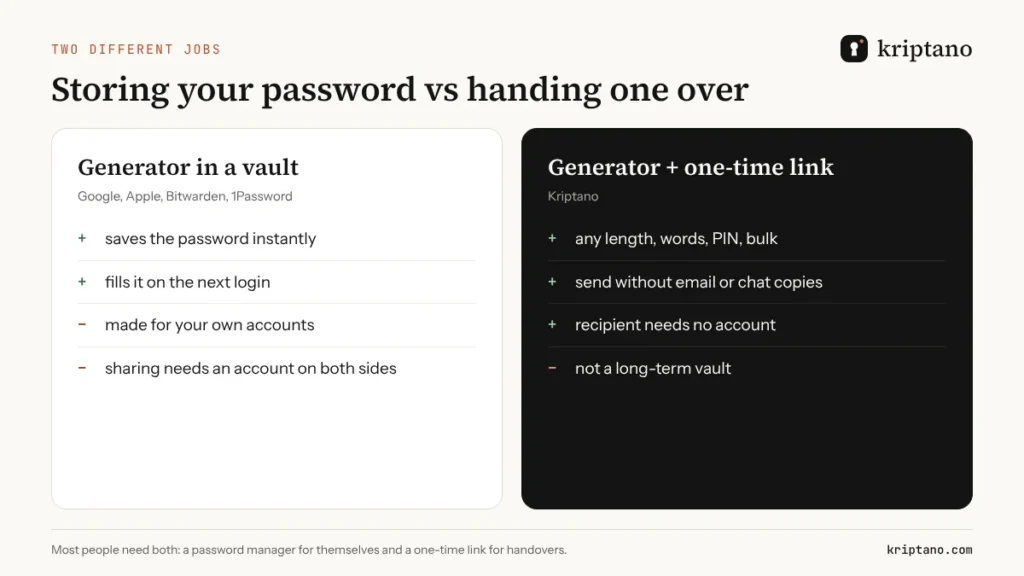
Most people end up using two tools: the generator in their password manager for their own accounts, and a sharing tool for the moments when a password has to travel. Our guide to the best place to keep passwords compares password managers, browsers and other options for the first job.
Search trends: generators everyone is looking for
The keyword data behind this article tells a clear story. Over five years, US searches for brand-name generators grew faster than any generic term, and people increasingly look for a specific length.
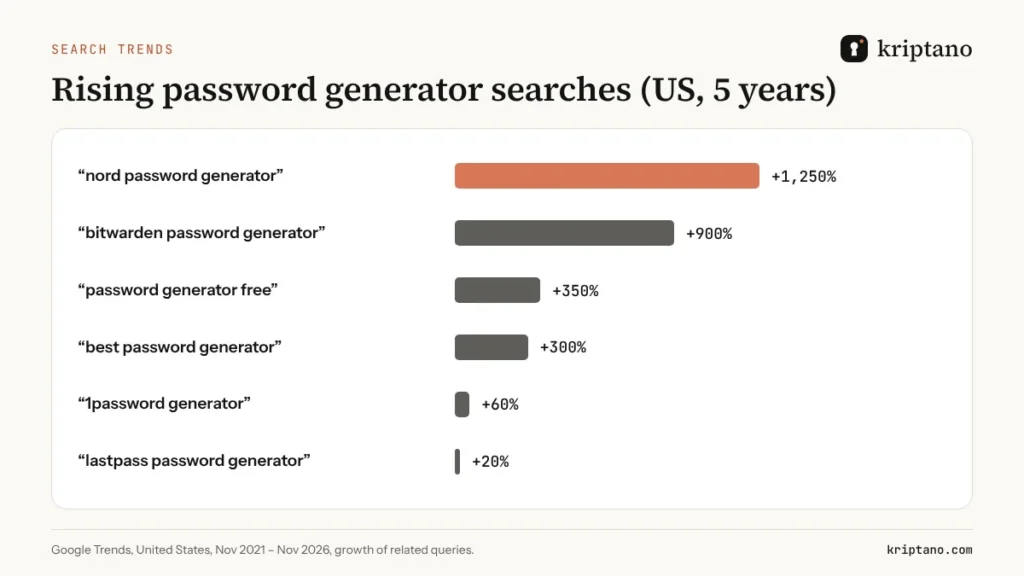
Our reading: when people look for the best password generator, they trust generators from brands they already know, and they arrive with a concrete requirement – a length, a site’s rules, a passphrase. A generator that makes those choices obvious wins. If length is your question, see password generator 12 characters vs 15, 16 and 20; if you want something memorable, the password generator with words.
Red flags: when a free password generator is not safe
Most free generators from known companies are fine, but the best password generator from a search result is not always what it seems. Be careful with unknown sites, especially if you notice any of these:
- The password is generated on the server – you can see a network request every time you click “generate”.
- The site offers to email you the password or “save it in your account” without a password manager behind it.
- The page is full of third-party ads and trackers – scripts you did not choose run next to your password.
- There is no HTTPS, or the generator uses
Math.random()in its source code. - The default is short (8 characters) or the length cannot be changed.
How to check in 30 seconds
Open the generator, load the page, then switch on airplane mode. If it still generates passwords, it works locally. Kriptano’s free password generator passes this test.
After you generate: share it safely
Even the best password generator in the world cannot protect a password that is pasted into an email. If the password is for someone else, send it as a one-time link instead. Kriptano encrypts it in your browser with AES-256-GCM, the key stays in the link after #, and the encrypted copy is deleted after the first opening. For agencies and IT providers, our guide to the secure password sharing tool shows the full workflow.
Best password generator – FAQ
What is the best free password generator?
The best password generator for your own accounts is usually the one in your password manager or browser, because it saves the password at once. For passwords you give to someone else, or when you need many at once, a free password generator such as Kriptano’s adds bulk mode, an API and one-time links.
Is Google’s password generator good?
Yes, it creates strong 15-character passwords and saves them in Google Password Manager. It has no options, works only in Chrome with a Google account and has no passphrase mode.
Is a free password generator safe?
It is safe when the password is created in your browser with a cryptographically secure source and is never sent or stored. Test it by going offline after the page loads – a local generator keeps working.
Which is the best password generator for options?
Bitwarden and Kriptano both go up to 128 characters with minimums, excluded characters and passphrases. Kriptano also offers PINs, pronounceable passwords, bulk generation with CSV export, an API and sending as a one-time link.
Do I need a password manager if I use a password generator?
Yes, for your own accounts. A generator creates passwords; a password manager stores and fills them. Use both, and use a one-time link when a password has to go to another person.
The free password generator that also sends
Generate strong passwords, passphrases and PINs – and share them as one-time links. Free, no sign-up.