Bitwarden vs 1Password in 2026: Price Increases, the CLI Incident and Which One to Choose
Bitwarden nearly doubled Premium in January, 1Password added $12 a year in March, and a compromised Bitwarden CLI package spooked developers in April. Here is what actually changed and how to choose.
2026 has been a busy year for password managers. Bitwarden raised its Premium plan for the first time in about a decade, 1Password followed with its own increase, and a malicious version of the Bitwarden command-line tool briefly appeared on npm. Searches for “bitwarden price increase”, “bitwarden cli compromised” and “bitwarden vs 1password” all spiked. This guide lays out what changed, what didn’t, and how to pick the right password manager in 2026 for you or your team.
Contents
Bitwarden vs 1Password: the 2026 price increase
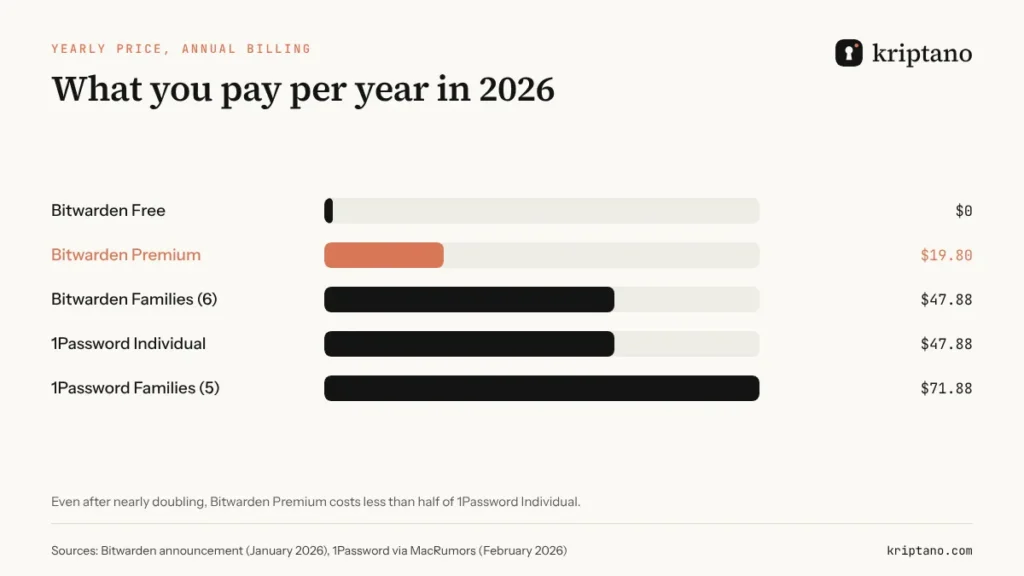
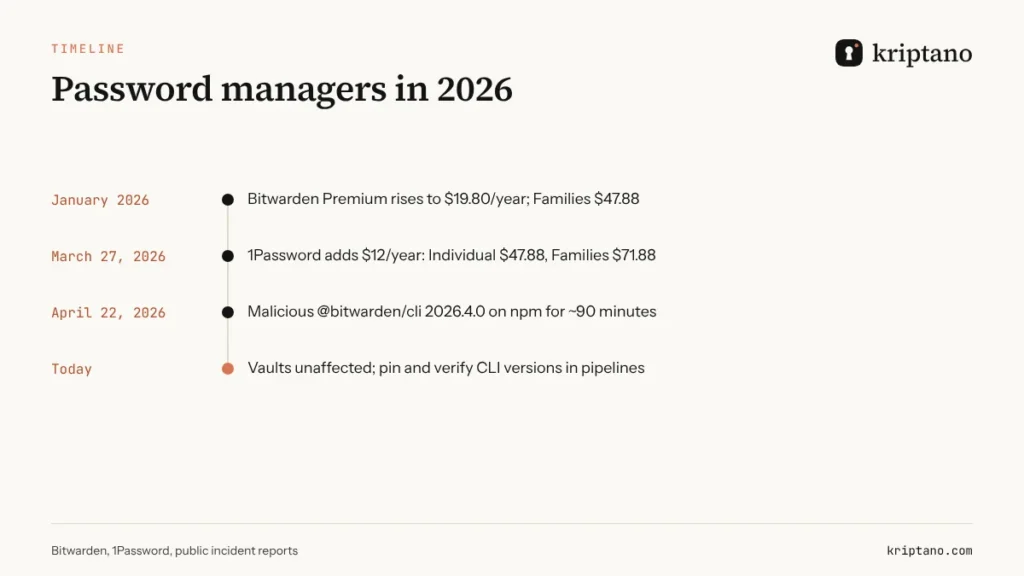
In January 2026 Bitwarden announced that Premium now costs $1.65 a month, billed annually at $19.80 a year (previously about $10), and that Families costs $47.88 a year for up to six users. The free plan stays: unlimited passwords on unlimited devices.
1Password, which has no free plan, raised prices on March 27, 2026 by $12 a year: Individual is now $47.88 a year and Families $71.88 a year for up to five people. A 14-day trial is still available.
The Bitwarden CLI incident: what happened
On April 22, 2026, a malicious version of the Bitwarden command-line tool – the npm package `@bitwarden/cli` version 2026.4.0 – was available for roughly 90 minutes before it was pulled. It affected developers and automation pipelines that installed the CLI from npm in that window, not the desktop apps, browser extensions or the encrypted vaults themselves. Version 2026.4.1 is clean.
The lesson is about supply chains, not about Bitwarden’s encryption. Any tool installed automatically from a public registry can be poisoned. If you use password-manager CLIs in build pipelines, pin versions, verify signatures and rotate any secrets those machines could read.
Security model: how they differ
Both are zero-knowledge: your vault is encrypted on your device with a key derived from your master password, and the company stores only ciphertext. The differences are in the details:
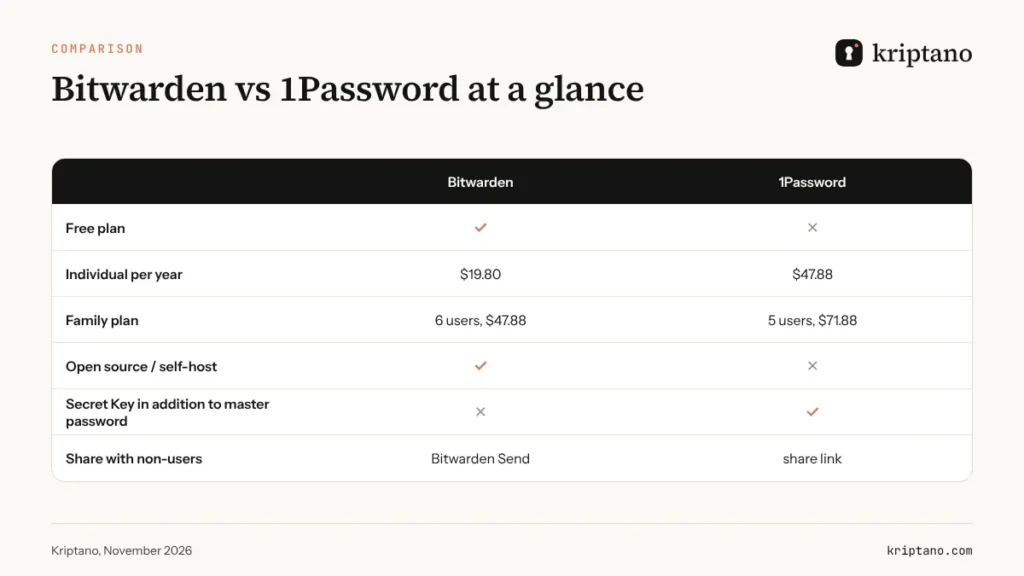
- Bitwarden is open source and can be self-hosted, which appeals to IT teams that want to audit or run it themselves.
- 1Password adds a 128-bit Secret Key to your master password, so a stolen vault file is useless even if your master password is weak – at the cost of keeping an Emergency Kit safe.
- Both support passkeys, TOTP codes, secure sharing inside the app and breach alerts. Read more about passkeys in are passkeys safe.
How to choose: 8 questions
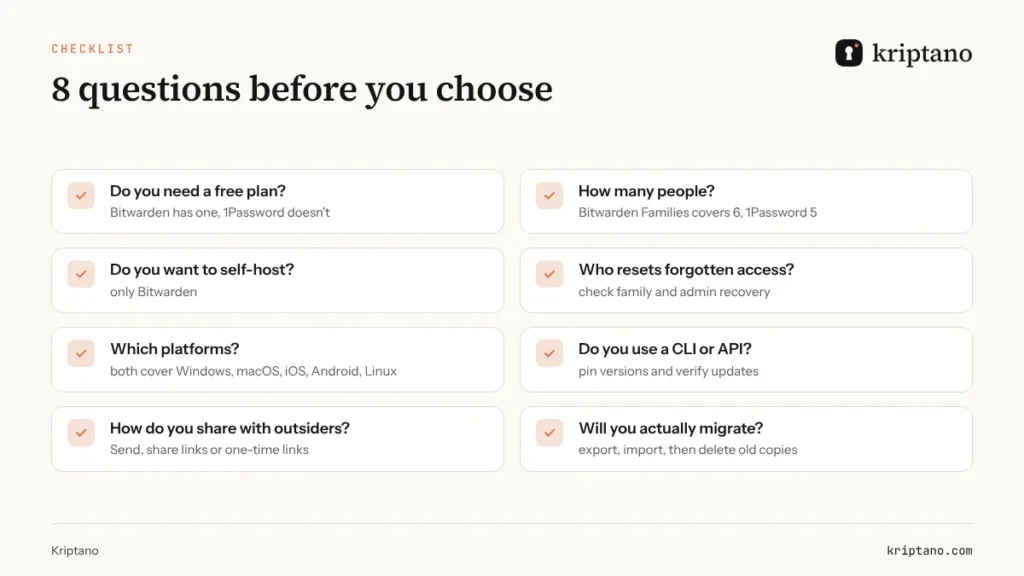
If you’re leaving one for the other, export, import and then securely delete the export file – a plain CSV of every password sitting in Downloads is the most dangerous file you’ll ever create.
Sharing passwords with people outside your vault
Both apps share brilliantly *inside* a family or team. The awkward moments are outside it: a contractor, a client, a new hire who isn’t set up yet. That’s where passwords end up in email and chat. A one-time secret link closes that gap: the secret is encrypted in your browser, opened once and deleted. Compare the options on Kriptano vs Bitwarden Send and Kriptano vs 1Password, and see our guide for agencies and MSPs.
The master password itself deserves care. Use a long, random passphrase – the password generator can create one – and check any password with the password strength checker.
Generate a passphrase for your master password
Generated in your browser – never sent to the server.
More options
The strength test runs only in your browser. The breach check sends only the first 5 characters of the password’s SHA-1 hash to Have I Been Pwned (k-anonymity) – never the password.
Generated locally in your browser with the Web Crypto API (crypto.getRandomValues). Passwords are never sent to our server or stored – only your settings are remembered in this browser.
Frequently asked questions
Is Bitwarden still cheaper than 1Password in 2026?
Yes. Bitwarden Premium is $19.80 a year and the free plan remains. 1Password Individual is $47.88 a year after the March 2026 increase and has no free plan.
Was my Bitwarden vault compromised in the CLI incident?
No vault compromise was reported. The malicious npm package @bitwarden/cli 2026.4.0 was available for about 90 minutes on April 22, 2026 and affected machines that installed the CLI from npm in that window. Version 2026.4.1 is clean.
Which is more secure, Bitwarden or 1Password?
Both use zero-knowledge encryption and have strong track records. 1Password adds a Secret Key; Bitwarden is open source and can be self-hosted. Your master password and device security matter more than the brand.
Can I share passwords with someone who doesn’t use my password manager?
Yes: Bitwarden Send and 1Password share links both work, or you can use a one-time secret link that deletes itself after reading.
How do I move from 1Password to Bitwarden?
Export your vault, import it into Bitwarden, check that everything arrived, then securely delete the export file and turn on two-factor sign-in.
Do I still need a password manager if I use passkeys?
Yes. Most accounts still have passwords, and a password manager is also a convenient place to store and sync passkeys.
Outside the vault, use a one-time link
Encrypted in your browser, opened once, then gone – with a record of when it was read.