Privnote Alternative: 7 Safer Ways to Send Self-Destructing Notes in 2026
Privnote made the self-destructing note famous – and its look-alike clones made it risky. Seven Privnote alternatives compared on encryption, files, teams and audit logs, plus a 4-step routine for sending a one time secret safely.
Privnote turned a simple idea into a habit: write a note, get a link, and the note destroys itself once it has been read. For a quick Wi-Fi password or a door code it still does the job. But if you are here, you are probably looking for a Privnote alternative – because you need files, a team, proof of who opened what, or simply a tool you can trust after years of look-alike phishing sites.
Google’s keyword data tells the same story: searches for “privnote alternative” have jumped sharply over the past year, and “onetimesecret alternative” keeps climbing next to them. This guide compares seven options, explains what actually makes a one time secret safe, and ends with a routine you can use today.
Contents
Why people look for a Privnote alternative
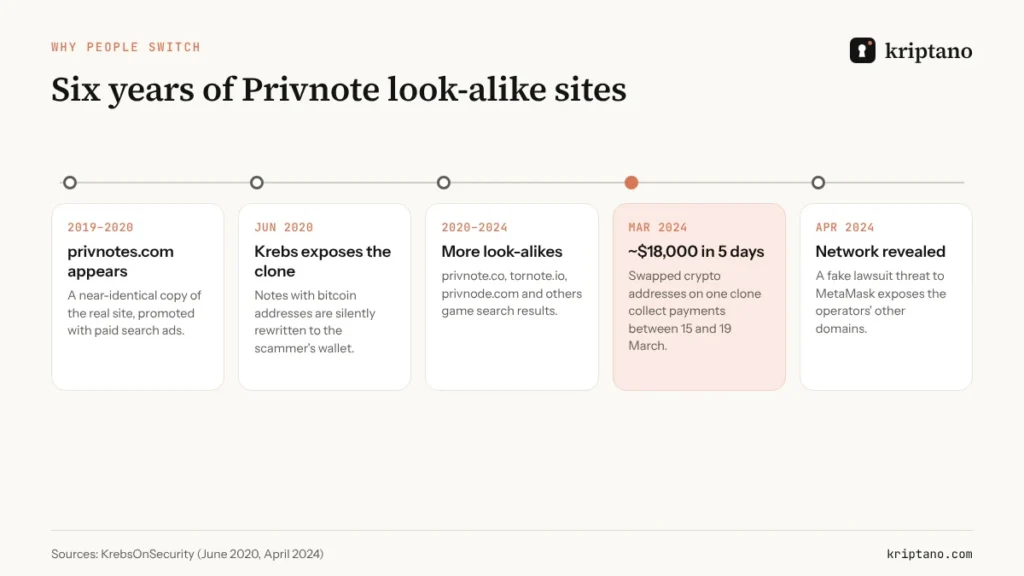
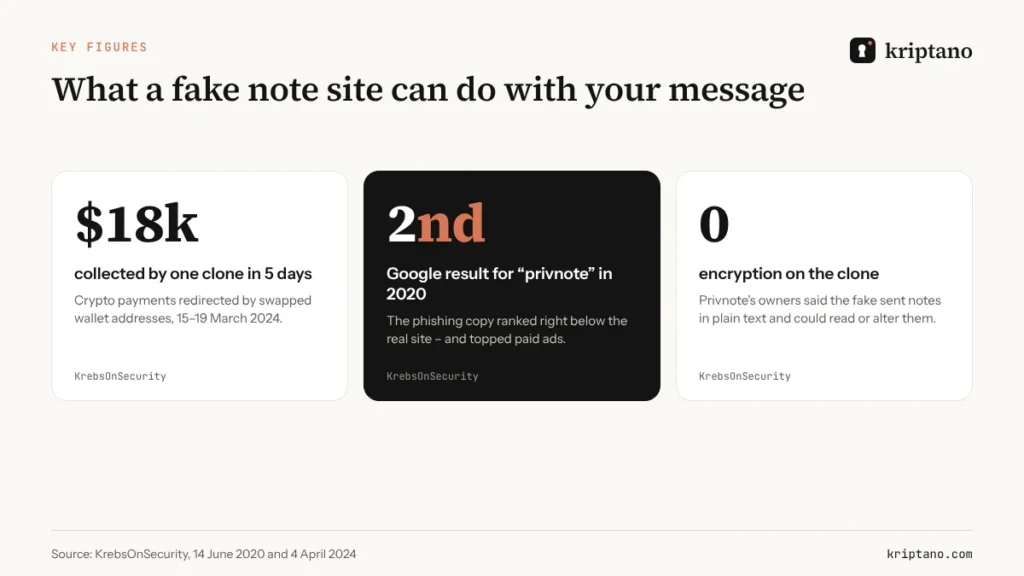
The first reason is not about Privnote’s own engineering at all. It is about impostors. In June 2020 security journalist Brian Krebs reported that a site called privnotes.com – one letter away from the real privnote.com – was copying its look and quietly rewriting any bitcoin address typed into a note, so payments went to the scammer instead. According to the real Privnote’s owners, the fake did not encrypt notes at all and could read or modify everything users sent.
It did not stop there. In April 2024 KrebsOnSecurity traced a whole network of clones – privnote.co, tornote.io and other near-identical domains – that ranked in search results and swapped cryptocurrency addresses. The four wallet addresses used on just one of them collected and moved out nearly $18,000 in five days.
The second reason is scope. Privnote is built for a short text note between two people. Businesses need more:
- files – a signed contract, a passport scan, an SSH key or a
.envfile; - requests – a way for a client to send *you* a password without emailing it;
- teams – shared settings, roles, enforced two-factor authentication and single sign-on;
- evidence – an audit log that shows when a secret was created and opened, useful for GDPR, UK GDPR and NIS2 questions;
- automation – an API, webhooks and links on your own domain.
None of that makes Privnote bad, and plenty of people searching for a onetimesecret alternative have the same list. It just means that once a self-destructing note becomes part of a business process, you need a Privnote alternative designed for that process.
What makes a one time secret actually safe
“Self-destructing” describes what happens after the note is read. It says nothing about who could read it before. When you compare any Privnote alternative or onetimesecret alternative, check these points rather than the marketing:
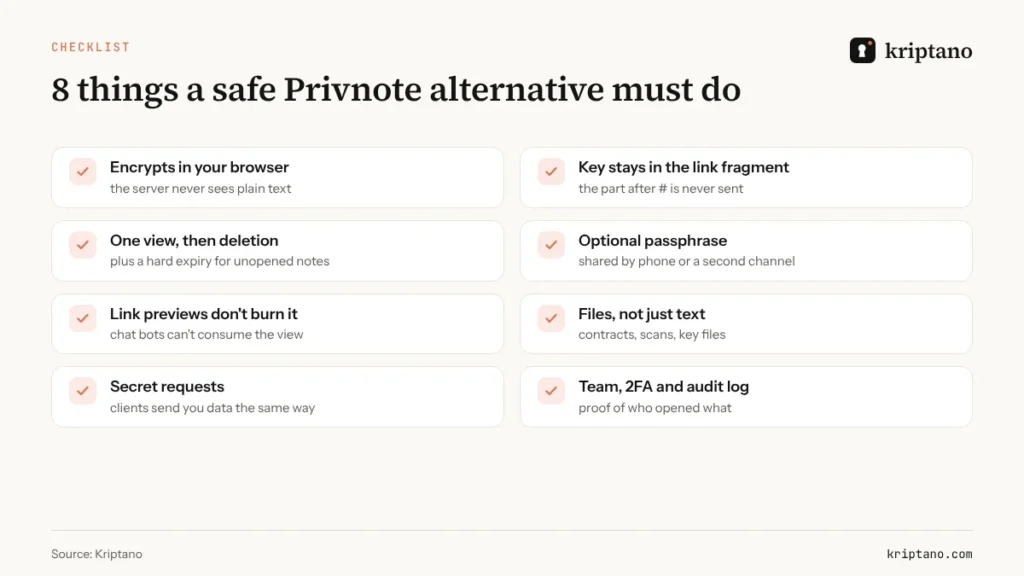
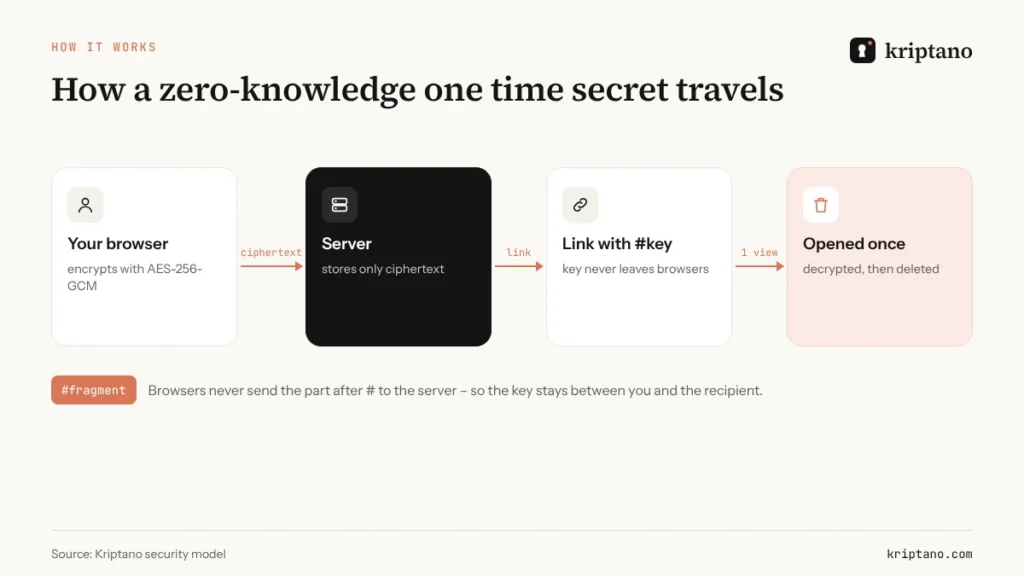
- Where encryption happens. The safest model encrypts in your browser and stores only ciphertext. If the server encrypts for you, the server sees your secret first.
- Where the key lives. In a good design the decryption key sits in the URL fragment – the part after
#– which browsers never send to the server. - One view plus a hard expiry. A note that is never opened must still disappear on schedule.
- A passphrase option. For bank logins or admin accounts, add a passphrase and say it over the phone.
- Link-preview protection. Slack, Teams, WhatsApp and email scanners “visit” links to build previews. A careless tool lets a bot burn the only view before your colleague sees it.
- Files and requests, if you handle documents or need data from clients.
- Team controls and an audit trail if more than one person sends secrets.
If you want the deeper mechanics – including how a one-time link differs from a one-time password – read our guide to one-time secret links.
7 Privnote alternatives compared
Prices change and features ship quickly, so treat this as a map rather than a verdict. Each option below is legitimate; the right one depends on whether you need a quick note, a self-hosted tool for engineers or a service for a whole company.
1. Kriptano – for teams that also send files and need an audit log
Kriptano encrypts every one time secret in your browser with AES-256-GCM and puts the key in the link fragment, so our servers store ciphertext only and delete it after the first view or at expiry.
You can add a passphrase, attach encrypted files (5 MB on the free plan, up to 10 GB on Pro Plus), and send a secret request when you need a client to send you a password. Chat and email link previews cannot consume the view, because opening a secret requires the key itself. Paid plans add a team with roles, enforced 2FA, Google and Microsoft sign-in, an audit log with CSV export, an API with webhooks and a custom domain. Eight secrets a month are free, with no sign-up.
2. Onetime Secret – the classic open-source option
Onetime Secret is the tool many sysadmins first used to send a one time secret. Its code is open source on GitHub, it can be self-hosted, and it has an API that scripts and help desks can call. If your main need is a familiar, scriptable onetimesecret alternative or a self-hosted copy of the original, it remains a solid choice. Check its current documentation for where encryption happens and which data region you use.
3. Password Pusher – open source with files and teams
Password Pusher (pwpush) lets you share passwords, text and files through links that expire after a number of views or days. It is open source and runs in Docker, and its hosted version adds team features. A good fit for IT teams that want to self-host but also need file sharing.
4. Yopass – minimal and developer-friendly
Yopass encrypts secrets client-side with OpenPGP before they reach the server, and links are meant to be read once. It is small, open source and easy to deploy, which makes it popular inside engineering teams. You trade convenience features such as teams and audit logs for simplicity.
5. PrivateBin – a zero-knowledge pastebin
PrivateBin is an open-source pastebin where the server has zero knowledge of the pasted data: text is encrypted in the browser, and you can choose “burn after reading”, expiry, attachments and even discussion threads. It shines for code snippets and logs, less so for non-technical recipients.
6. Bitwarden Send – if your company already uses Bitwarden
Bitwarden Send shares end-to-end encrypted text or files through temporary links. You can set a deletion date (up to 31 days), an expiry date, a maximum access count and a password. Text Sends are free; file Sends need a premium or paid organization plan, as Bitwarden’s documentation explains.
7. Your password manager’s share link
1Password and other managers can share a single item through a link that expires and can be limited to specific people. That is ideal for credentials that already live in the vault. For anything outside it – a document, a recovery code from another system, a password you need *from* a client – a dedicated one-time link tool is usually simpler.
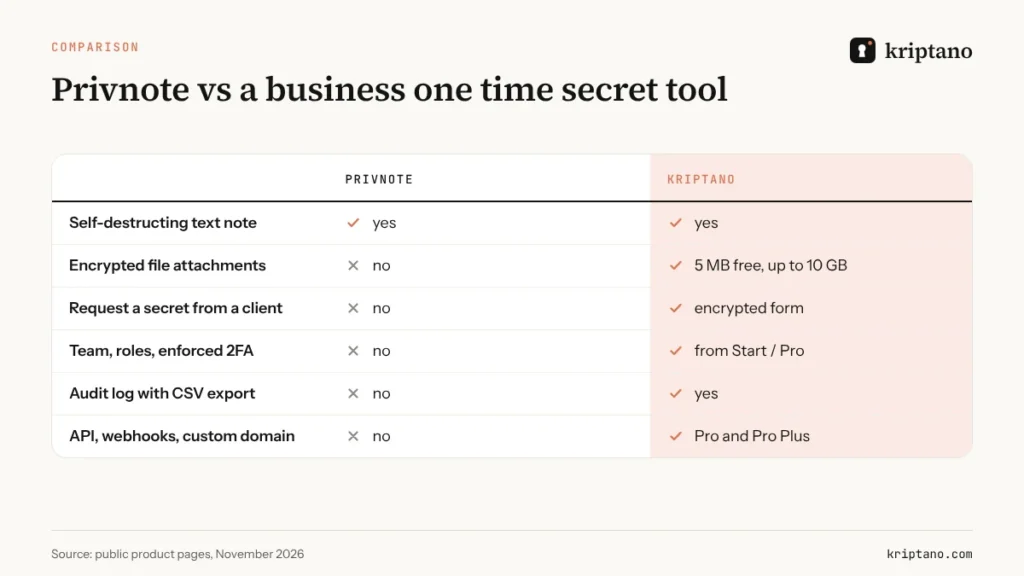
| Tool | Open source | Self-hosting | Files | Team features | API |
|---|---|---|---|---|---|
| Kriptano | no | custom domain | yes, up to 10 GB | roles, 2FA, SSO, audit log | yes + webhooks |
| Onetime Secret | yes | yes | text-focused | accounts | yes |
| Password Pusher | yes | yes | yes | yes (hosted) | yes |
| Yopass | yes | yes | yes | no | yes |
| PrivateBin | yes | yes | attachments | no | JSON API |
| Bitwarden Send | yes | yes (Bitwarden) | premium | via organization | CLI |
| Privnote | no | no | no | no | no |
How to spot a fake Privnote – or a fake of any secret tool
The clone problem is not unique to Privnote. Any popular onetimesecret alternative can be copied. These habits protect you regardless of which tool you choose:
- Bookmark the real address and open it from the bookmark, not from a search result or an ad. Krebs made the same recommendation back in 2020.
- Read the domain letter by letter before you paste anything. “privnote”, “privnotes”, “privnode” and “tornote” look alike on a phone screen.
- Never put payment details in a note. Bank account numbers and crypto addresses are exactly what clone sites rewrite. Confirm them by phone.
- Prefer tools with a business identity: a company name, legal pages, a security page and a way to reach a person.
- Use your own domain for links you send to clients, so recipients learn to trust one address.
Received a note link from someone you don't know?
Treat it like any other unexpected link. A real one-time note never asks you to log in, pay or install anything to read it.
How to send a one time secret safely in 4 steps
Whichever Privnote alternative you choose, the routine for sending a one time secret is the same. It takes under a minute.
Split the secret from its context
Put only the password in the note; send the username and system name separately.
Set one view and a short expiry
One view is the default; choose hours rather than weeks for anything sensitive.
Add a passphrase for high-value access
Tell it by phone or in a different app, never in the same message as the link.
Confirm and rotate
When the recipient confirms, have them change temporary passwords at first login.
If the recipient says the link “doesn’t work”, someone may already have opened it. That is the point of a one-view link: it tells you about interception instead of hiding it. Treat the secret as exposed and change it.
When a self-destructing note is not enough
A one-time link solves the *handover*. It does not replace everything else:
- Shared logins people use every day belong in a password manager with shared vaults – our guide on where to keep passwords compares the options.
- Agencies and MSPs that juggle hundreds of client credentials need a repeatable process; see our secure password sharing tool playbook.
- Large documents such as contracts, scans and medical records deserve encrypted file transfer with an expiry, not an attachment.
- Login codes are a different thing entirely – here is how a one time password (OTP) differs from a one-time link.
- The password itself should be long and random before you send it anywhere – our strong password generator guide shows how long is long enough.
For the full playbook on sharing credentials inside and outside your company, start with our pillar guide on how to share passwords securely.
Free
For the occasional password, no sign-up.
$0€0
forever
Try for free- 8 secrets per month per IP address
- Lifetime up to 7 days
- 1 view per link
- Encrypted attachments up to 5 MB
- Extra passphrase to open
- QR code for the link
- Password generator + generator API
- SSO login: Google + Microsoft
Start
For freelancers and small offices.
$6€6 $4.80€4.80 / mo
billed monthly billed yearly: $57.60€57.60
Choose Start- 2,000 secrets per month
- Lifetime up to 30 days
- Up to 10 views per link
- Encrypted attachments up to 50 MB
- 2 GB attachment storage
- Email notification when a secret is opened
- Password generator + generator API
- SSO login: Google + Microsoft
- Two-factor login (authenticator app)
- Up to 10 secret requests (clients send data to you)
Most popular
Pro
For agencies, IT and accounting teams.
$24.90€24.90 $19.90€19.90 / mo
billed monthly billed yearly: $238.80€238.80
Choose Pro- 30,000 secrets per month
- Lifetime up to 90 days
- Up to 50 views per link
- Encrypted attachments up to 500 MB
- 20 GB attachment storage
- Email notification when a secret is opened
- Password generator + generator API
- SSO login: Google + Microsoft
- Two-factor login (authenticator app)
- Up to 1,000 secret requests (clients send data to you)
- Automatic delivery of secrets and requests by email
- API access and integrations
- Your logo and colors
- Team of up to 5 members
- Audit log with CSV export
- Webhooks (up to 10) with HMAC signatures
- Team roles and enforced 2FA
Pro Plus
Your domain, your brand and larger teams.
$62.90€62.90 $49.90€49.90 / mo
billed monthly billed yearly: $598.80€598.80
Choose Pro Plus- Unlimited secrets
- Lifetime up to 365 days
- Up to 100 views per link
- Encrypted attachments up to 10 GB
- 1,000 GB attachment storage
- Email notification when a secret is opened
- Password generator + generator API
- SSO login: Google + Microsoft
- Two-factor login (authenticator app)
- Unlimited secret requests
- Automatic delivery of secrets and requests by email
- API access and integrations
- Your logo and colors
- Team of up to 50 members
- Audit log with CSV export
- Unlimited webhooks with HMAC signatures
- Team roles and enforced 2FA
- Unlimited custom domains (e.g. secrets.your-company.com)
- Send email from your own domain
- Your own SMTP server
- Geo-blocking and IP allowlist
- No Kriptano branding (white label)
All prices include VAT or sales tax. Bank transfer offers are at the same final price. Subscription by card, PayPal, Apple Pay or Google Pay via Paddle – or bank transfer against an offer. Cancel anytime.
Frequently asked questions
What is the best Privnote alternative for business?
For business, choose a Privnote alternative that encrypts in the browser and adds files, secret requests, team roles, enforced 2FA and an audit log. Kriptano, Password Pusher and Bitwarden Send cover those needs in different ways.
Is Privnote safe to use?
The real privnote.com is a legitimate service for short self-destructing notes. The main risk is landing on a look-alike clone, so bookmark the genuine address and never send payment details in a note.
What is a onetimesecret alternative?
It is any tool that creates one-view links for passwords and other secrets, like Onetime Secret does. Popular options include Kriptano, Password Pusher, Yopass, PrivateBin and Bitwarden Send.
Can link previews in Slack or WhatsApp destroy a one time secret?
With some tools, yes – the preview bot opens the link first. Kriptano requires the decryption key to open a secret, so previews cannot consume the view.
Can I send files with a self-destructing link?
Privnote is text-only, but Kriptano, Password Pusher, PrivateBin and Bitwarden Send support files. Kriptano allows 5 MB on the free plan and up to 10 GB on Pro Plus.
Do I need an account to open a one-time note?
No. With Kriptano the recipient only needs the link in a browser – no account, app or installation.
Try a safer Privnote alternative
Free, no sign-up. Encrypted in your browser, deleted after one view.