Random Password Generator: Why True Randomness Beats the Passwords People Invent
Humans are terrible at being random – attackers know our patterns. Here is how a random password generator creates unpredictable passwords, how to spot a bad one and how to send the result without leaving a copy in email.
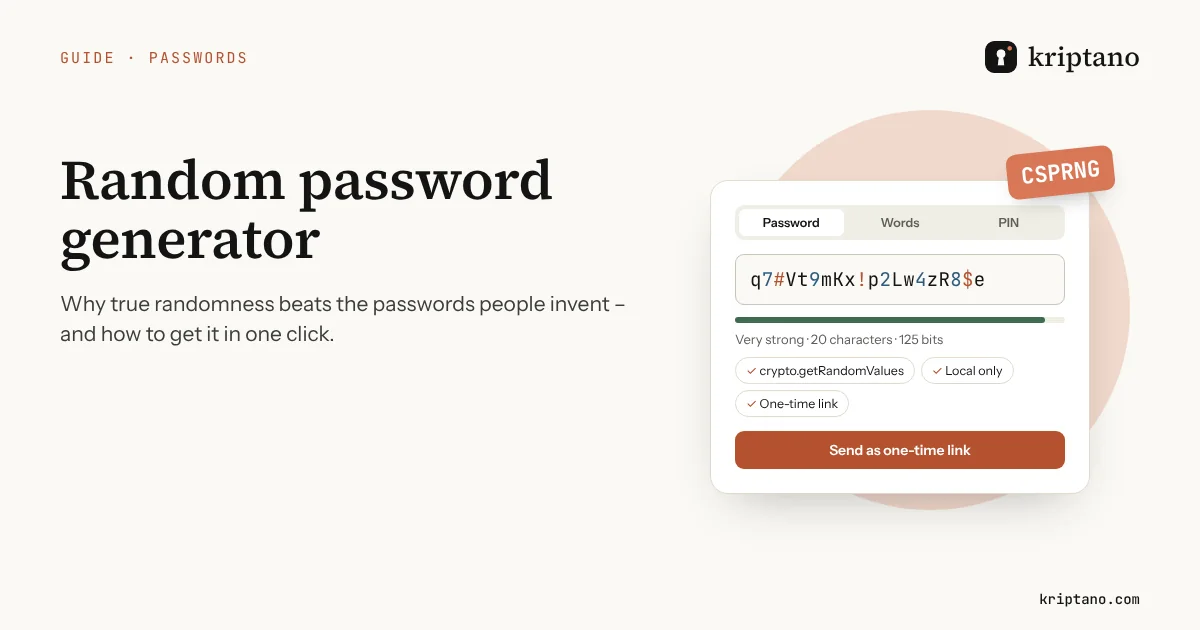
A random password generator does one thing people cannot: it picks characters with no pattern at all. When we “make up” a password, we reach for names, years, keyboard rows and a final exclamation mark – and password-cracking tools try exactly those patterns first. This guide explains what real randomness means, how a good random password generator produces it, how to recognize a bad one, and what to do with the password once you have it.
Contents
- Why people are bad at random passwords
- What "random" means for a password generator
- How a random password generator works under the hood
- The modulo trap: when "random" is biased
- Try the random password generator
- How long should a random password be?
- Five signs of a trustworthy random password generator
- Random passwords for teams, onboarding and scripts
- You have a random password – now don't leak it
- Common questions
- Random password generator – FAQ
Why people are bad at random passwords
Ask a hundred people for a “random” password and you will see the same shapes again and again: a capital letter at the start, a word, a year or a birthday, and a symbol at the end. Summer2024! looks complex to a website’s strength meter, but it follows the most common template on the internet.
Attackers do not guess character by character. Cracking tools such as Hashcat combine huge word lists with rules – capitalize the first letter, append a year, swap a for @ – so a human-made password is usually found long before an attacker would have to try random strings. Hive Systems, whose yearly table models a well-equipped attacker, stresses that its times only apply to passwords that are randomly generated; anything a person invents falls much faster.
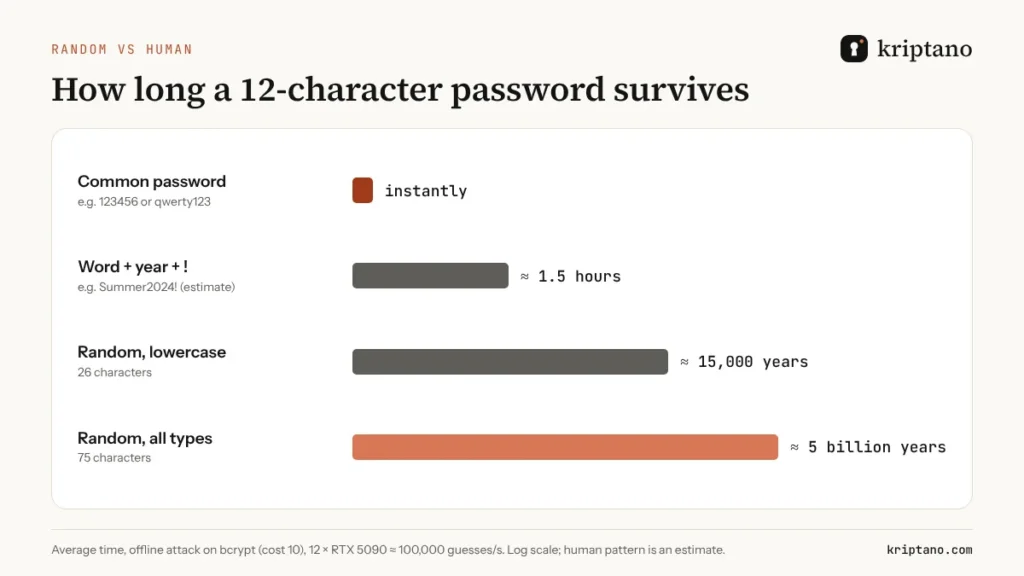
The lesson is simple: length helps only if the characters are unpredictable. That is the job of a random password generator – and why NIST’s current guidance, SP 800-63B-4, focuses on length and on blocking known passwords rather than on composition rules that people satisfy in predictable ways.
What “random” means for a password generator
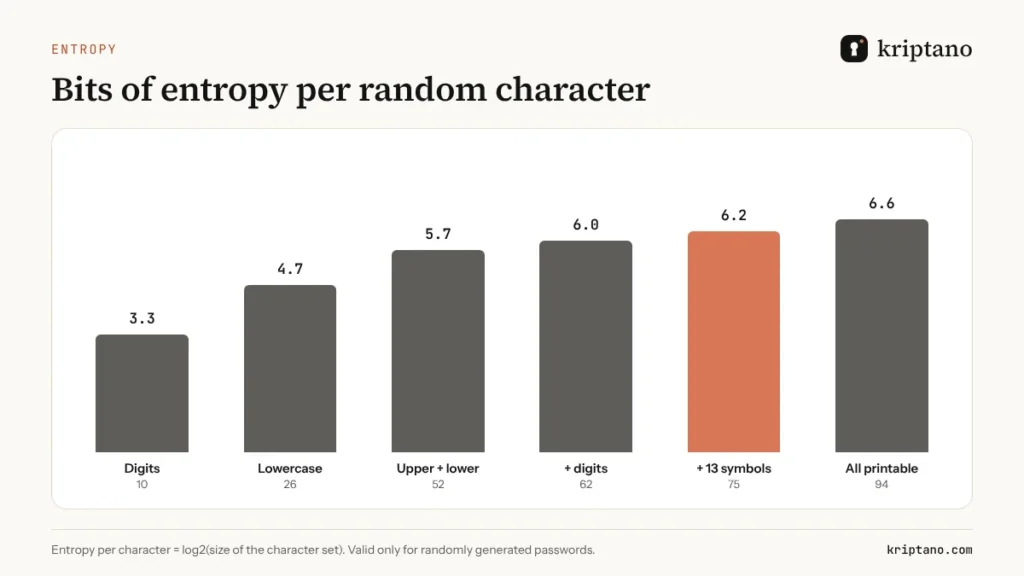
In security, random means unpredictable to an attacker, not merely “looks messy”. A random password is one where every character (or word) was chosen from a known set with equal probability, independently of all the others. If the set has 75 characters and every one is equally likely, each character adds log2(75) ≈ 6.2 bits of entropy; 20 characters give about 125 bits.
Entropy is the honest way to measure a random password: each extra bit doubles the number of guesses an attacker needs. It only works when a machine does the choosing – a person who picks “random” characters still favors some letters, avoids others and repeats habits. Studies of leaked password lists show the same favorites year after year: the number 1 at the end, an uppercase first letter, the current year. A random password generator has no favorites, which is exactly why its output cannot be guessed from those lists.
How a random password generator works under the hood
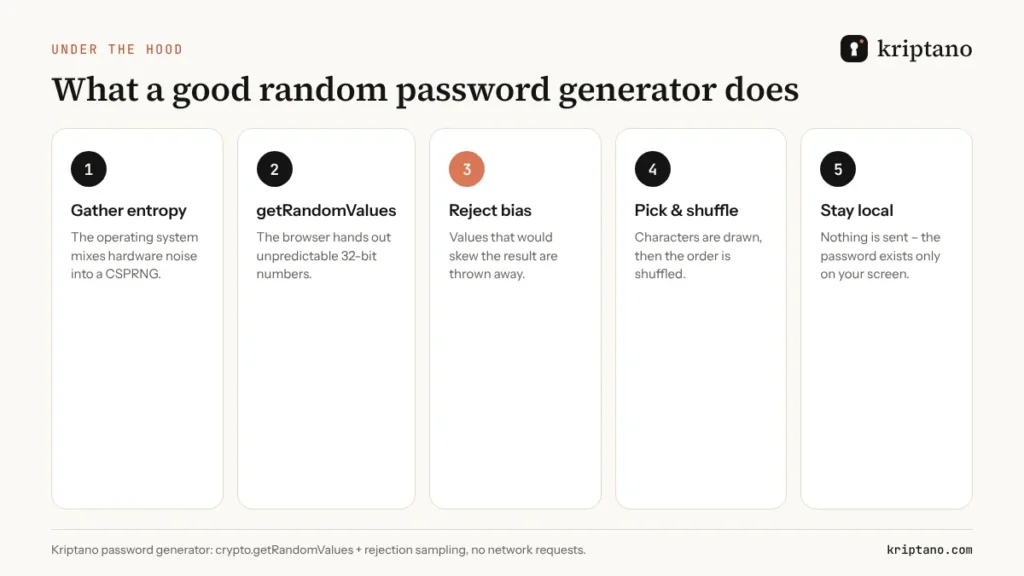
A trustworthy random password generator in the browser uses the operating system’s cryptographically secure random number generator (CSPRNG) through the Web Crypto API, crypto.getRandomValues(). The operating system mixes hardware noise into this generator; the browser hands out unpredictable 32-bit numbers.
The generator then turns those numbers into characters. This step is where many quick scripts go wrong, so here is the full sequence a careful random password generator follows:
- Ask the CSPRNG for random 32-bit values.
- Discard any value that would make some characters more likely than others (rejection sampling).
- Map the remaining values to the chosen character set.
- Place the required characters (a digit, a symbol) first, then fill the rest.
- Shuffle the whole password so the required characters are not always in the same place.
- Show the result only on your screen – nothing is sent anywhere.
The modulo trap: when “random” is biased
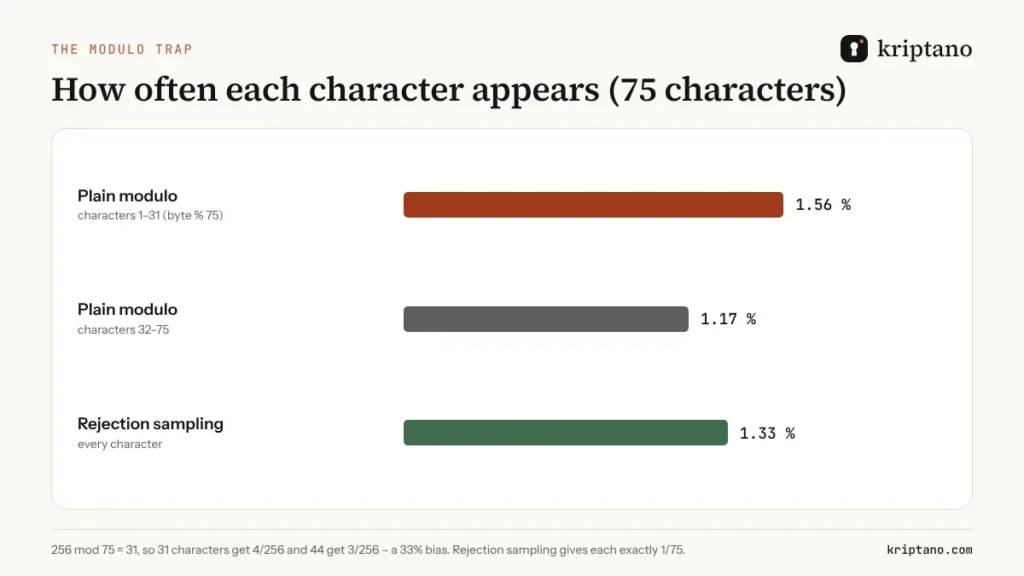
Suppose a script takes a random byte (0–255) and uses byte % 75 to pick one of 75 characters. Because 256 is not a multiple of 75, the first 31 characters get four chances out of 256 and the other 44 get only three. Those 31 characters are a third more likely to appear – a measurable bias that a cracking tool can exploit.
The fix is rejection sampling: throw away values above the largest multiple of 75 and draw again. It costs a few extra random numbers and removes the bias completely. Kriptano’s random password generator does this for every character and every word.
Math.random() is not for passwords
JavaScript’s Math.random() is fast but not cryptographically secure – MDN says so directly. A password generator that uses it may produce predictable output. Look for crypto.getRandomValues() instead.
Try the random password generator
You can generate a random password right here. Choose the length (20 is a good default), the character sets and how many passwords you need. The generator runs only in your browser; you can even switch off your network after the page has loaded.
Random password generator
Generated in your browser – never sent to the server.
More options
The strength test runs only in your browser. The breach check sends only the first 5 characters of the password’s SHA-1 hash to Have I Been Pwned (k-anonymity) – never the password.
Generated locally in your browser with the Web Crypto API (crypto.getRandomValues). Passwords are never sent to our server or stored – only your settings are remembered in this browser.
Need something easier to type? Switch to the Words tab for a passphrase, or Pronounceable for groups of syllables in Apple’s style. For devices that accept digits only, the PIN tab avoids patterns such as 1234 or 0000. The full password generator page also has a strength test, bulk export and a QR code.
How long should a random password be?
Because each character from a random password generator adds about 6.2 bits, length is the lever that matters. NIST requires at least 15 characters when a password is the only factor and 8 when it is combined with multi-factor authentication. CISA’s advice for everyone is at least 16 characters, random and unique.
| Length | Entropy | Good for |
|---|---|---|
| 12 | about 75 bits | everyday accounts protected by 2FA |
| 15 | about 93 bits | NIST minimum without a second factor |
| 16 | about 100 bits | CISA recommendation, work accounts |
| 20 | about 125 bits | email, admin and Wi-Fi accounts |
| 32 | about 199 bits | service accounts and API secrets |
For a detailed comparison of 12, 15, 16 and 20 characters – with crack times – see our guide to password generator length. If you prefer something memorable, our article on the password generator with words shows how many words match a 20-character random password.
Five signs of a trustworthy random password generator
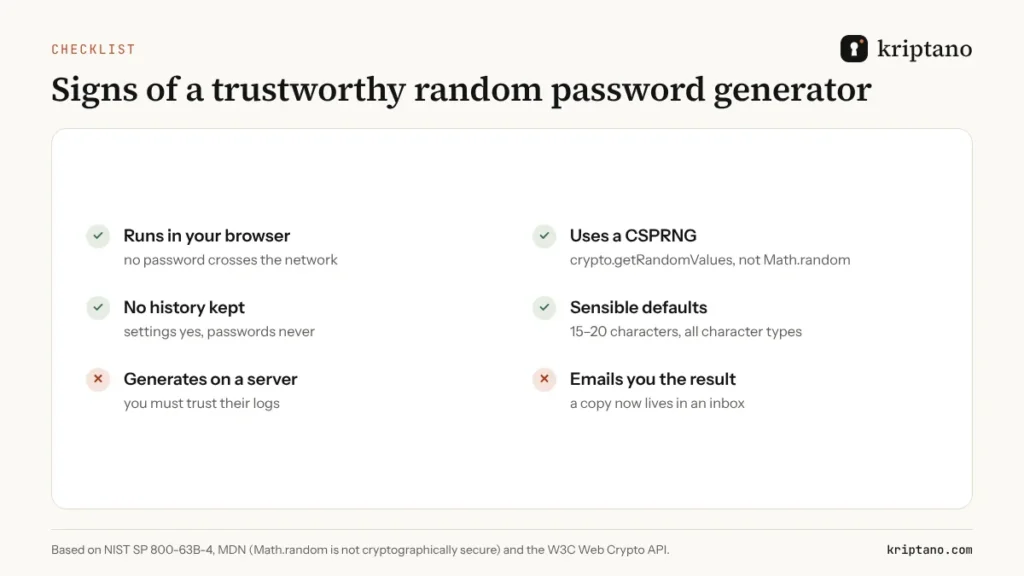
Not every random password generator deserves your trust. Before you use one for an important account, check these points:
- It runs in your browser. The password should never travel over the network. If the page sends a request each time you click “generate”, the server sees your password.
- It uses a CSPRNG. Look for
crypto.getRandomValues()(or the operating system’s generator in an app), notMath.random(). - It avoids bias. Rejection sampling or an equivalent method, so every character is equally likely.
- It keeps no history. Remembering your settings is fine; storing passwords is not.
- It has sensible defaults. 15–20 characters and all character types, so a quick click is already a strong random password.
Password managers such as Bitwarden, 1Password and Apple Passwords include good generators for your own vault. Kriptano adds what happens next – getting the password to another person safely. Our comparison of the best password generators goes through the differences, and the Google password generator guide explains what Chrome does and where it stops.
Random passwords for teams, onboarding and scripts
A single random password is easy. The real work starts when an office manager needs twenty new accounts on Monday, or an agency hands a client the logins for a new website. Typing “random” passwords by hand at that scale always ends with a pattern – the client name plus the year, or one password reused for every mailbox.
A random password generator with bulk mode solves this: generate 20, 50 or 100 passwords at once, check them, and download them as a TXT or CSV file for your provisioning tool. In the Kriptano random password generator you set the quantity under the password, and every entry in the list is created with the same cryptographic randomness as the first one.
For automated workflows there is an API. GET /api/v1/password?length=20&count=10 returns ten random passwords as JSON, and format=text gives one per line for shell scripts. It works on every plan without a key (30 requests per minute per IP address). With a Pro or Pro Plus key you can also create the password and send it as a one-time link in one call – useful for onboarding, where the new employee should be the only person who ever sees the initial password. Our guide to temporary passwords and login credentials explains the handover step by step.
Password generator random settings for teams
Use at least 16 characters for work accounts, avoid look-alike characters (I, l, 1, O, 0) if passwords will be read aloud or printed, and make the employee change nothing – a random password from the generator is already stronger than anything they would choose. Just turn on two-factor login.
You have a random password – now don’t leak it
The weakest moment in a random password’s life is often the first five minutes: you create it for a colleague, a client or a new employee, and then paste it into an email or chat. That message stays in inboxes, backups and synced phones for years. A perfect random password that sits in a Slack history is no longer secret.
Send it as a one-time link instead. Kriptano encrypts the password in your browser with AES-256-GCM, keeps only the ciphertext and deletes it after the first opening. The key travels in the part of the link after #, which browsers never send to the server. For extra safety, add a passphrase and share it over a different channel. Our guide on sharing passwords securely covers the rules for teams.
Common questions
Random password generator – FAQ
Is a random password generator safe to use online?
Yes. A random password generator is safe if the password is created in your browser with a cryptographically secure source such as crypto.getRandomValues() and is never sent to a server. Check that the generator keeps no history and works even after you go offline.
What makes a password truly random?
In a random password generator, every character or word is chosen with equal probability from a known set, independently of the others, by a cryptographically secure generator. Passwords that a person invents are not random, even if they look complicated.
Is Math.random() good enough for a password generator?
No. Math.random() is not designed to be cryptographically secure, and its output can be predictable. Use crypto.getRandomValues() in the browser or the operating system’s secure generator in other software.
How long should a random password be?
At least 15 characters when the password is the only factor (NIST) and 16 according to CISA. Use 20 or more for email, admin and Wi-Fi accounts. With two-factor authentication, 12 random characters are a reasonable minimum.
Are random passwords better than passphrases?
Both are strong when they are generated randomly. A random password is shorter for the same strength; a passphrase of six random words is easier to type and remember. Choose by where you will use it.
How do I share a random password with someone?
Do not paste it into email or chat. Send it as a one-time encrypted link that is deleted after the first opening, and send any extra passphrase over a different channel, such as a text message.
Generate it. Send it. It disappears.
Create a random password in the free password generator and send it as a one-time link – no sign-up needed.