Password Generator 12 Characters vs 15, 16 and 20: Which Length Do You Need in 2026?
Searches for "password generator 12 characters" have exploded – but is 12 enough? We compare 12, 15, 16 and 20 random characters, show crack times and match each length to the accounts it protects.
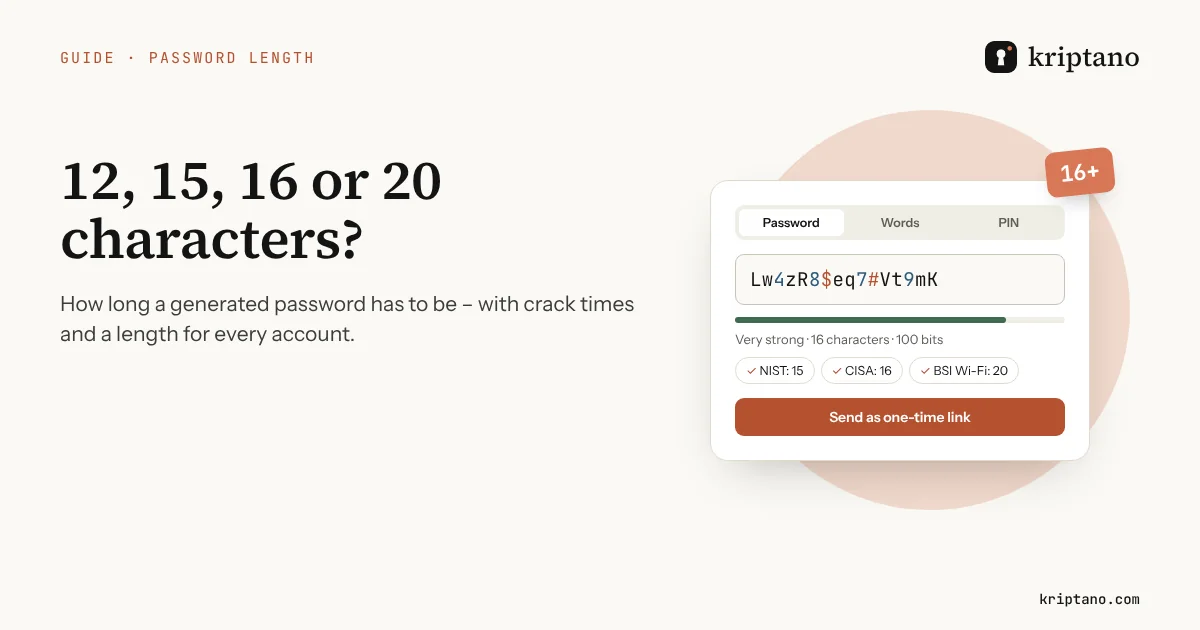
“Password generator 12 characters” is one of the fastest-rising password searches in the United States – people want a quick answer to a simple question: how long does a password have to be? The honest answer depends on two things: whether the password is truly random and whether the account also has a second factor. This guide compares 12, 15, 16 and 20 characters with real numbers, explains what NIST, CISA and the German BSI recommend, and ends with a length for every kind of account.
Contents
- Why length beats complexity
- Password generator 12 characters: how strong is it really?
- Why everyone is searching for a password generator 12 characters long
- What 8 characters look like in 2026
- Password generator 12 characters vs 16 characters, side by side
- 15 character password generator: the NIST line
- Password generator 16 characters: the CISA recommendation
- 20 characters and more: email, admin and Wi-Fi
- Generate a password of the right length
- Length is wasted if the password leaks in transit
- Key numbers at a glance
- Password length – FAQ
Why length beats complexity
Every random character multiplies the number of possible passwords. With a set of 75 characters (letters, digits and 13 symbols), one more character means 75 times more guesses for an attacker. Adding a symbol to a short password helps far less than adding three more characters – which is why modern guidance talks about length first.
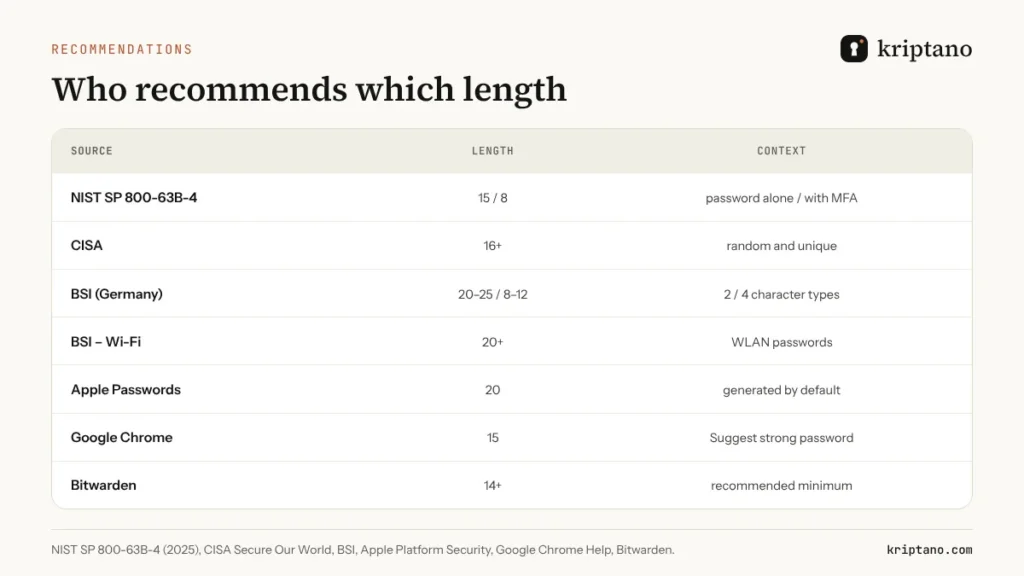
NIST’s SP 800-63B-4, final since 2025, requires at least 15 characters when a password is the only authentication factor, 8 characters when multi-factor authentication is used, and tells services to allow at least 64. It also forbids composition rules such as “must contain a symbol”, because people meet them in predictable ways.
Password generator 12 characters: how strong is it really?
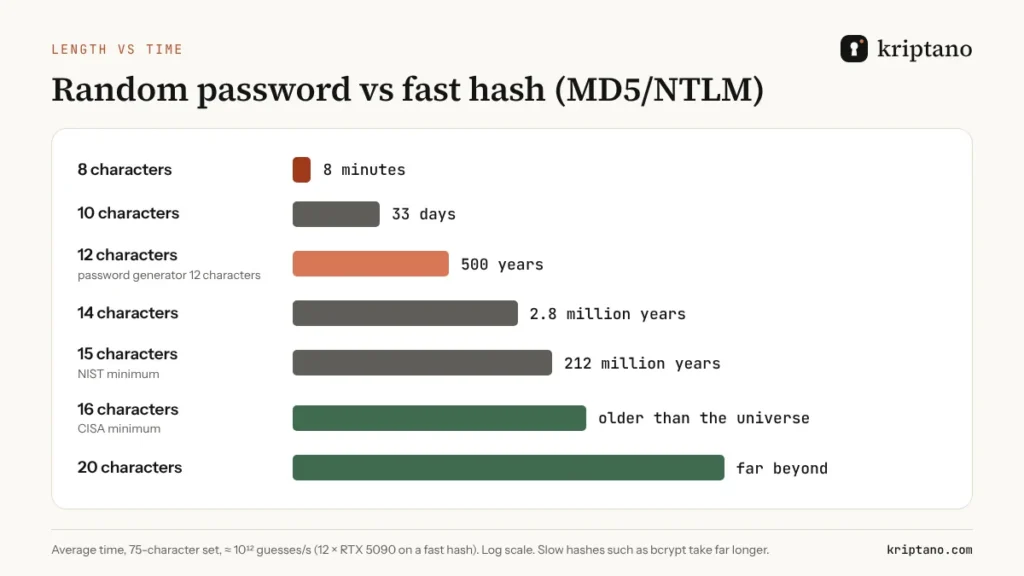
A random 12-character password from our generator’s default set has about 75 bits of entropy. Against a fast hash like MD5 or NTLM, a rig of twelve RTX 5090 cards trying around a trillion guesses per second would need about 500 years on average. Against bcrypt with a cost of 10 – the scenario in the Hive Systems 2025 password table – the time grows into billions of years.
So a password generator 12 characters long is strong if the characters are random and the account has two-factor authentication. Without a second factor, 12 is below the NIST minimum of 15. And “12 characters” written by a person – Summer2024!! – is not in the same league at all; it falls to a dictionary attack in hours.
The short answer
12 random characters: fine with 2FA. 15–16: the modern minimum without 2FA. 20+: email, admin, Wi-Fi and anything that protects other accounts.
Why everyone is searching for a password generator 12 characters long
Google Trends data for the United States over the past five years shows how people ask the question. “Password generator 12 characters” is marked as a breakout search, and its neighbours grew just as fast: “password generator 14 characters” by about 2,550%, “password generator 16 characters” by 1,900%, and both “password generator 8 characters” and “password generator 20 characters” by about 1,150%.
The reason is mundane. Sign-up forms tell people exactly how long a password must be – “8 to 64 characters”, “at least 12 characters” – and they look for a password generator 12 characters long (or 8, or 16) that matches the rule. That is a good instinct: picking the length first and letting a generator fill it is far better than inventing something that barely passes the form’s check.
- 12 characters – the most common “at least” rule on modern sign-up forms
- 14 characters – the length Bitwarden recommends as a minimum
- 15 characters – NIST’s minimum for a password used alone and the length Chrome generates
- 16 characters – CISA’s minimum for everyone
- 20 characters – Apple’s default and the BSI’s minimum for Wi-Fi
What 8 characters look like in 2026
Eight characters is still the minimum on many websites, so it is worth seeing what it buys. Hive Systems modelled twelve RTX 5090 graphics cards against bcrypt in 2025. An eight-character password of digits only fell in about 15 minutes, lowercase letters in three weeks, upper and lowercase in 15 years, with numbers 62 years and with symbols 164 years.
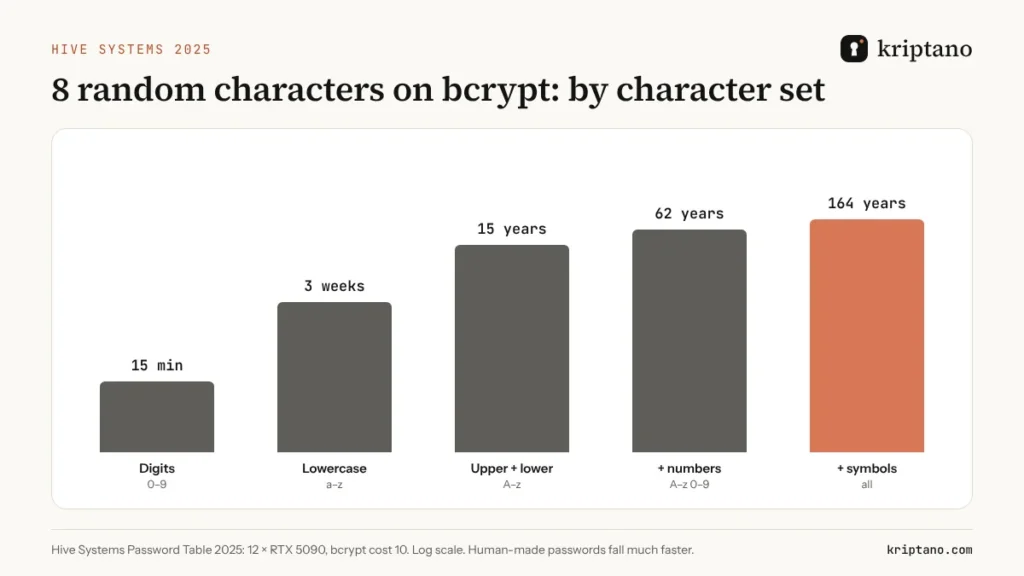
Those numbers assume a slow hash and a random password. If the service used a fast hash or the password came from a person, the same eight characters fall in minutes. That is why eight characters only make sense together with a second factor – and why a 15 character password generator setting is a much better default.
Password generator 12 characters vs 16 characters, side by side
Four characters do not sound like much, but with a 75-character set they multiply the number of combinations by 75⁴ – more than 31 million. A password generator 12 characters long gives about 75 bits of entropy; a password generator 16 characters long gives about 100 bits. Against a fast hash, that is the difference between centuries and longer than the universe has existed.
The practical costs are almost the same. Both lengths fit nearly every website, both are filled in by a password manager, and neither is meant to be memorized. The only case where 12 wins is a form that caps the length – and there a random 12 is still far better than anything a person would type.
| Property | 12 characters | 16 characters |
|---|---|---|
| Entropy (75-character set) | about 75 bits | about 100 bits |
| Fast hash, 10¹² guesses/s | about 500 years | longer than the age of the universe |
| NIST without a second factor | below the minimum | meets it |
| Best use | accounts with 2FA, length-capped sites | work, finance, anything shared |
15 character password generator: the NIST line
Fifteen characters is the number NIST chose as the minimum for passwords used alone. With 75 possible characters, 15 random characters give about 93 bits, which is well beyond brute force for any realistic attacker, even against a fast hash.
Fifteen is also what Google’s generator in Chrome produces when it suggests a strong password. It is a sensible length for accounts where you cannot enable 2FA, and short enough to fit the length limits that some older sites still impose.
Password generator 16 characters: the CISA recommendation
The US Cybersecurity and Infrastructure Security Agency recommends at least 16 characters, random and unique, for everyone. A password generator 16 characters long gives about 100 bits of entropy – roughly a million times more combinations than 12 characters.
Sixteen is our recommendation for work accounts, shared tools and anything you would be embarrassed to see in a breach notification. If your password manager fills passwords automatically, the extra length costs you nothing.
20 characters and more: email, admin and Wi-Fi
Some accounts are keys to other accounts. Your email resets every other password, an admin account controls a whole company, and a Wi-Fi password can be attacked offline once someone captures a handshake. For these, use 20 characters or more. The German BSI explicitly recommends at least 20 characters for WLAN passwords.
Apple’s Passwords app generates 20-character passwords by default – 16 lowercase letters, one uppercase, one digit and two hyphens, about 71 bits by Apple’s own calculation. A fully random 20-character password from the Kriptano generator has about 125 bits, because every position can be any of 75 characters.
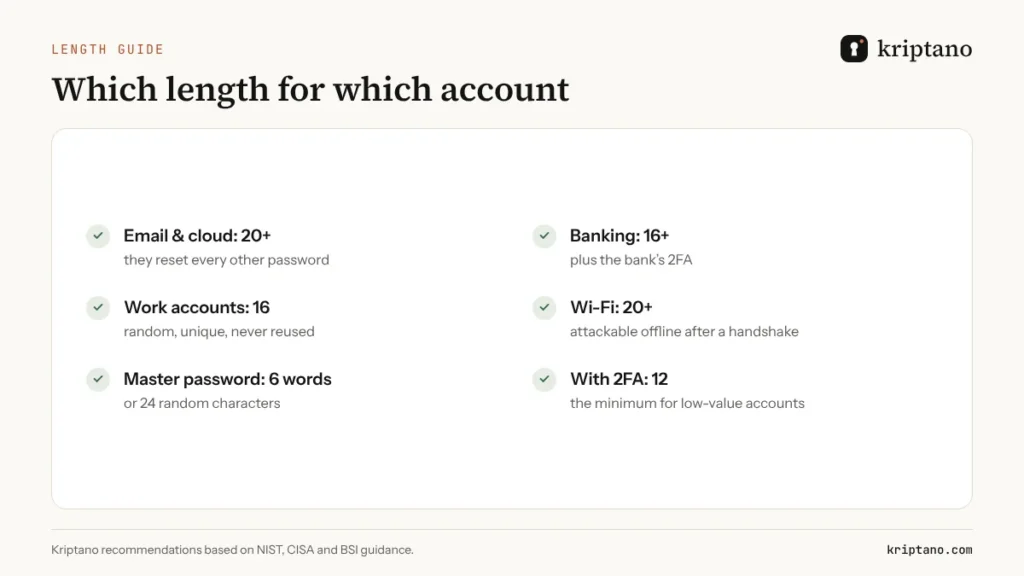
| Account | Length | Notes |
|---|---|---|
| Email, cloud storage, Apple/Google/Microsoft account | 20+ | Add a passkey or app-based 2FA |
| Online banking and payments | 16+ | 2FA is usually required anyway |
| Work accounts and shared tools | 16 | CISA minimum, random and unique |
| Wi-Fi (WPA2/WPA3) | 20+ | BSI recommends at least 20 |
| Password manager master password | 6 random words or 24 characters | You have to type it – words are easier |
| Low-value accounts with 2FA | 12 | A password generator 12 characters setting is enough here |
| Device PIN | 6 digits | Avoid 1234, 0000 and birth years |
Generate a password of the right length
Use the quick buttons in the generator below – a password generator 12 characters preset, plus 15, 16 and 20, is one click away – or move the slider anywhere between 4 and 128. You can also open the password generator with a preset length by adding ?length=16 to the address.
Password generator 12 characters – or any length
Generated in your browser – never sent to the server.
More options
The strength test runs only in your browser. The breach check sends only the first 5 characters of the password’s SHA-1 hash to Have I Been Pwned (k-anonymity) – never the password.
Generated locally in your browser with the Web Crypto API (crypto.getRandomValues). Passwords are never sent to our server or stored – only your settings are remembered in this browser.
When a site rejects symbols, keep the length and switch symbols off rather than shortening the password. Twenty letters and digits are still stronger than twelve characters with symbols. If you need to type the password on a TV or read it out, turn on avoid look-alike characters so that I, l, 1, O and 0 never appear.
Length is wasted if the password leaks in transit
Whether you use a password generator 12 characters or 20 characters long, the result protects nothing once it sits in an email thread. Every forward, every backup and every synced phone keeps another copy. When you create a password for someone else, send it as a one-time link: Kriptano encrypts it in your browser and deletes it after the first opening.
Use the generator’s Send as one-time link button, or paste the password into the form below. For logins you hand over to new staff, see our guide on temporary passwords and login credentials, and for client handovers the guide to the secure password sharing tool.
Key numbers at a glance
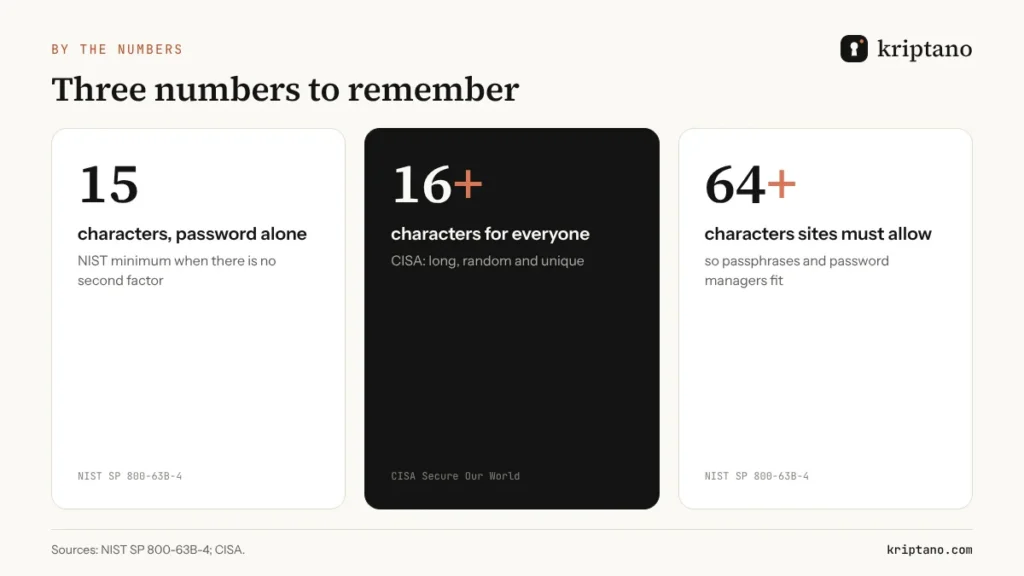
If you came here for a password generator 12 characters long, you now know when 12 is enough and when it is not. If you remember only three numbers, make them these: 15 characters when the password is the only factor (NIST), 16 characters as an everyday minimum (CISA), and at least 64 characters that every service should accept so password managers and passphrases work. For the reasoning behind randomness, read our guide to the random password generator; if you prefer words, see the password generator with words.
Password length – FAQ
Is a password generator 12 characters setting strong enough?
A random 12-character password from a password generator is strong for accounts that also use two-factor authentication. Without a second factor, NIST asks for at least 15 characters. A 12-character password that a person invented is much weaker than a random one.
Is 16 characters better than 15?
Yes – each random character multiplies the possible combinations by the size of the character set. 15 meets the NIST minimum, 16 meets the CISA recommendation; the difference costs nothing when a password manager fills the password for you.
How long should a Wi-Fi password be?
At least 20 random characters. The German BSI recommends 20 or more for WLAN, because Wi-Fi passwords can be attacked offline once a handshake is captured.
What length does Google’s password generator use?
Chrome’s “Suggest strong password” creates 15-character passwords. You cannot change the length; use a separate password generator if a site needs more or fewer characters.
Do I still need symbols?
Not necessarily. Length matters more than symbols, and NIST no longer allows sites to require them. Symbols are useful when a site caps the length.
What is the maximum password length I should use?
Use what the site allows and your password manager can fill – 20 to 32 characters is plenty for almost any account. Services should accept at least 64 characters according to NIST.
Pick a length, generate, send
Free password generator from 4 to 128 characters – and a one-time link to share the result.