Secure Password Sharing Tool for Agencies and MSPs: How to Share Credentials With Clients
Agencies, MSPs and freelancers live on other people's passwords – WordPress admins, ad accounts, DNS, cloud consoles. What a secure password sharing tool must do, a 6-rule playbook, and the best way to share passwords with clients in both directions.
Agencies, managed service providers (MSPs), consultants and freelancers run on other people’s passwords. WordPress admins, Google Ads and Meta Business accounts, domain registrars, DNS, Shopify, AWS consoles, Microsoft 365 tenants – each one arrives from a client and often leaves again with a contractor. A secure password sharing tool is how you handle that flow without leaving credentials scattered across inboxes, Slack channels and project boards.
This guide is written for teams that share credentials with clients every week. It covers why agencies are a favorite target, what to look for in a tool, a six-rule playbook, and the best way to share passwords with clients in both directions – sending and receiving.
Contents
- Why agencies and MSPs are a favorite target
- Two directions: sending and receiving credentials
- What a secure password sharing tool must do
- The 6-rule playbook to share credentials securely
- The best way to share passwords with clients – step by step
- API keys, .env files and developers
- Freelancers: the lightweight version
- Security questionnaires: what bigger clients will ask
- For MSPs: scaling a secure password sharing tool across clients
- Frequently asked questions
Why agencies and MSPs are a favorite target
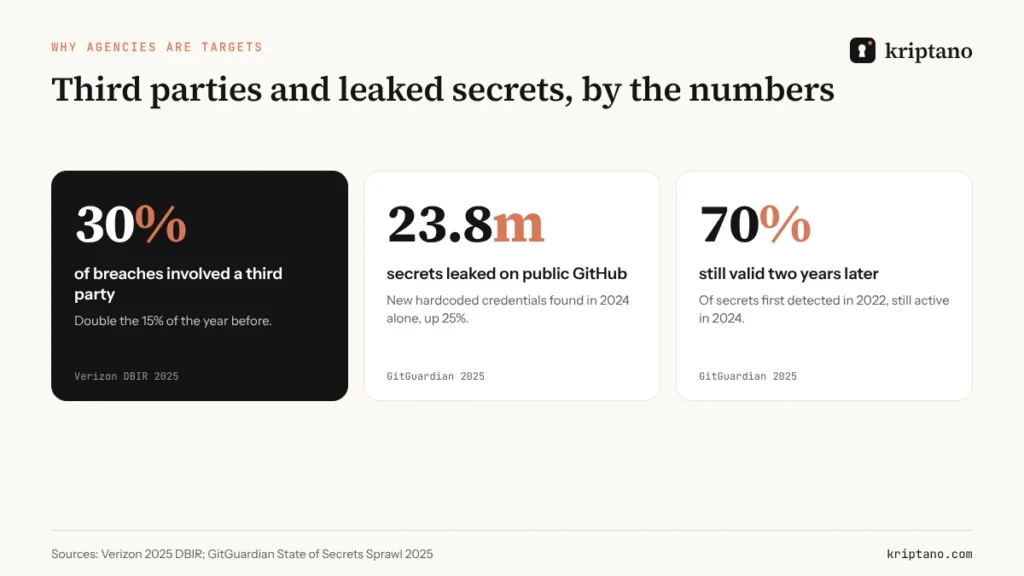
Attackers have learned that the easiest way into a well-defended company is often through the smaller firm that holds its keys. The 2025 Verizon Data Breach Investigations Report found that a third party was involved in 30% of breaches – twice the share of the previous year – with credential reuse in third-party environments a recurring pattern. The same report measured a median of 94 days to remediate leaked secrets discovered in GitHub repositories.
Developers make the problem visible. GitGuardian’s State of Secrets Sprawl 2025 counted 23.8 million new secrets leaked on public GitHub in 2024 alone, and found that 70% of the secrets it first detected in 2022 were still valid two years later.
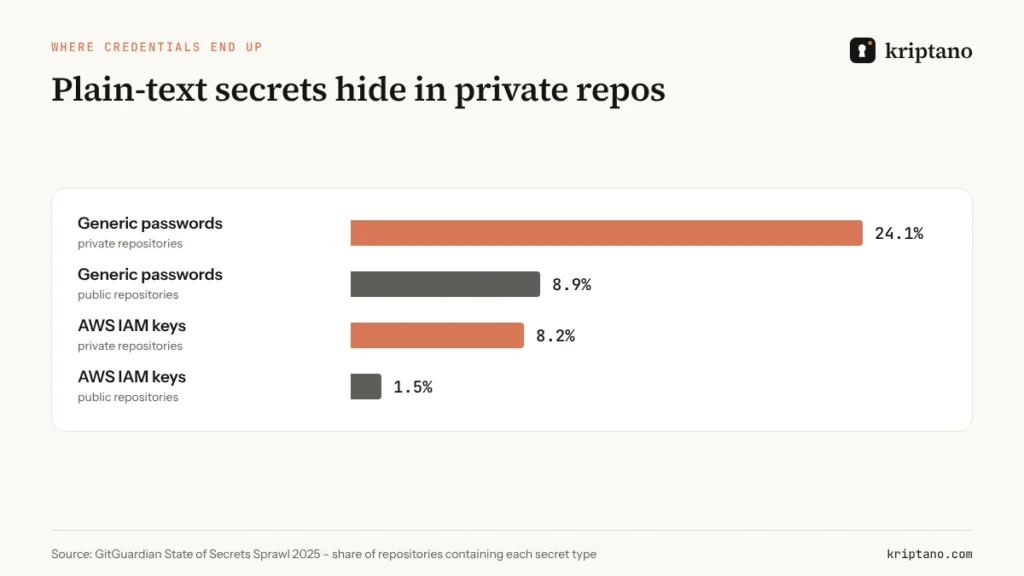
The more uncomfortable finding is where the plain-text secrets sit. In GitGuardian’s data, generic passwords and cloud keys appeared far more often in private repositories than in public ones – because teams assume “private” means “safe” and stop thinking about it.
Two directions: sending and receiving credentials
Most advice covers only half of an agency’s day. You need to share credentials securely in both directions:
- Sending – a staging site login for the client, a new email account for their employee, an API key for their developer, access to a dashboard you built.
- Receiving – the client’s hosting login, their domain registrar, the admin password for a plugin licence, a database connection string from their previous agency.
Sending is the easier problem: you control the channel, and any secure password sharing tool handles it. Receiving is where things go wrong, because clients use whatever they have – usually email, sometimes a screenshot in WhatsApp. That’s why the best way to share passwords with clients starts with giving them a safe way to send you theirs.
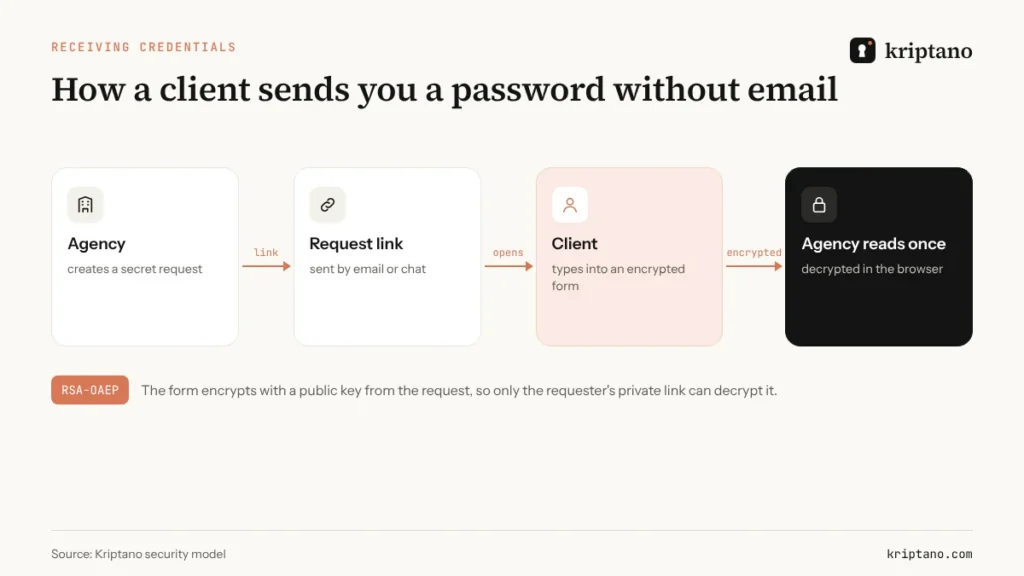
A secret request solves it. You create a request link and send it by any channel. The client opens it in a browser, types the password into an encrypted form and submits. You read it once in your account. Nothing travels by email, and the client needs no account or app.
What a secure password sharing tool must do
A password manager is excellent for credentials your team uses every day. It is less convenient when the other side is a client who will never buy a seat. A secure password sharing tool built for client work should tick these boxes:
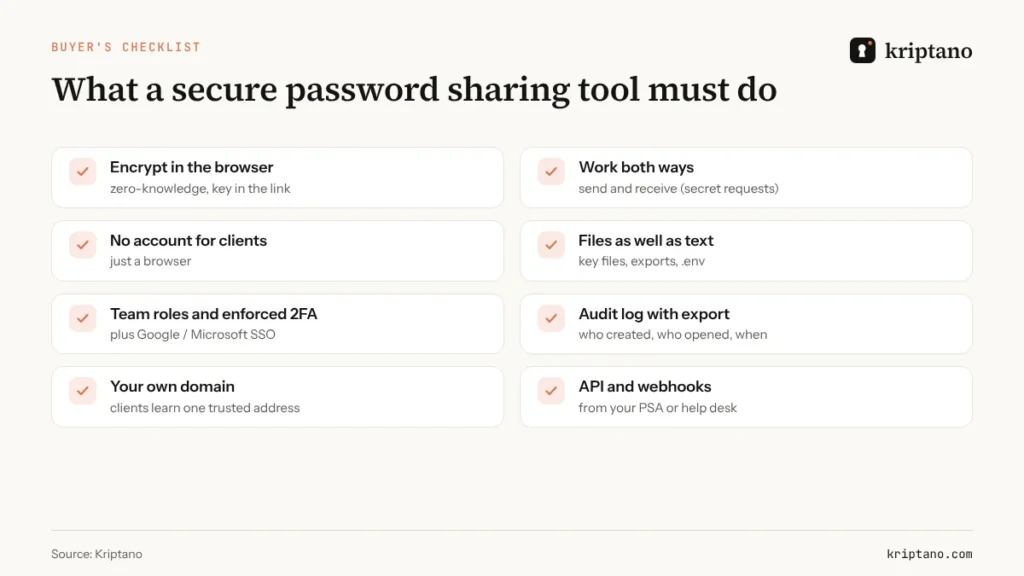
If a tool can’t share credentials securely in both directions, you’ll end up back in email for half your work. Two items deserve emphasis. Your own domain matters more than it looks: when every link comes from secure.youragency.com, clients learn one address to trust, and look-alike phishing gets harder – a lesson we covered in our Privnote alternative comparison. And an audit log turns “I sent it, I promise” into evidence you can show a client or an auditor.
The 6-rule playbook to share credentials securely
Prefer delegated access over shared passwords
Ads manager accounts, Meta Business partner access, separate WordPress users, AWS IAM roles – if the platform supports it, nobody needs the client’s password.
Send with a one-time link and a passphrase
One view, a short expiry, and a passphrase said on the call or sent in a different app.
Receive with a secret request
Never ask a client to “just email it”. Send a request link instead.
Store each client’s credentials in one vault
One vault per client in your password manager, with access limited to the people on that account.
Rotate at the end of the engagement
When a project or contract ends, rotate every shared credential and remove your users.
Keep the log
Export who created and opened each secret – useful for disputes, audits and security questionnaires.
Rule one deserves the most attention because it removes risk instead of managing it. The other five are how you share credentials securely when delegation isn’t available. Most major platforms now support delegated or partner access precisely so agencies never handle the owner’s password. Use a secure password sharing tool for whatever is left: legacy systems, registrar logins, shared mailboxes, licence keys.
The best way to share passwords with clients – step by step
Here is the routine many agencies standardize on, from first contact to offboarding:
- Kick-off email: “We never ask for passwords by email. You’ll receive a secure request link from us – it takes 30 seconds.”
- Access list: agree which systems you need, and for each one whether delegated access is possible.
- Secret requests: for each system that needs a password, send one request; label it so you know which client and system it belongs to.
- Vault: move each received credential into the client’s vault and enable MFA where the platform allows, with the recovery codes stored separately.
- Handover to the client: at launch, send new admin credentials through one-time links and ask the client to change them.
- Offboarding: rotate, remove your users, and send the client a short summary with the audit log attached.
A sentence for your proposal template
“We exchange credentials only through encrypted one-time links and secret requests; nothing is sent by email or chat, and every exchange is logged.” Clients notice – and security-conscious ones choose you for it.
API keys, .env files and developers
The best way to share passwords with clients’ developers is rarely “a password” at all.
They share some of the most dangerous secrets – production database URLs, cloud keys, signing certificates – and they share them fastest, often by pasting into Slack or a pull request comment. The fix is the same tool used a little differently:
- send a
.envfile or a key file as an encrypted attachment on a one-time link, not as a chat message; - give each contractor their own key with the narrowest permissions and an expiry, so you can revoke one person without breaking everyone;
- if you send many credentials, automate it: the secret sharing API creates links from your own scripts, and webhooks tell your help desk when a secret has been opened.
For larger files – exports, backups, signed contracts – see how to send sensitive documents securely, and how to password protect files when a client insists on an encrypted ZIP.
Freelancers: the lightweight version
If you work alone, you don’t need policies and dashboards – you need two habits. First, never accept a password by email: reply with a secret request link instead, which takes less time than explaining why. Second, keep each client in its own folder of your password manager and delete or rotate everything when the job is done. A free secure password sharing tool is enough to start; the client sees a professional process, and you stop being the place where their credentials leak from. Make the passwords you hand over long and random, too – our strong password generator guide explains what “long enough” means today.
Security questionnaires: what bigger clients will ask
Once you work with larger companies, a security questionnaire arrives sooner or later. Many of its questions are really about how you share credentials securely:
- *How do you receive and store client credentials?* – Secret requests, per-client vaults, MFA on the vault.
- *Who on your team can access our systems?* – Named people via roles, enforced 2FA, SSO.
- *How do you revoke access when staff leave?* – SSO deprovisioning plus rotation of shared credentials.
- *Can you show when our data was accessed?* – An audit log export from your secure password sharing tool.
- *Do you send passwords by email?* – “No – only through encrypted one-time links.”
Having these answers ready shortens sales cycles. It also tells the client that the best way to share passwords with clients is already built into how you work, not improvised per project. When the questionnaire asks about encryption itself, our explainer on end-to-end encryption gives you plain-language wording.
For MSPs: scaling a secure password sharing tool across clients
When dozens of technicians share credentials with hundreds of clients, the tool must scale with you:
- Team roles and policies – who can create secrets, who can see the log, maximum expiry and view counts.
- Enforced 2FA and SSO – Google or Microsoft sign-in, so leaving staff lose access the moment their account is disabled.
- An audit log with CSV export – per client, per technician.
- A custom domain and custom SMTP – links and notification emails carry your brand.
- Webhooks into your PSA or help desk – “secret opened” appears on the ticket automatically.
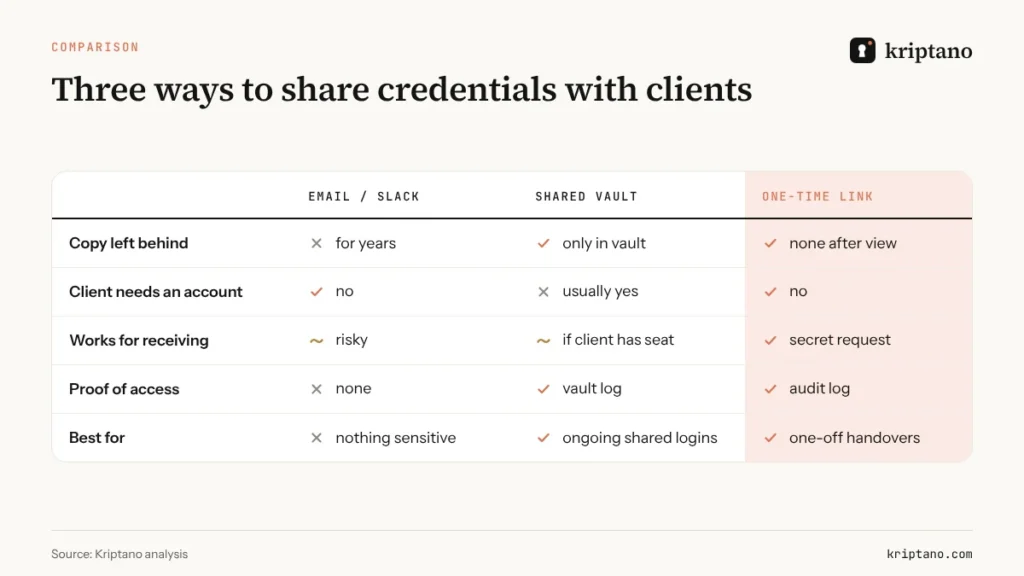
Kriptano covers this range from a free plan for occasional links to Pro Plus with unlimited secrets, a custom domain and custom SMTP. The plans differ in volume and business features; the encryption is the same for everyone.
Free
For the occasional password, no sign-up.
$0€0
forever
Try for free- 8 secrets per month per IP address
- Lifetime up to 7 days
- 1 view per link
- Encrypted attachments up to 5 MB
- Extra passphrase to open
- QR code for the link
- Password generator + generator API
- SSO login: Google + Microsoft
Start
For freelancers and small offices.
$6€6 $4.80€4.80 / mo
billed monthly billed yearly: $57.60€57.60
Choose Start- 2,000 secrets per month
- Lifetime up to 30 days
- Up to 10 views per link
- Encrypted attachments up to 50 MB
- 2 GB attachment storage
- Email notification when a secret is opened
- Password generator + generator API
- SSO login: Google + Microsoft
- Two-factor login (authenticator app)
- Up to 10 secret requests (clients send data to you)
Most popular
Pro
For agencies, IT and accounting teams.
$24.90€24.90 $19.90€19.90 / mo
billed monthly billed yearly: $238.80€238.80
Choose Pro- 30,000 secrets per month
- Lifetime up to 90 days
- Up to 50 views per link
- Encrypted attachments up to 500 MB
- 20 GB attachment storage
- Email notification when a secret is opened
- Password generator + generator API
- SSO login: Google + Microsoft
- Two-factor login (authenticator app)
- Up to 1,000 secret requests (clients send data to you)
- Automatic delivery of secrets and requests by email
- API access and integrations
- Your logo and colors
- Team of up to 5 members
- Audit log with CSV export
- Webhooks (up to 10) with HMAC signatures
- Team roles and enforced 2FA
Pro Plus
Your domain, your brand and larger teams.
$62.90€62.90 $49.90€49.90 / mo
billed monthly billed yearly: $598.80€598.80
Choose Pro Plus- Unlimited secrets
- Lifetime up to 365 days
- Up to 100 views per link
- Encrypted attachments up to 10 GB
- 1,000 GB attachment storage
- Email notification when a secret is opened
- Password generator + generator API
- SSO login: Google + Microsoft
- Two-factor login (authenticator app)
- Unlimited secret requests
- Automatic delivery of secrets and requests by email
- API access and integrations
- Your logo and colors
- Team of up to 50 members
- Audit log with CSV export
- Unlimited webhooks with HMAC signatures
- Team roles and enforced 2FA
- Unlimited custom domains (e.g. secrets.your-company.com)
- Send email from your own domain
- Your own SMTP server
- Geo-blocking and IP allowlist
- No Kriptano branding (white label)
All prices include VAT or sales tax. Bank transfer offers are at the same final price. Subscription by card, PayPal, Apple Pay or Google Pay via Paddle – or bank transfer against an offer. Cancel anytime.
If you are also cleaning up how your own team stores passwords, our guide to the best place to keep passwords compares vault options, and the pillar guide on how to share passwords securely covers internal handovers. Handling client data under GDPR or NIS2? Our NIS2 and GDPR compliance guide includes a seven-point procedure you can adopt.
Frequently asked questions
What is a secure password sharing tool?
It is a service that sends passwords and other secrets through encrypted links that expire after viewing, instead of email or chat. Good tools also let you receive passwords from clients, attach files and keep an audit log.
What is the best way to share passwords with clients?
Prefer delegated access where the platform supports it. Otherwise send credentials through a one-time encrypted link with a passphrase, receive theirs through a secret request, store them in a per-client vault and rotate everything when the engagement ends.
How can clients send me a password securely?
Send them a secret request link. They type the password into an encrypted form in their browser, and you read it once in your account – no email, no account needed on their side.
Do clients need an account to open a link?
No. With Kriptano, recipients open one-time links and secret requests in any browser without an account, app or installation.
Should agencies use a password manager or a one-time link tool?
Both. Use a password manager for credentials your team uses every day, and a one-time link tool to share credentials securely with anyone outside your vault.
Can I put links on my agency’s own domain?
Yes. Kriptano Pro Plus supports a custom domain and custom SMTP, so clients see links and emails from your brand.
Give your clients one safe way to share credentials
Start free, upgrade when your team grows. Encrypted in the browser, logged for you.