Best Place to Keep Passwords: Password Managers, Browsers and Notebooks Ranked
A password manager, the browser, a notebook in a drawer or a spreadsheet called "passwords.xlsx"? Six places to keep passwords ranked by real risk – plus what the LastPass breach and the ICO's £1.2m fine teach about choosing a password locker.
Ask ten people where they keep their passwords and you will hear ten answers: a password manager, the browser, a notebook in the kitchen drawer, a phone note, a spreadsheet, “my head”. The best place to keep passwords is the one that keeps them encrypted, unique per account and out of reach of anyone who breaks into your email. This guide ranks six common options, looks at what the LastPass breach taught us about choosing a password locker, and explains the one thing even the best vault does not solve: handing a password to someone else.
Contents
- The best place to keep passwords: the short answer
- 6 places to save passwords, ranked
- The LastPass lesson: choosing a password locker
- How businesses should save passwords
- The gap every vault leaves: sharing with people outside it
- Families and small offices: a simple setup that works
- Passkeys: will you still need a password locker?
- Where not to keep passwords – a quick audit
- Frequently asked questions
The best place to keep passwords: the short answer
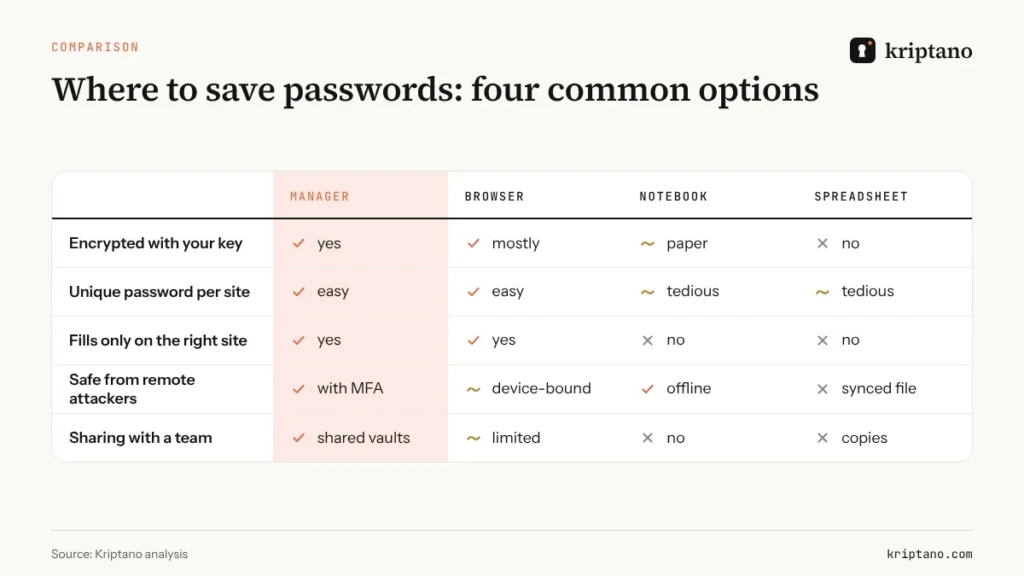
For almost everyone, the best place to keep passwords is a dedicated password manager protected by a strong master passphrase and multi-factor authentication. For people who live inside one ecosystem, the built-in manager in the browser or operating system is a solid second choice. A notebook kept at home beats a spreadsheet. And email, chat and phone notes are not storage at all – they are leaks waiting to happen.
6 places to save passwords, ranked
1. A dedicated password manager
A password manager – Bitwarden, 1Password, Proton Pass, Keeper, Dashlane and others – encrypts your vault with a key derived from your master password, syncs across devices and fills logins only on the matching website. That last part is underrated: autofill that refuses to work on a look-alike domain is a quiet anti-phishing tool. Even the US Cybersecurity and Infrastructure Security Agency (CISA) recommends password managers in its mobile communications guidance, alongside phishing-resistant MFA.
For teams, the real value is shared vaults: access can be granted and revoked without anyone “sending” a password. If you want to save passwords for a company, this is where they belong.
2. Your browser or operating system
Apple Passwords, Google Password Manager and Microsoft Edge all generate, save and sync passwords and passkeys. For an individual who uses one ecosystem, it is a big upgrade over reuse. The limits show up at work: sharing with colleagues outside the same family or account is clumsy, admin controls are thin, and switching platforms means exporting everything.
3. An offline password locker
Some people prefer a local encrypted database – a KeePass-style file on their own device, sometimes with a hardware key. It removes the cloud provider from the picture, but you become responsible for backups, sync and keeping the file away from malware. Great for technical users, demanding for everyone else.
4. A paper notebook at home
Surprisingly, a notebook in a drawer is not the worst option. It cannot be hacked remotely, and it encourages unique passwords. It does nothing against someone in your home, it cannot autofill, and it fails completely at the office. Use it, if at all, for a handful of personal accounts – never for business credentials.
5. A spreadsheet or notes app
“passwords.xlsx” is one of the first things an attacker searches for after getting into a mailbox or a cloud drive. Spreadsheets get synced, shared, attached and backed up. Phone notes are often synced to the cloud in plain form. Neither is a password locker; both are a list for whoever gets in first.
6. Email and chat
Your inbox is the worst place to save passwords, yet it’s where most of them end up – because that is how they were sent. A password in an email lives in the sender’s sent folder, the recipient’s inbox, both providers’ servers and every backup, for years. Chat history in Slack, Teams or WhatsApp is no better.
The LastPass lesson: choosing a password locker
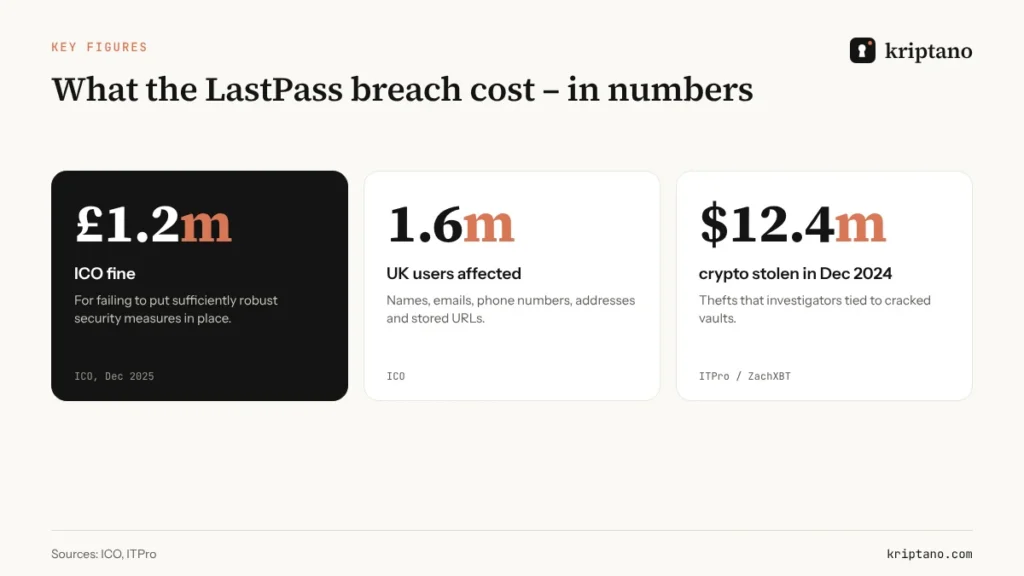
In 2022 LastPass suffered a two-stage breach. An attacker first compromised a developer’s laptop and reached the development environment; information and keys from that first incident later helped them get into the cloud storage holding LastPass’s backups, including customers’ encrypted vaults. In December 2025 the UK Information Commissioner’s Office fined LastPass UK Ltd £1.2 million, saying the company failed to put sufficiently robust technical and security measures in place for up to 1.6 million UK users.
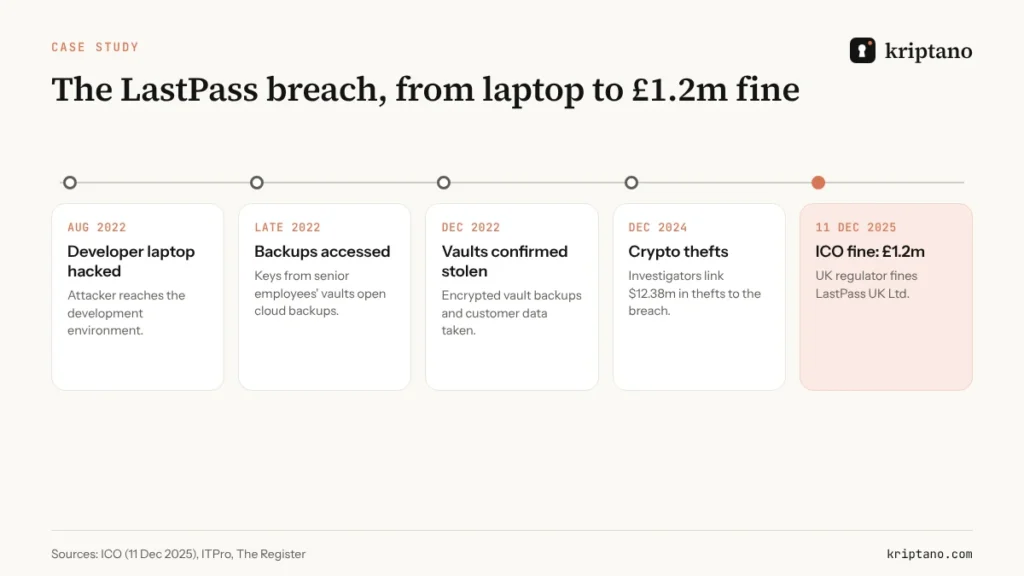
Encrypted vaults are only as strong as the master password protecting them once they are stolen. Investigators later linked millions of dollars in cryptocurrency thefts to vaults that were cracked offline – ITPro cites $12.38 million stolen on 16 and 17 December 2024 alone. The Register reported that the ICO’s decision weighed heavily on how the company handled personal devices and linked personal and business accounts.
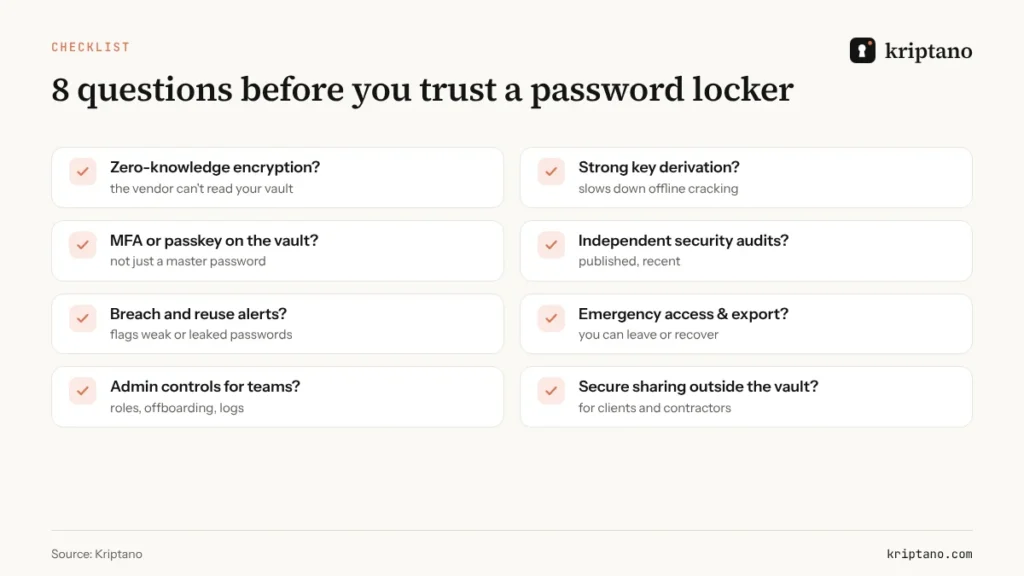
The lessons for anyone choosing the best place to keep passwords:
- Use a long, generated master passphrase – five or six random words or more. Our strong password generator guide shows why.
- Turn on MFA or a passkey for the vault itself.
- Never keep crypto wallet seeds or recovery phrases in a cloud vault if losing them would be catastrophic.
- Keep work and personal vaults separate, and keep the work vault off personal devices that IT can’t manage.
- Look for published, independent security audits and a clear incident history.
How businesses should save passwords
For a company, the best place to keep passwords is a business password manager with shared vaults, roles, offboarding and an audit trail. Three rules make it work:
- One source of truth. Every shared credential lives in one vault, not in a spreadsheet “as a backup”.
- Least privilege. People see only the vaults their role needs; contractors get time-limited access.
- Offboarding is a checklist item. When someone leaves, their access is revoked and every shared credential they knew is rotated.
According to the 2025 Verizon Data Breach Investigations Report, a third party was involved in 30% of breaches – double the year before – with credential reuse in third-party environments a recurring theme. That is why the edge of your vault matters: the moment a password leaves it for a vendor, a client or a freelancer.
30%
of breaches involved a third party (Verizon DBIR 2025)
22%
started with credential abuse
1.6m
UK users affected by the LastPass breach
£1.2m
ICO fine, December 2025
The gap every vault leaves: sharing with people outside it
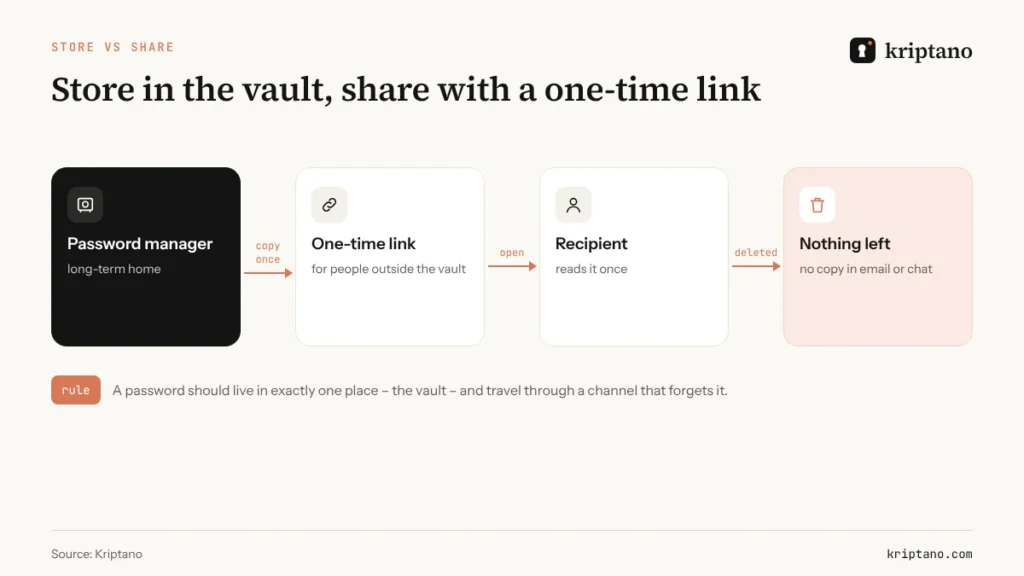
A password manager is a superb place to *store* passwords. It is not always the right way to *hand one over* – to a new hire who doesn’t have an account yet, a client, an accountant, a contractor, or someone at another company with a different password manager. That is exactly when people fall back to email “just this once”.
The fix is to keep two jobs separate. The vault is the long-term home; a one-time encrypted link is the delivery van. You copy the password once into a link, the recipient opens it once, and nothing remains in email or chat. The recipient can then save the password in their own password locker – or change it at first login.
Need to *receive* a password from a client instead? Kriptano’s secret request lets them type it into an encrypted form you read once – details in our guide to the secure password sharing tool agencies use. For the full process, see how to share passwords securely.
Families and small offices: a simple setup that works
You don’t need an enterprise rollout to get this right. For a household or an office of five, the best place to keep passwords is usually a family or small-business plan of one password manager, set up like this:
- one vault per person for private accounts, plus one shared vault for things like the router, streaming services, utilities or the office printer;
- one emergency contact with emergency access, so a partner or co-founder can get in if something happens to you;
- one printed recovery sheet with the account recovery codes, sealed and kept with other important papers;
- MFA everywhere it is offered, starting with email – because whoever controls your email can reset almost everything else.
The bigger risk in small offices is informality: “just text me the Wi-Fi password”, “the logins are on the whiteboard”. A shared vault and a one-time link for everyone outside it remove both habits without slowing anyone down.
Passkeys: will you still need a password locker?
Passkeys replace a password with a cryptographic key pair stored on your devices, and they cannot be phished or reused. More sites support them every month, and the major password managers now save and sync passkeys alongside passwords. That is good news, but it does not make the vault obsolete. Most accounts will keep a password for years, many work systems still rely on shared credentials, and passkeys themselves need a home that syncs safely across devices. In practice, the best place to keep passwords is becoming the best place to keep passkeys, too. Our guide to the one time password (OTP) explains how passkeys compare with codes sent by SMS or an app.
Where not to keep passwords – a quick audit
Spend ten minutes today searching your own accounts for the word “password”:
- your email, including the sent folder;
- Slack, Teams and WhatsApp chats;
- cloud drives for files named “passwords”, “logins” or “access”;
- help desk tickets and project management cards;
- phone notes and screenshots.
Move anything you find into your password manager, delete the original, and change any password that has been sitting in a shared place. Then tell your team what you did and why – the audit works best when it becomes a habit every few months rather than a one-off clean-up after an incident. If a password was shared over chat, our article on encrypted text messages explains why even “secure” chats keep a copy.
Don't forget files
Scans, contracts and exports protected by a password are only safe if the password travels separately. See how to password protect files and send the key through a one-time link.
Frequently asked questions
What is the best place to keep passwords?
For most people and businesses, the best place to keep passwords is a reputable password manager protected by a long master passphrase and multi-factor authentication. The browser’s built-in manager is a reasonable alternative for individuals.
Is it safe to save passwords in my browser?
For personal use, yes – modern browsers encrypt saved passwords and fill them only on the matching site. For teams, a dedicated password manager offers better sharing, admin controls and offboarding.
Is a password locker app safe after the LastPass breach?
A password locker is still far safer than reuse or spreadsheets. Choose one with zero-knowledge encryption, published audits and MFA on the vault, and use a long, generated master password.
Is it OK to write passwords down?
A notebook kept safely at home protects against remote attackers and is better than reusing passwords. It is not suitable for work accounts or anything shared.
How do I give someone a password from my password manager?
If they use the same manager, share the item through a shared vault. Otherwise send a one-time encrypted link, add a passphrase for sensitive accounts and ask them to save or change it.
Where should a company save passwords?
In a business password manager with shared vaults, roles and an audit log – never in spreadsheets, email or chat channels.
Keep passwords in the vault – share them through a link that forgets
Free, no sign-up. Encrypted in your browser, deleted after one view.