One-Time Secret Links: How Self-Destructing Links Work and When to Use Them
What a one-time secret link is, how browser-side encryption and the key in the URL fragment work, how it differs from a one-time password, and what to look for in a onetimesecret alternative.
Contents
- What a one-time secret link is – and what it is not
- How it works: encryption in the browser, key in the fragment
- When to use a one-time secret link
- How to send a one-time secret link in 4 steps
- Lifecycle of a secret: from creation to deletion
- How to choose a one-time secret link service (onetimesecret alternative)
- One-time links and compliance
- Free or paid
- Frequently asked questions
A one-time secret link is a URL that reveals a confidential message exactly once. As soon as the recipient opens it, the secret is shown and permanently deleted from the server; anyone who tries the same link later only sees that it no longer exists. That is why people also call it a self-destructing link, a burn-after-reading note or a one-time link. This article explains how it works under the hood, where it fits, and what separates a trustworthy service from a “message that disappears”.
If you are looking for a complete process for your team, start with the main guide on how to share passwords securely; this article goes deeper into the technology.
What a one-time secret link is – and what it is not
A one-time secret link points to an encrypted message, not to a document or a chat. Its job is a handover: a password for a new employee, a PIN, a Wi-Fi key, a recovery code, an API token or the passphrase to open a PDF. The recipient reads it once, copies what they need, and nothing remains in the channel you used to deliver the link.
One-time link vs. one-time password (OTP)
One-time link vs. password manager
How it works: encryption in the browser, key in the fragment
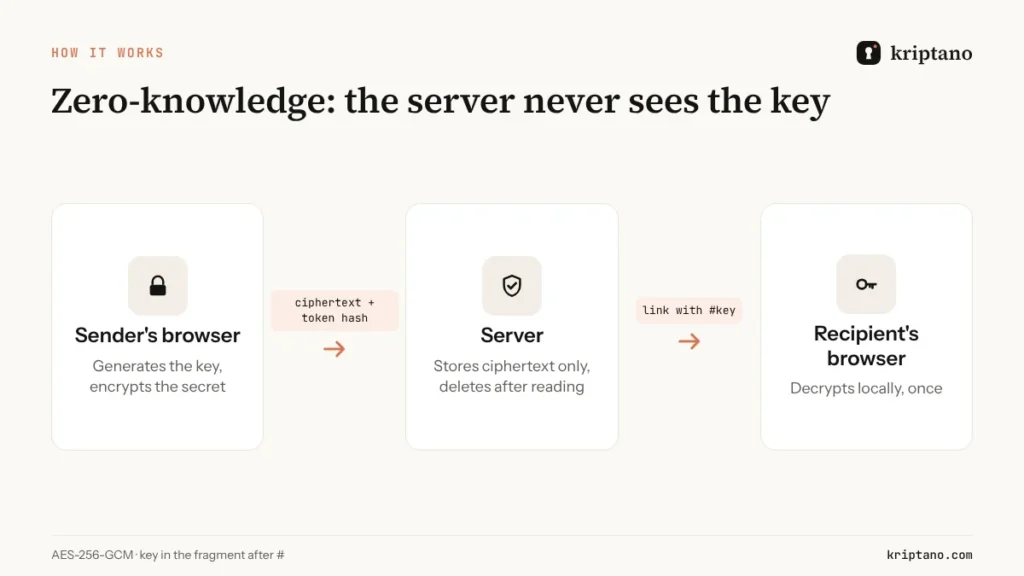
The quality of a one-time secret link depends on one question: can the service read your secret? With Kriptano the answer is no, by design.
- Your browser generates a random 256-bit key and encrypts the secret with AES-256-GCM (NIST FIPS 197), an authenticated cipher that also detects tampering.
- The key is put into the URL fragment – the part after #. By specification, browsers do not send the fragment in HTTP requests, so the server never receives it.
- The server stores only the ciphertext and a hash of an access token derived from the key. Without the key it cannot decrypt anything – and cannot even release the ciphertext.
- When the recipient opens the link, their browser fetches the ciphertext, decrypts it locally and the server deletes the record immediately.
- Unopened secrets are deleted automatically when the expiry runs out.
Why link previews do not “burn” the secret
Optional passphrase
AES-256
encryption in your browser
1×
the secret opens once, then it is gone
0
readable copies on the server
600,000
PBKDF2 iterations for a passphrase
When to use a one-time secret link
A one-time secret link shines wherever information has to be handed over once, not shared permanently:
| Who | What they send | Why a one-time link |
|---|---|---|
| IT support and sysadmins | first passwords, VPN and server access | nothing stays in tickets or email |
| Agencies and freelancers | CMS, hosting and ad account logins | clean handover at project end |
| HR and onboarding | first login, personal data | fewer personal data in inboxes |
| Developers | API keys, tokens, .env values | keys do not live in chat history |
| Clinics and labs | the passphrase for a results PDF | health data do not stay in messages |
| Finance and accounting | portal logins, PINs | no permanent record of access data |
For documents and larger files the same principle applies, with encryption in chunks – see sending sensitive documents securely.
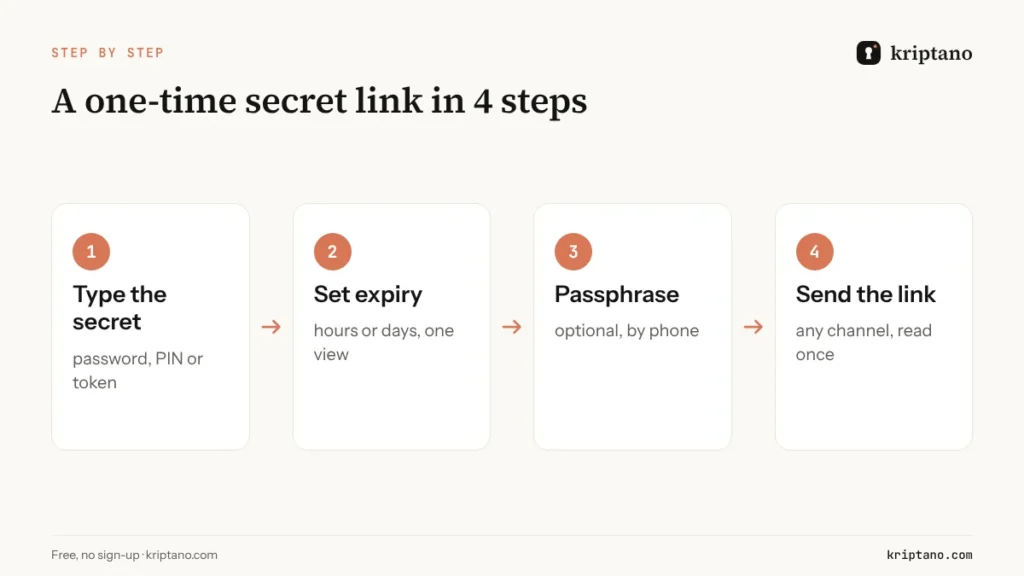
How to send a one-time secret link in 4 steps
Type the secret
A password, PIN, token or a short confidential note.
Set expiry and views
How long the link is valid and how many times it can be opened.
Add a passphrase (optional)
Share it with the recipient by phone or another channel.
Send the link
By email, chat or SMS – after it is read, it reveals nothing.
Lifecycle of a secret: from creation to deletion
It helps to know exactly what exists, where and for how long:
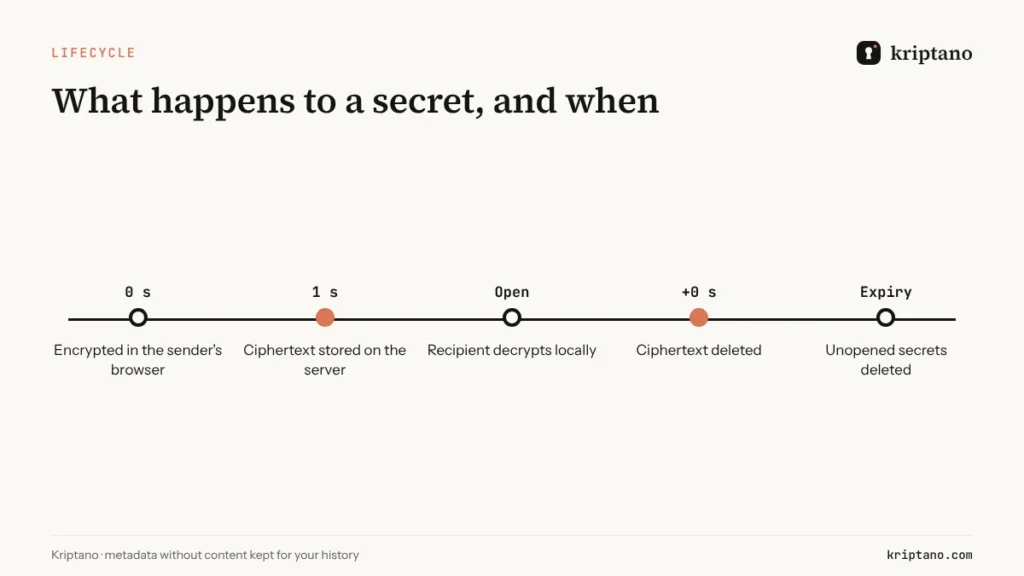
What remains after deletion is only metadata you need for your own history – label, creation and opening time – never the content or the key.
How to choose a one-time secret link service (onetimesecret alternative)
One-Time Secret is one of the best-known tools of its kind, and many teams look for an alternative with more business features. These are the criteria that actually matter:
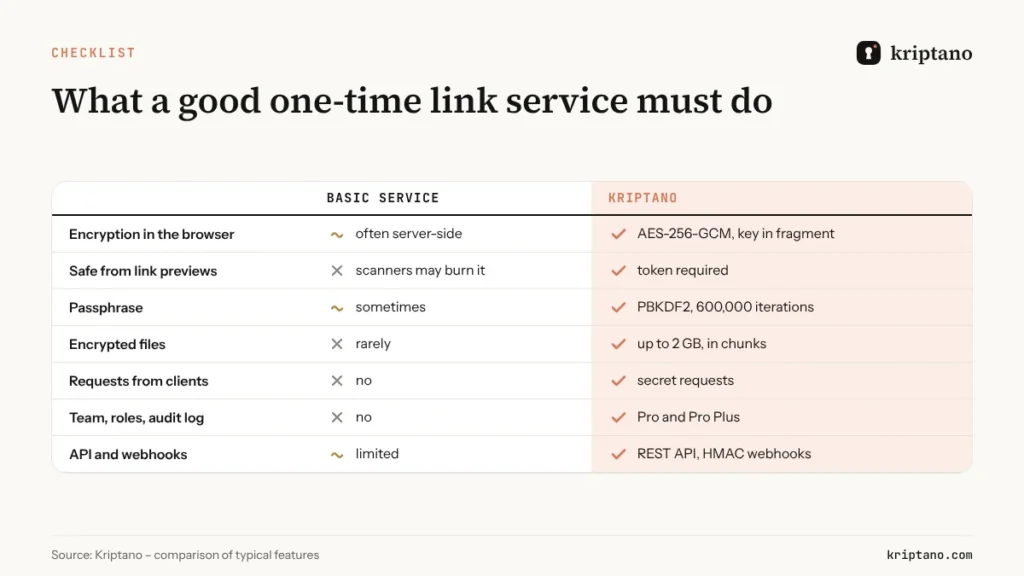
Also check where the servers are (Kriptano runs in the EU, which simplifies GDPR), whether there is any third-party analytics on the page where the secret is shown (Kriptano has none), and whether the provider can explain its security model in detail – ours is on the security page.
One-time links and compliance
Regulations do not prescribe a specific tool, but GDPR asks for data minimisation, storage limitation and encryption as an appropriate technical measure, and NIS2 asks covered entities for policies on cryptography and secure communications. A one-time link supports all of them: the secret is encrypted before it leaves the sender’s computer, it is not kept after reading, and in Pro and Pro Plus the audit log proves when it was sent and opened. The details are in our guide to NIS2 and GDPR compliance.
Free or paid
Text secrets with one view are free and need no account. Paid plans add longer expiry, more views, encrypted attachments, read notifications, secret requests, teams with roles and enforced 2FA, an audit log, API access and webhooks. See the pricing page for current plans.
Free
For the occasional password, no sign-up.
$0€0
forever
Try for free- 8 secrets per month per IP address
- Lifetime up to 7 days
- 1 view per link
- Encrypted attachments up to 5 MB
- Extra passphrase to open
- QR code for the link
- Password generator + generator API
- SSO login: Google + Microsoft
Start
For freelancers and small offices.
$6€6 $4.80€4.80 / mo
billed monthly billed yearly: $57.60€57.60
Choose Start- 2,000 secrets per month
- Lifetime up to 30 days
- Up to 10 views per link
- Encrypted attachments up to 50 MB
- 2 GB attachment storage
- Email notification when a secret is opened
- Password generator + generator API
- SSO login: Google + Microsoft
- Two-factor login (authenticator app)
- Up to 10 secret requests (clients send data to you)
Most popular
Pro
For agencies, IT and accounting teams.
$24.90€24.90 $19.90€19.90 / mo
billed monthly billed yearly: $238.80€238.80
Choose Pro- 30,000 secrets per month
- Lifetime up to 90 days
- Up to 50 views per link
- Encrypted attachments up to 500 MB
- 20 GB attachment storage
- Email notification when a secret is opened
- Password generator + generator API
- SSO login: Google + Microsoft
- Two-factor login (authenticator app)
- Up to 1,000 secret requests (clients send data to you)
- Automatic delivery of secrets and requests by email
- API access and integrations
- Your logo and colors
- Team of up to 5 members
- Audit log with CSV export
- Webhooks (up to 10) with HMAC signatures
- Team roles and enforced 2FA
Pro Plus
Your domain, your brand and larger teams.
$62.90€62.90 $49.90€49.90 / mo
billed monthly billed yearly: $598.80€598.80
Choose Pro Plus- Unlimited secrets
- Lifetime up to 365 days
- Up to 100 views per link
- Encrypted attachments up to 10 GB
- 1,000 GB attachment storage
- Email notification when a secret is opened
- Password generator + generator API
- SSO login: Google + Microsoft
- Two-factor login (authenticator app)
- Unlimited secret requests
- Automatic delivery of secrets and requests by email
- API access and integrations
- Your logo and colors
- Team of up to 50 members
- Audit log with CSV export
- Unlimited webhooks with HMAC signatures
- Team roles and enforced 2FA
- Unlimited custom domains (e.g. secrets.your-company.com)
- Send email from your own domain
- Your own SMTP server
- Geo-blocking and IP allowlist
- No Kriptano branding (white label)
All prices include VAT or sales tax. Bank transfer offers are at the same final price. Subscription by card, PayPal, Apple Pay or Google Pay via Paddle – or bank transfer against an offer. Cancel anytime.
Frequently asked questions
What is a one-time secret link?
A link to an encrypted message that can be opened only once. After it is opened, or when it expires, the secret is permanently deleted from the server.
Is a self-destructing link really deleted?
Yes. With Kriptano the ciphertext is deleted immediately after the first view, and unopened secrets are deleted when they expire. Only metadata without content remains for your history.
Can the service provider read my secret?
Not with Kriptano. The key is generated in your browser and stays in the URL fragment after #, which is never sent to the server. The server only has ciphertext.
Will Slack or Outlook link previews destroy the secret?
No. The server releases the ciphertext only to a browser that proves it has the key from the fragment. Preview bots do not have it.
What is the difference between a one-time link and a one-time password?
A one-time password (OTP) is a code that proves your identity when you log in. A one-time link delivers a piece of information – such as a password or API key – that should be read once.
Can I send files with a one-time link?
Yes, in the Start, Pro and Pro Plus plans you can attach encrypted files up to 50 MB, 500 MB or 10 GB. The free plan supports files up to 5 MB.
Create your first one-time secret link
Free and without sign-up. Encrypted in your browser, deleted after reading.