Strong Password Generator Guide: How Long Should a Password Be in 2026?
NIST now asks for 15 characters, the UK's NCSC swears by three random words, and your password manager can generate 30 random characters in a click. How to use a strong password generator properly – and why the handover is where good passwords die.
“Password generator” is one of the most searched security terms on the web – Google’s keyword data shows hundreds of thousands of searches a month for it and its variations. That’s good news: a strong password generator produces passwords no human would ever guess. The bad news is that the generator is the easy part. The password still has to be stored, handed over and eventually changed, and that is where most strong passwords quietly turn weak.
This guide covers the current rules from the US National Institute of Standards and Technology (NIST) and the UK’s National Cyber Security Centre (NCSC), compares a random password generator with the “three random words” method, and shows how to deliver a new password without leaving a copy in someone’s inbox.
Contents
- What makes a password strong in 2026
- Random password generator vs three random words
- How to use a strong password generator properly
- Where strong passwords actually leak
- Creating a strong password you have to remember
- 8 mistakes that turn a strong password into a weak one
- Updating your company's password policy
- Frequently asked questions
What makes a password strong in 2026
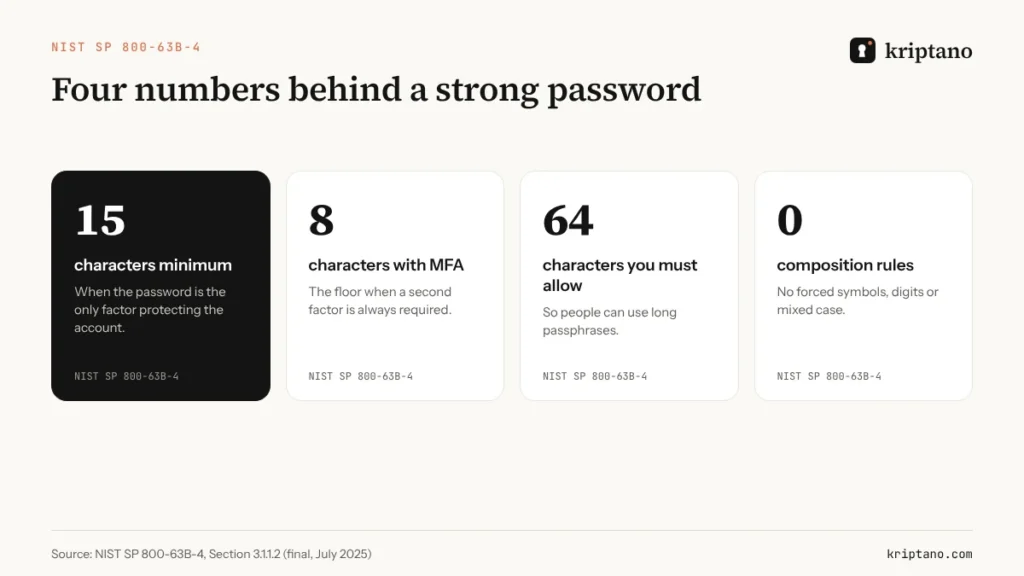
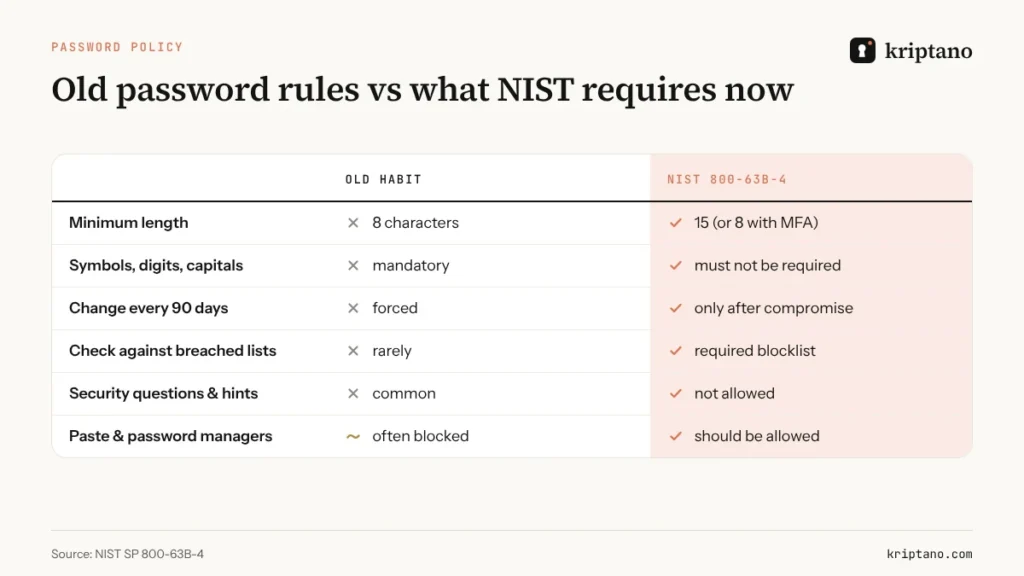
The rulebook changed. NIST published the final version of SP 800-63B-4 in July 2025, and it reads very differently from the policies many companies still enforce:
- passwords used as the only factor must be at least 15 characters long;
- when a second factor is always required, the minimum is 8 characters;
- systems should accept at least 64 characters, so passphrases fit;
- verifiers must not impose composition rules such as “one capital, one digit, one symbol”;
- passwords should not expire on a schedule – only when there is evidence of compromise;
- new passwords must be checked against a blocklist of common and breached passwords.
15
characters minimum for single-factor passwords
8
characters minimum when MFA is required
64
characters a system should accept
0
mandatory composition rules
The UK takes the same direction from the user’s side. The NCSC’s long-running advice is to combine three random words – something like “applenemobiro” – or to let a password manager create and remember passwords for you. Both organizations agree on the core idea: length and unpredictability beat clever substitutions.
Random password generator vs three random words
A random password generator picks each character independently from a large alphabet. With the 94 printable keyboard characters, every character adds about 6.55 bits of entropy – the measure of how many guesses an attacker would need. A passphrase generator picks whole words from a list instead; with the 7,776-word Diceware list, each word adds about 12.9 bits.
That gives a simple rule of thumb you can check yourself:
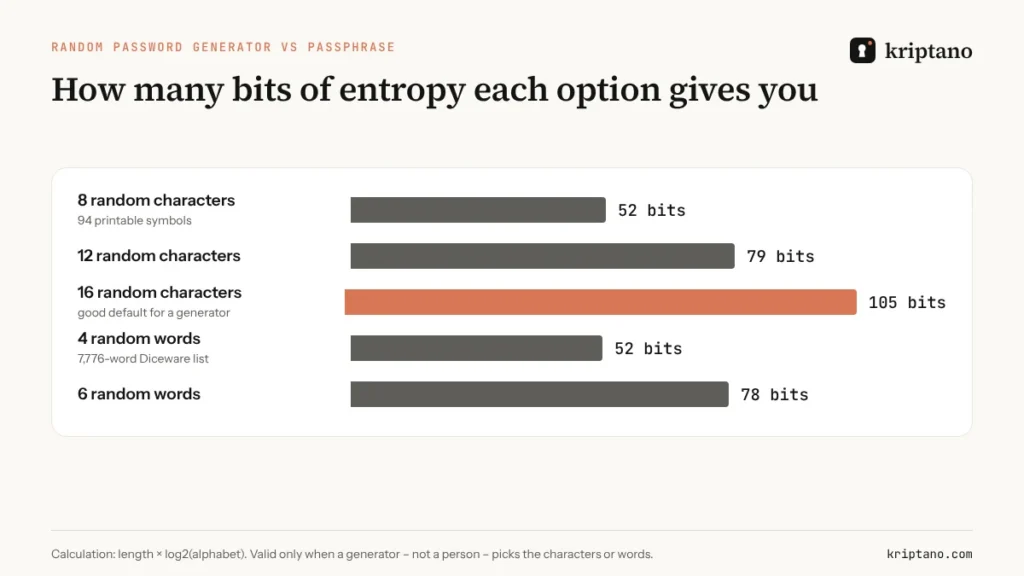
The important caveat is in the chart’s footnote. Those numbers only hold when a machine does the choosing. People asked for “random” words reliably pick related ones – “red apple tree” – and people asked for random characters end up with “Summer2026!”. When creating a strong password by hand, you lose most of the theoretical strength.
So which should you use?
| Password | Best method | Why |
|---|---|---|
| Accounts stored in a password manager | random password generator, 16–24 characters | you never type it, so length costs nothing |
| Password manager master password | 5–6 random words from a generator | you type it daily and must remember it |
| Laptop or phone login | 4–5 random words or a long PIN with biometrics | typed often, protected by device limits |
| Wi-Fi for guests | 4 random words | easy to read out, easy to type on a phone |
| First password for a new employee | random password generator + forced change | it will be replaced at first login |
How to use a strong password generator properly
Generating a strong password takes seconds. Doing it in a way that doesn’t create new risks takes a little more thought.
Generate where you will store it
Use the generator built into your password manager, Apple Passwords or your browser, so the password goes straight into the vault.
Prefer length over symbols
16+ random characters, or 5–6 random words, is plenty. Add symbols only if a site insists.
Make it unique
One password per account. Reuse turns one breach into many.
Turn on a second factor or a passkey
Even a perfect password can be phished; MFA limits the damage.
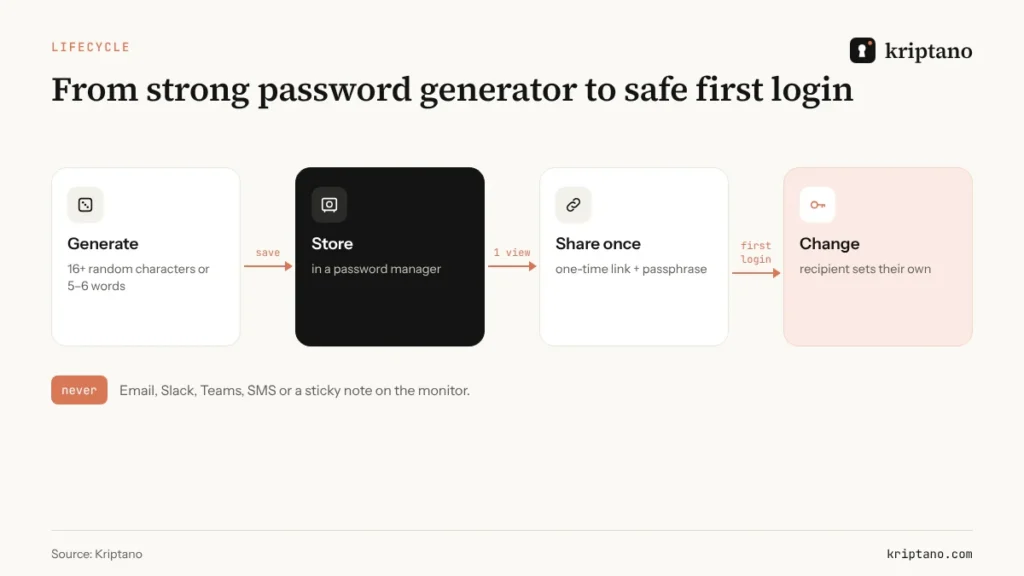
Hand it over once – then let them change it
If someone else needs it, send a one-time link, never the text itself.
What happens inside a random password generator
A good random password generator relies on the operating system’s cryptographically secure random number generator – in a browser that is crypto.getRandomValues(), not the everyday Math.random() used for games and animations. The difference matters: a secure source cannot be predicted from earlier output, so seeing one generated password tells an attacker nothing about the next. Good tools also avoid “modulo bias”, a subtle flaw that makes some characters slightly more likely than others. You don’t have to check this yourself if you stick to a well-known strong password generator, but it is a fair question to ask any vendor.
Some generators let you exclude look-alike characters such as l, 1, O and 0. That costs a little entropy per character, so compensate with one or two extra characters – a worthwhile trade when someone has to read the password aloud or type it from another screen.
A word on online generators: a random password generator on an unknown website could, in theory, log what it shows you. Reputable tools generate in your browser without sending anything, but the simplest defense is to use the generator that already lives in your password manager or operating system.
If you need ideas on where those passwords should live afterwards, our guide to the best place to keep passwords compares password managers, browsers and the paper notebook.
Where strong passwords actually leak
Attackers rarely brute-force a 16-character random password. They do not need to. According to the 2025 Verizon Data Breach Investigations Report, credential abuse was again the most common way into a company, involved in 22% of breaches. Most of those credentials were not cracked – they were found: in mailboxes, chat histories, tickets, spreadsheets and infostealer logs.
Think about where a freshly generated password goes next:
- the IT admin emails it to a new hire – now it sits in two mailboxes and two backups;
- someone posts it in a Slack channel “just this once” – now 40 people can search for it;
- a help desk agent pastes it into the ticket – now it is in the ticket history and every export of it.
A one-time link fixes this step. The password is encrypted in your browser, the recipient opens it once, and afterwards the link reveals nothing. That is the difference between a password that is strong on paper and one that stays strong in practice.
For the full process, including passphrases over the phone and receiving passwords from clients, read how to share passwords securely. Handing out first logins to staff? See our guide to temporary passwords and login credentials.
Creating a strong password you have to remember
Some passwords can’t live in a password manager: the manager’s own master password, your laptop login, the recovery passphrase for an encrypted drive. For these, creating a strong password means making something long that you can actually type.
- Let a passphrase generator pick five or six words – don’t choose them yourself.
- Keep them in the order generated; add spaces or hyphens if the system allows.
- Practise typing it a few times while you can still look it up.
- Store an emergency copy offline, for example sealed in a safe, if losing it would lock you out of everything.
Creating a strong password this way takes a minute and saves you from the reset loop later. The NCSC’s three random words are a good minimum for everyday accounts. For a master password that guards hundreds of others, go further.
8 mistakes that turn a strong password into a weak one
Even good intentions produce predictable passwords. These are the patterns cracking tools try first – and the habits that expose a password after it was generated.
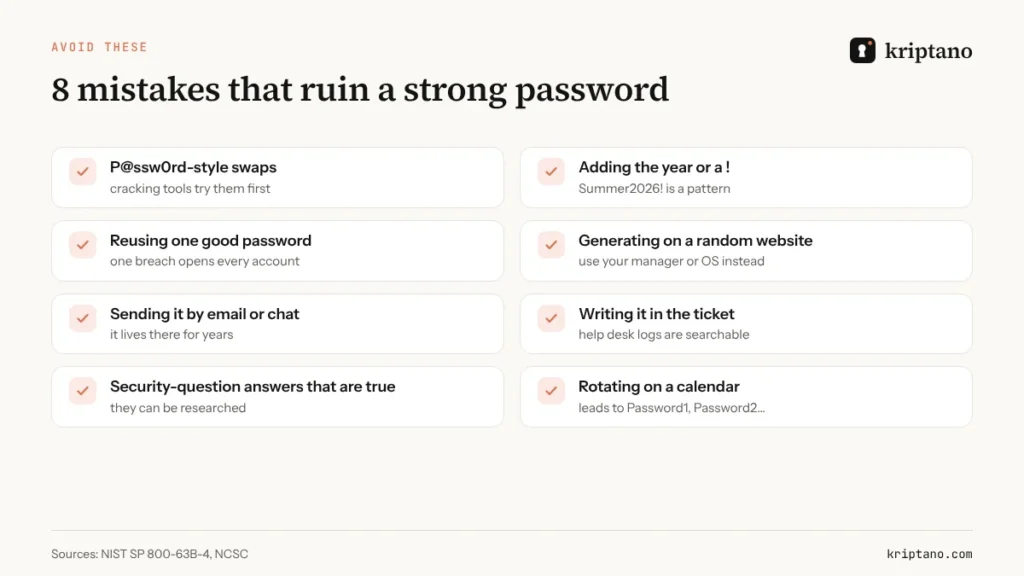
Security questions are passwords too
NIST tells verifiers not to use password hints or knowledge-based questions. If a site forces them, answer with random words from your strong password generator and store the answers in your manager.
Updating your company’s password policy
If your internal policy still demands 8 characters, three character classes and a change every 90 days, it is out of step with NIST and creates the very patterns attackers exploit. A modern policy is shorter and kinder to users:
- 15+ characters for single-factor accounts, 8+ where MFA is enforced;
- no composition rules, no scheduled expiry, no hints;
- every new password checked against a breached-password list;
- password managers allowed and encouraged, paste enabled in login forms;
- a defined, secure channel for handing passwords to people – never email or chat.
A short checklist for IT and security teams
- Pick one approved strong password generator – usually the one in your company password manager – and name it in the policy.
- Set generator defaults to at least 16 characters for service accounts and shared logins.
- Block known-breached passwords at the identity provider, not only in training slides.
- Treat creating a strong password and delivering it as one procedure, with the delivery channel written down.
- Review help desk macros and onboarding templates for passwords pasted in plain text.
That last point is where many policies stop short. They describe how to create a password and say nothing about how to deliver it. If you work under NIS2 or GDPR, a documented handover process also helps when an auditor asks how credentials are protected – our NIS2 and GDPR compliance guide has a template. And when a password protects a file rather than an account, the same rule applies: see how to password protect files and send the password separately.
Frequently asked questions
What is a strong password generator?
It is a tool that creates passwords from random characters or random words chosen by a machine, not a person. The best strong password generator is usually the one in your password manager, because it saves the result straight into your vault.
How long should a strong password be in 2026?
NIST SP 800-63B-4 requires at least 15 characters for a password used on its own and at least 8 when multi-factor authentication is required. For generated passwords stored in a manager, 16–24 random characters is a comfortable default.
Is a random password generator better than three random words?
Both are strong when a machine picks them. A random password generator is ideal for passwords you never type; random words are easier to remember and type, so they suit master passwords and Wi-Fi keys.
Are online password generators safe?
Reputable ones generate in your browser and send nothing, but you can’t easily verify that. Using the generator in your password manager, browser or operating system avoids the question entirely.
How do I send a generated password to someone?
Use a one-time encrypted link instead of email or chat, add a passphrase for sensitive accounts, and ask the recipient to change the password at first login.
Should passwords still expire every 90 days?
No. NIST says passwords should be changed only when there is evidence they were compromised. Forced rotation leads to predictable patterns.
Generated a strong password? Send it the right way
Free, no sign-up. Encrypted in your browser and deleted after it is read.