Temporary Passwords and Login Credentials: How to Hand Them Over to Employees, Clients and Vendors
A new starter, a website handover to a client, temporary access for a vendor, a colleague leaving – login credentials leak most often at the moment of handover. Six rules for temporary passwords, recovery codes and API keys, from day one to revocation.
Contents
- What login credentials are – and why they're not just passwords
- The lifecycle: from issue to revocation
- Six rules for handing over login credentials
- New starters: the temporary password on day one
- Clients: agencies, web studios and accountants
- Vendors and temporary access
- Recovery codes and API keys: the shortest expiry
- Leavers: revocation and new passwords
- Email, SMS or a one-time link?
- Team policies: the same rules for everyone
- Frequently asked questions
A temporary password changes hands more often than most teams realise: a new starter gets accounts for email and the ERP, an agency hands a client the website admin, a vendor needs VPN access for a week, and a departing colleague leaves shared passwords behind. The riskiest moment isn’t sign-in – it’s the handover, when login credentials travel by email, SMS or on a sticky note under the keyboard.
This guide walks through the whole lifecycle: issuing a temporary password, handing it over, the first sign-in and revocation when someone leaves. You’ll get six rules you can adopt today, recommended expiry times for different kinds of secrets, and advice for recovery codes and API keys. The basics of sharing passwords are covered in How to share passwords securely; here we focus on handovers inside a company and to partners.
What login credentials are – and why they’re not just passwords
When we say “password”, we usually mean one string of characters. In practice, login credentials cover much more:
| Type | Example | What an attacker gets |
|---|---|---|
| Username and password | email, ERP, CRM | access to the account and its data |
| Temporary password | new starter, new client | first entry, often with admin rights |
| Recovery codes | backup codes for two-factor sign-in | a way around the second factor |
| API keys and tokens | integrations, scripts | automated access with no sign-in |
| SSH keys and config | servers, .env files | control of the system |
| Wi-Fi passwords | office, guests | a foothold on the local network |
What they have in common is that they stay valid until someone changes them. Login credentials that once landed in a mailbox remain dangerous until the next change – which sometimes never comes.
The lifecycle: from issue to revocation
Login credentials go through four stages, each with its typical mistake:
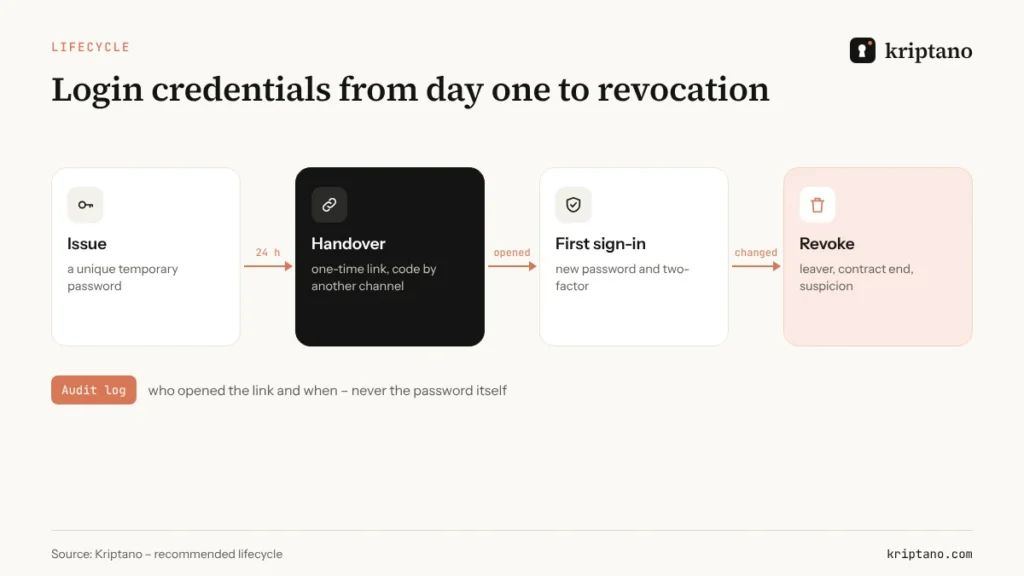
- Issue – the same temporary password for every new starter (“Company2026!”) or one that never has to be changed.
- Handover – the password in an email or SMS, together with the username and the system address.
- First sign-in – the user keeps the temporary password and never turns on two-factor authentication.
- Revocation – after an employee or vendor leaves, the shared passwords stay the same.
Six rules for handing over login credentials
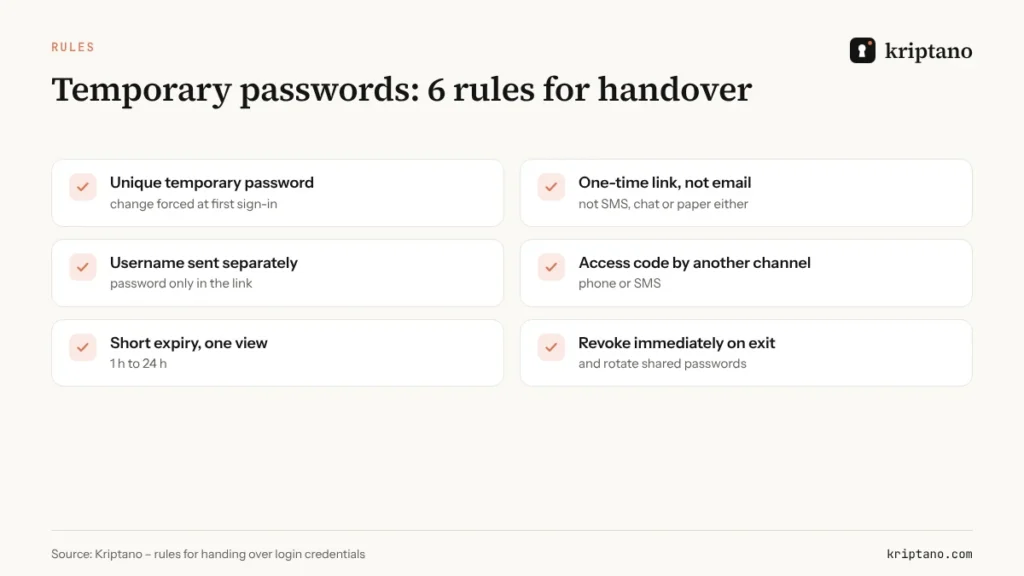
The temporary password is unique and single-use
Every user gets a different password, and the system forces a change at first sign-in.
Hand it over by one-time link
Not by email, SMS, chat or on paper. The link opens once and is then deleted.
Keep the username separate
The system address and username can go by email; the password goes only into the encrypted link.
Access code by another channel
Share the extra passphrase for the link by phone or SMS, never in the same message.
Short expiry, one view
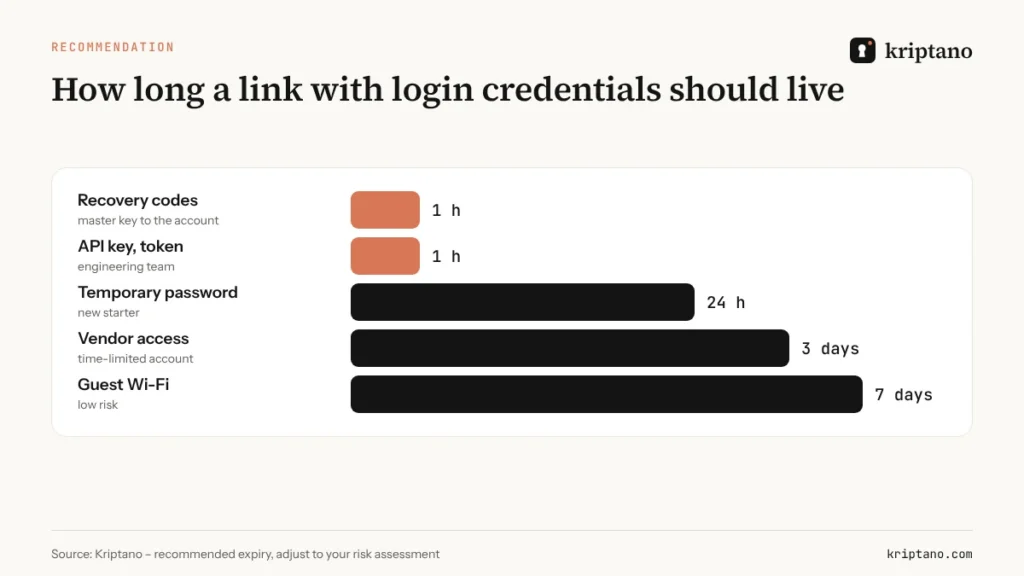
24 hours for a temporary password, one hour for recovery codes and API keys.
Revoke without delay
When someone leaves or a contract ends, disable the account and change the shared passwords.
These rules line up with NIST SP 800-63B-4, finalised in 2025, and with the UK NCSC’s advice on forced password expiry: don’t change passwords on a calendar, change them when there’s evidence of compromise, and favour long passwords plus two-factor authentication. That’s why the handover matters so much – if login credentials leak at handover, nobody will rotate them “routinely”.
New starters: the temporary password on day one
The usual scenario: IT creates the account, emails the temporary password to the line manager, who forwards it to the new starter’s personal address. The password now sits in three mailboxes, one of them outside the company. A better flow is simple:
- IT creates a one-time link with the temporary password, a 24-hour expiry and a single view.
- The link goes to the starter’s work address or phone; the line manager shares the access code in person.
- At first sign-in the starter sets a new password and turns on two-factor authentication.
Companies that onboard people in an HR system can automate the whole step: the system creates the link through the API, and a webhook reports when the starter opened it. See our guide to the secret sharing API and webhooks.
Clients: agencies, web studios and accountants
An agency handing over a website hands over the login credentials for the CMS, hosting, domain registrar and analytics too. Instead of a “Logins.pdf” in an email, send each set by its own link – the client saves them in their password manager, and you no longer have their passwords sitting in your sent folder.
In the other direction, when a client needs to send you their login credentials, send them a secret request. The client types the password into the form, their browser encrypts it, and you read it once. Translators use the same pattern for document scans, as described in our guide to certified translation.
Vendors and temporary access
Equipment maintenance, remote support, a security audit – vendors often need access for a few days. The same rules apply, with two additions: the account has an end date, and login credentials go only to the person named in the contract. A link with a three-day expiry and an open log gives you evidence that the handover was controlled.
That’s also what NIS2 expects: supply-chain security and access control are among the mandatory risk-management measures. More in our guide to NIS2 and GDPR compliance. If the vendor is bidding for a public contract, see Confidential tender documents as well.
Recovery codes and API keys: the shortest expiry
Recovery codes let someone sign in without the second factor. Whoever holds them doesn’t need your phone. That’s why recovery codes should never go by email or into a support ticket: send them by link with a one-hour expiry, and have the recipient store them in a password manager straight away or print them and lock them up.
API keys and tokens are even riskier because nobody looks at them: a key in a Slack message or a Git repository can open a system for years without any sign-in. Send the key to the engineering team by one-time link, and keep it in a secrets manager rather than in code.
Leavers: revocation and new passwords
Revocation is the stage most often skipped. A leaver’s personal accounts are disabled the same day, but shared login credentials – Wi-Fi, the router admin account, the company’s social media, the alarm PIN – often stay the same for years. Make a list of shared accounts per team and note who knows each one.
When someone leaves, change everything on that list and share the new credentials with the rest of the team by one-time links. That way the new password doesn’t appear in a group chat the former colleague may still belong to. The same applies when a contract with an agency or vendor ends.
The most common handover mistakes
- The same temporary password for everyone – know one, know them all.
- A PDF of login credentials in an email, often unprotected or with the password in the same message.
- Passwords in a ticket or project-management task, visible to the whole team.
- Recovery codes in phone notes, synced to the cloud.
- Forwarding to a personal address because the work account isn’t ready yet.
Email, SMS or a one-time link?
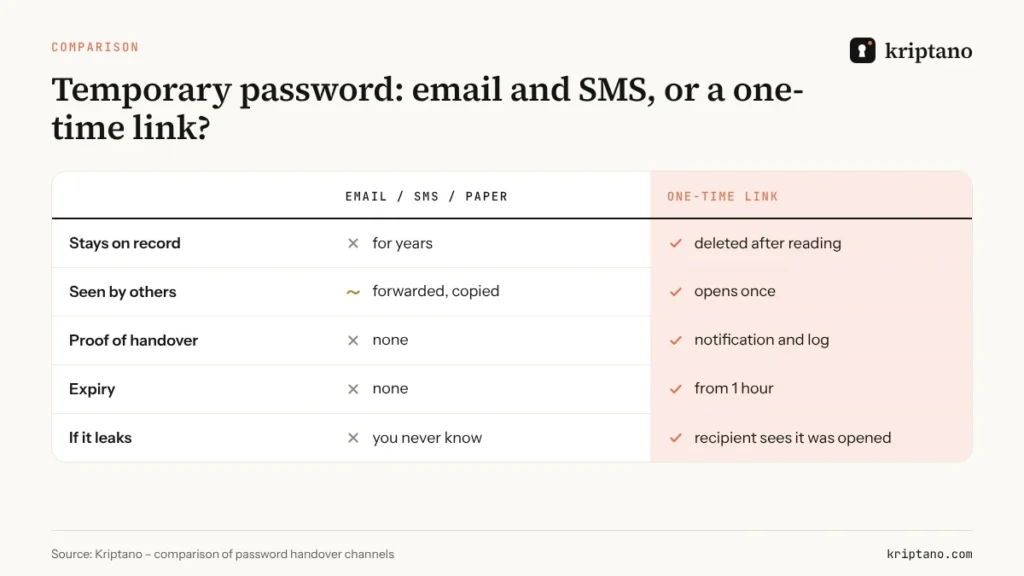
Email and SMS leave a permanent record: with the sender, the recipient, the provider and in backups. Paper gets photographed and left on desks. A one-time link can’t stop the recipient writing the password down, but it removes every other copy – and shows you if someone opened it before the intended recipient.
For ongoing password sharing within a team, keep using a password manager. A one-time link is for the handover – the moment login credentials pass from one person to another.
Team policies: the same rules for everyone
Rules only work if everyone follows them. On Pro and Pro Plus the account owner sets team policies: a mandatory passphrase on every link, maximum expiry, maximum number of views, mandatory two-factor authentication and sign-in with Google or Microsoft. The activity log records who sent a link and when it was opened, never the secret itself, and can be exported to CSV for internal controls, SOC 2 or ISO 27001 audits.
Teams have up to 5 members on Pro and up to 25 on Pro Plus. Compare plans on the Pricing page and read about the security model on the Security page.
Frequently asked questions
How do I send a temporary password to a new employee securely?
Create a one-time link with a 24-hour expiry and a single view, send it to their work address, and share the access code in person or by phone. Make the system force a password change at first sign-in.
Can login credentials go in the same email as the username?
No. The username and system address can go by email, but the password belongs only in an encrypted link, with the access code sent by another channel.
How should recovery codes be shared?
By one-time link with a one-hour expiry. The recipient saves them in a password manager or prints and locks them away, and the link is deleted once opened.
Should passwords be changed every 90 days?
NIST SP 800-63B-4 and the UK NCSC advise against forced periodic changes; change passwords when there’s a sign of compromise. Long passwords, two-factor authentication and a safe handover matter more.
What should we do when an employee leaves?
Disable their accounts the same day, change any shared passwords they knew, and share the new login credentials with the team by one-time links.
Handover with no trail in email
Your first one-time link is free. For team policies, the audit log and the API, choose Pro.