WeTransfer Alternative: SwissTransfer, TransferNow or an Encrypted Link for Large Files?
Free WeTransfer now allows 10 transfers or 3 GB every 30 days. We compared SwissTransfer, TransferNow, Google Drive and encrypted one-time links – and when each one actually makes sense.
If you tried to send a few videos or a project archive this year, you have probably seen the new message: free WeTransfer won’t accept another transfer until your 30-day window resets. Search interest in “transfernow vs wetransfer” and “swisstransfer” has jumped worldwide as a result, and so have searches for a WeTransfer alternative. This guide compares the most common options to send large files, and explains when a plain transfer service is enough and when you need an encrypted link instead.
Contents
- What changed with free WeTransfer
- The most popular WeTransfer alternative: SwissTransfer, TransferNow or Drive
- Speed isn't the same as confidentiality
- What to watch for with free services
- How to choose a way to send large files
- How to send a large confidential file with an encrypted link
- What about the ZIP password?
- A full comparison with WeTransfer
- Frequently asked questions
What changed with free WeTransfer
WeTransfer is owned by the Italian company Bending Spoons and introduced new plans at the end of 2024. According to its official help center, free users can send up to 10 transfers or 3 GB in total every 30 days, and a single transfer can be up to 3 GB. The limit is a rolling window – a transfer from 29 days ago still counts.
For occasional use that’s fine. For agencies, photographers, architects, video editors and accounting firms it isn’t. The cheapest paid plan, Starter, costs $6.99 a month; the unlimited Ultimate plan is $25.
10
transfers per 30 days on free WeTransfer
3 GB
total per month and maximum per transfer
50 GB
per transfer on SwissTransfer, no account
The most popular WeTransfer alternative: SwissTransfer, TransferNow or Drive
SwissTransfer from Swiss host Infomaniak is currently the most searched alternative: up to 50 GB per transfer, no sign-up, and files can stay available for up to 30 days. Daily transfers and downloads are capped, so it isn’t built for mass distribution.
TransferNow from France offers 5 GB per transfer with no monthly quota and a 7-day expiry. Google Drive, OneDrive and Dropbox aren’t transfer services but storage: a file stays until you delete it, and access depends on your sharing settings.
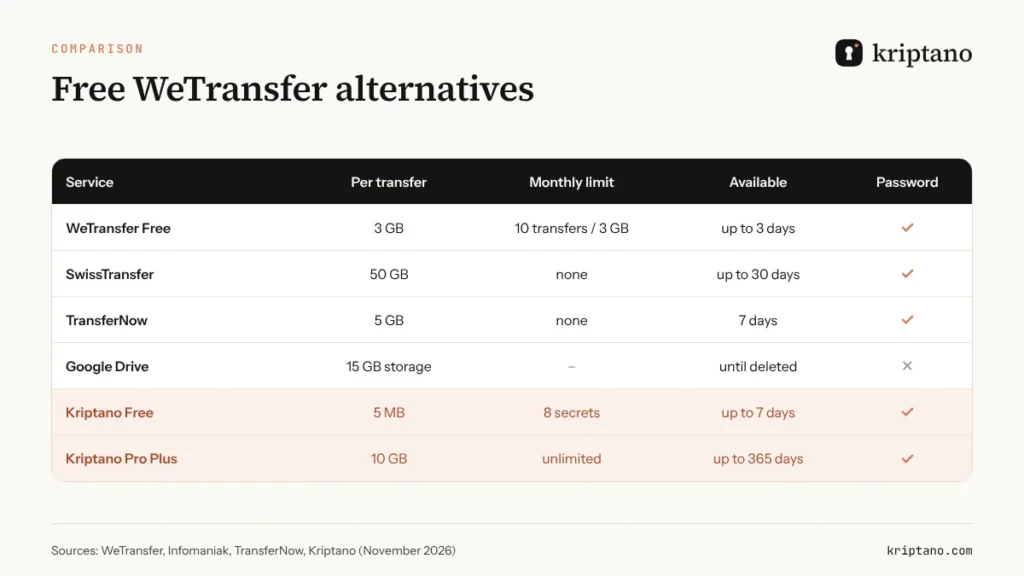
Kriptano isn’t in the table by accident: it isn’t a classic bulk transfer service but a tool for confidential files. The free plan handles attachments up to 5 MB (enough for a contract, an ID scan or a lab report), and paid plans go up to 10 GB per file.
Speed isn’t the same as confidentiality
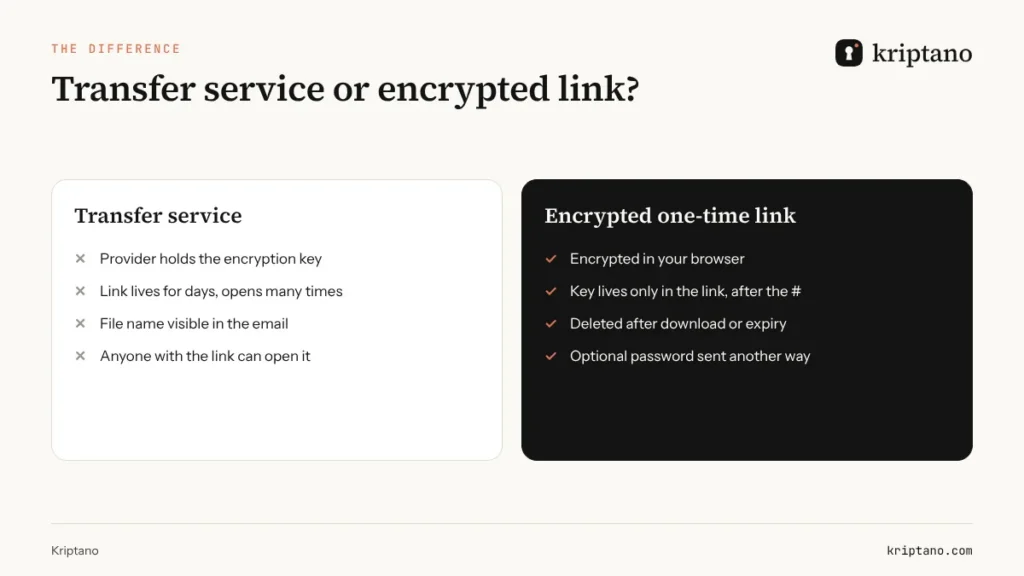
Most transfer services do encrypt files – but the provider holds the key. Your file is protected in transit and at rest, yet the company storing it can technically open it. For wedding footage that’s no problem. For payroll files, contracts, medical records, client lists or database exports it is, because you are responsible for how personal data leaves your hands under GDPR, HIPAA or your client agreements.
The second difference is the trail. A WeTransfer or Drive link usually ends up in an email or chat thread and stays there. If someone finds it later while it’s still active, they can download the file without any check. That’s why sensitive documents need a link that expires quickly and switches itself off after the download.
What to watch for with free services
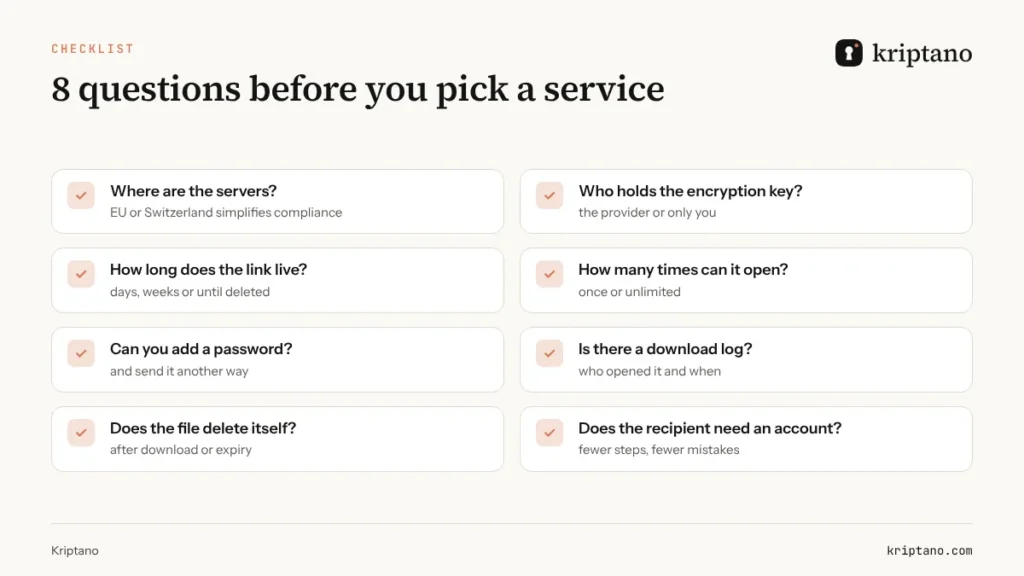
Free usually means you pay another way. Some services show ads on the download page, others require the recipient’s email address, and some keep transfer metadata. Before the first upload, check where the servers are and what the provider’s privacy policy says about retention.
The second trap is expiry. SwissTransfer lets you choose up to 30 days, but a link that works for a month is exposed for a month. For confidential files, pick the shortest window that works for the recipient and limit downloads to one or two.
How to choose a way to send large files
Before you sign up for anything, answer three questions. Is the file confidential? How big is it? Is it going to one person or many? The answers almost always pick the tool for you.
| Situation | Recommendation | Why |
|---|---|---|
| Video, photos, print-ready artwork | SwissTransfer or TransferNow | High limits, not confidential |
| Files a team works on for weeks | Google Drive, OneDrive | Shared storage and versions |
| Contract, ID scan, payslip | Encrypted link | One-time, deleted after opening |
| Database export, keys, credentials | Encrypted link + password | Zero-knowledge, logged access |
How to send a large confidential file with an encrypted link
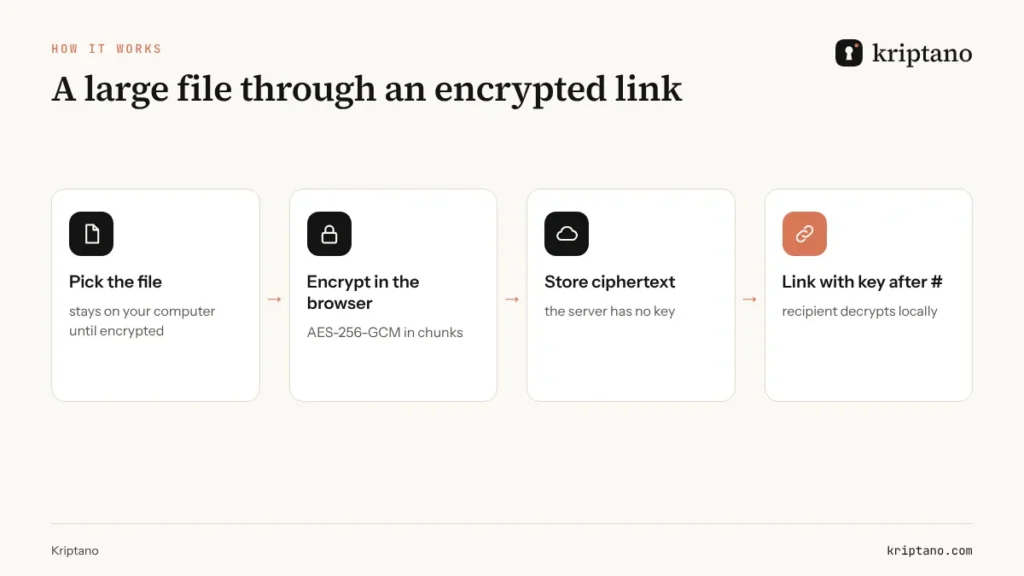
With Kriptano, the file is encrypted in your browser with AES-256-GCM before a single byte reaches the server. The key is added to the link after the # sign, which browsers never send to the server – so not even we can read the content. Large attachments are encrypted in chunks and permanently deleted after download or expiry. The details are on our Security page, and every option for bigger files is on send large files securely.
Add the file
On the home page or in your account, drop the file into the form and add a note if you like.
Set expiry and opens
For example 3 days and one download.
Add a password
Optional – share it by text or phone, never in the same email.
Send the link
After the download the encrypted record is deleted, and your account shows when it was opened.
What about the ZIP password?
A common habit is to lock a ZIP with a password, send it via WeTransfer – and put the password in the same email. That cancels the protection. If you do use a locked archive, send the password through another channel or a one-time link that self-destructs after reading. Create a strong archive password with the password generator and test it with the password strength checker.
Generate a password for your ZIP archive
Generated in your browser – never sent to the server.
More options
The strength test runs only in your browser. The breach check sends only the first 5 characters of the password’s SHA-1 hash to Have I Been Pwned (k-anonymity) – never the password.
Generated locally in your browser with the Web Crypto API (crypto.getRandomValues). Passwords are never sent to our server or stored – only your settings are remembered in this browser.
If you’re sending credentials along with files (FTP, cloud, CMS, hosting), read how to hand over temporary passwords and login credentials and why passwords don’t belong in email – more in how to share passwords securely.
A full comparison with WeTransfer
For a side-by-side look at features, pricing and encryption, see Kriptano vs WeTransfer. If you regularly send medical or legal paperwork, the guides on sending sensitive documents securely and file encryption are worth a read too.
Frequently asked questions
What is the best free WeTransfer alternative?
For large files that aren’t confidential, SwissTransfer gives the most room (up to 50 GB per transfer, no account). TransferNow offers 5 GB with no monthly quota. For confidential documents, an encrypted one-time link is the better choice.
How much does free WeTransfer allow in 2026?
Up to 10 transfers or 3 GB in total within a rolling 30-day window, with a maximum of 3 GB per transfer.
Is SwissTransfer safe for business documents?
SwissTransfer encrypts files in transit and at rest and runs servers in Switzerland. The provider still holds the key, so for personal data, contracts and medical records we recommend browser-side encryption and a one-time link.
How do I email a file larger than 25 MB?
Not as an attachment – Gmail and Outlook will reject it or convert it into a storage link. Send a transfer link or an encrypted link instead, and share any password through a different channel.
How large a file can I send with Kriptano?
Up to 5 MB per file for free, 50 MB on Start, 500 MB on Pro and 10 GB on Pro Plus. The file is encrypted in your browser and deleted after download or expiry.
Can I put the ZIP password in the same email?
No. Anyone who gets the email gets both the file and the password. Send the password by text, phone call or a one-time link.
Send your first file for free
Up to 5 MB per file and 8 secrets a month, no card needed. For bigger files, compare the plans.