How to Send Sensitive Documents Securely: Encrypted File Transfer for Businesses, Clinics and Law Firms
Why email attachments and shared cloud links are risky for contracts, medical results and financial records, and how end-to-end encrypted file transfer with one-time links works – up to 10 GB.
Contents
- Why email attachments cannot send sensitive documents securely
- Why "anyone with the link" cloud sharing is not enough either
- How encrypted file transfer lets you send sensitive documents securely
- How to send sensitive documents securely in 4 steps
- Receiving documents from clients: secret requests with files
- Healthcare: send sensitive documents securely to patients
- Law firms, accountants and HR
- Checklist: before you send a sensitive file
- Frequently asked questions
Contracts, payroll files, ID scans, tax records, medical results – most organisations need to send sensitive documents securely every day, and most of them still do it as email attachments or shared cloud links. This guide explains what goes wrong with those methods, how encrypted file transfer with one-time links works (including files up to 10 GB), and gives a 4-step process you can introduce in an afternoon. A separate section covers clinics, labs and law firms, where the stakes are highest.
The same principles apply to passwords; if that is your main concern, read the core guide on how to share passwords securely.
Why email attachments cannot send sensitive documents securely
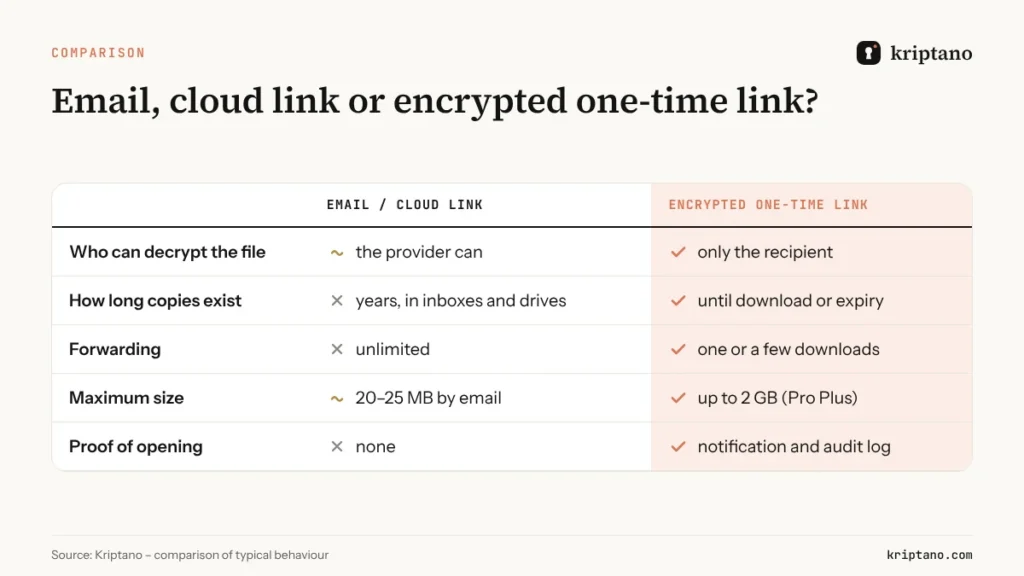
An attachment is not sent once – it is copied many times. It sits in the sender’s sent folder, in the recipient’s inbox, on both providers’ servers, on every synced phone and laptop, and in backups that may be kept for years. If any of those places is compromised, the document leaks.
- Wrong recipient. Autocomplete makes it easy to send a file to the wrong “Michael”. A misdirected email cannot be recalled reliably.
- Forwarding. Attachments travel on with every forward, often to people who should never see them.
- No expiry. A document sent in 2021 is still readable today in every mailbox that received it.
- Size limits. Many providers cap attachments around 20–25 MB, which pushes people to unmanaged file-sharing sites.
- No proof of whether and when the file was opened.
Password-protected ZIP or PDF files are a common attempt to send sensitive documents securely, but the password is usually sent in the next email to the same address – which protects nothing.
Why “anyone with the link” cloud sharing is not enough either
To send sensitive documents securely, shared links from Google Drive, OneDrive or Dropbox are not enough on their own: they solve the size problem, but introduce others: the provider can decrypt the file, links often stay valid forever, “anyone with the link” access can be forwarded indefinitely, and the file remains in someone’s drive long after the work is done. For internal collaboration that may be fine; for a one-off handover of sensitive data it leaves too much behind.
How encrypted file transfer lets you send sensitive documents securely
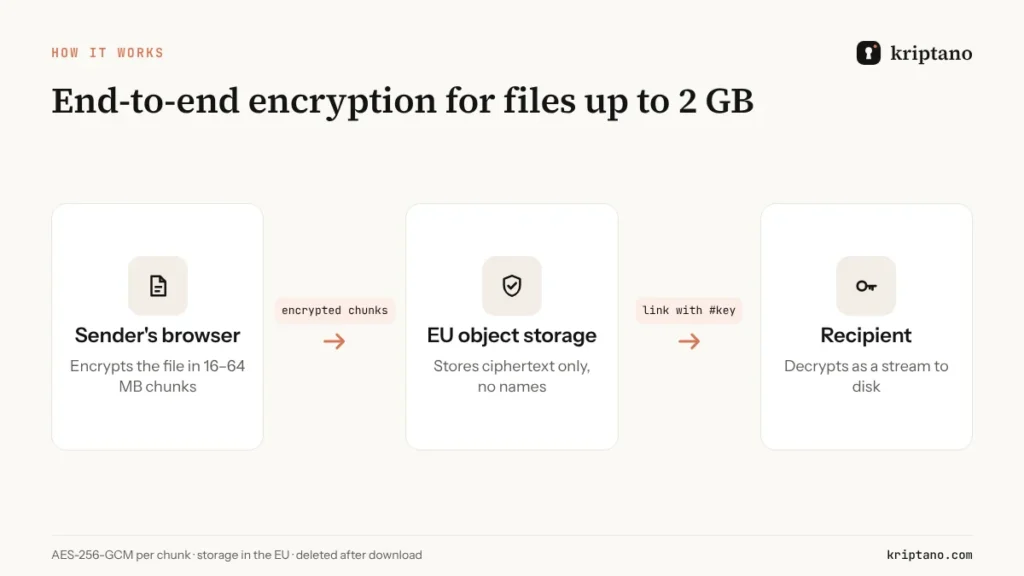
Kriptano encrypts files the same way it encrypts passwords – in the sender’s browser, before anything is uploaded:
- You choose the file. Your browser creates a random 256-bit key just for that file and encrypts it with AES-256-GCM.
- Large files are encrypted in chunks of 16–64 MB. Each chunk is authenticated, and its position is bound into the encryption, so chunks cannot be swapped, dropped or truncated. Memory use stays the same whether the file is 5 MB or 10 GB.
- Encrypted chunks go directly to object storage in the EU over signed links. If the connection drops, the upload resumes from the last chunk.
- The file key is placed inside the encrypted secret, and the secret’s key travels only in the link fragment after #. The server never has either key.
- The recipient opens the link and the file is decrypted as a stream straight to disk. After the download – or when the expiry runs out – the file is deleted from storage.
File size limits by plan
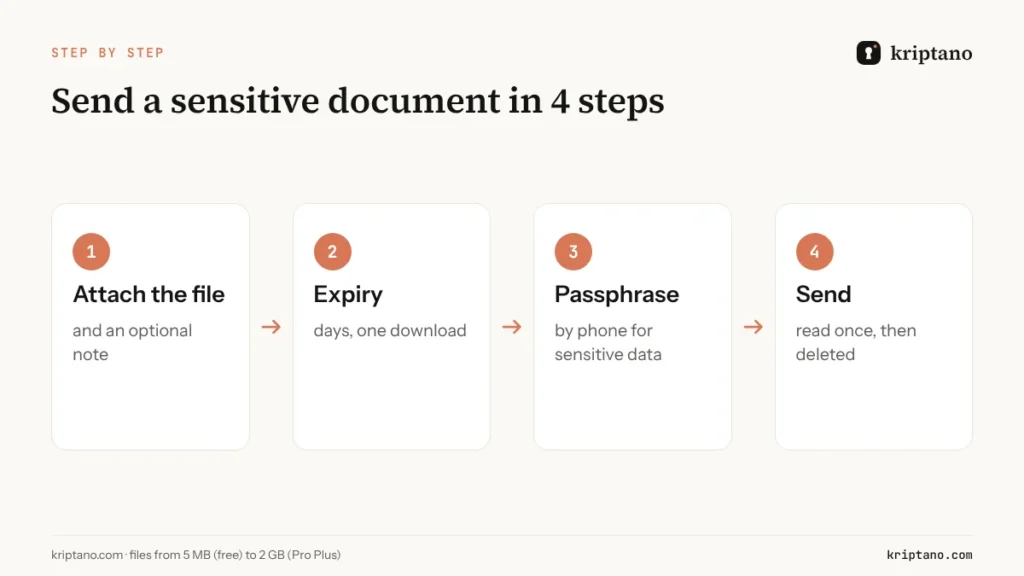
How to send sensitive documents securely in 4 steps
Attach the file
Add a short note if needed – the note is encrypted too.
Set expiry and downloads
A few days and one download are enough for most handovers.
Add a passphrase
For health, legal and financial data, share it by phone.
Send the link
The recipient downloads once; the file is then deleted.
Receiving documents from clients: secret requests with files
The reverse direction is just as important. Accountants need bank statements, lawyers need ID scans, HR needs signed contracts. Instead of asking clients to email them, send a secret request: the client opens your link, attaches the files and a message, and their browser encrypts everything with your public key before upload. You receive a one-time link in your account. Files in responses count toward your plan and are deleted after you download them.
Healthcare: send sensitive documents securely to patients
Health data is a special category of personal data under GDPR Article 9, and in the United States it is protected under HIPAA. Clinics, labs and practices send results, discharge letters and imaging reports every day – often as unencrypted email attachments, because patients ask for them that way.
A practical, patient-friendly way to send sensitive documents securely:
- Send the result as an encrypted one-time link with a short expiry (for example 7 days).
- Set a passphrase the patient already knows or that you give them at the reception desk – for example a date of birth combined with a visit code.
- Keep one download, so a forwarded email does not expose the result.
- Use the audit log (Pro, Pro Plus) as evidence of when the result was sent and opened.
For larger imaging files, chunked encryption handles hundreds of megabytes without special software on the patient’s side. Whether this alone satisfies your local rules depends on your jurisdiction; it is a technical measure, not legal advice.
Law firms, accountants and HR
Professional secrecy obligations mean these teams must send sensitive documents securely too. The same discipline applies:
| Sector | Typical documents | Recommended settings |
|---|---|---|
| Law firms | contracts, court filings, ID scans | passphrase, 1 download, 3–7 days |
| Accountants | payroll, bank statements, tax returns | secret request from the client, Pro audit log |
| HR | contracts, salary data, health certificates | 1 download, passphrase, short expiry |
| IT and MSPs | configuration exports, keys, backups | Pro Plus for large files, API automation |
| Real estate | ID scans, proof of funds | secret request, delete after download |
Checklist: before you send a sensitive file
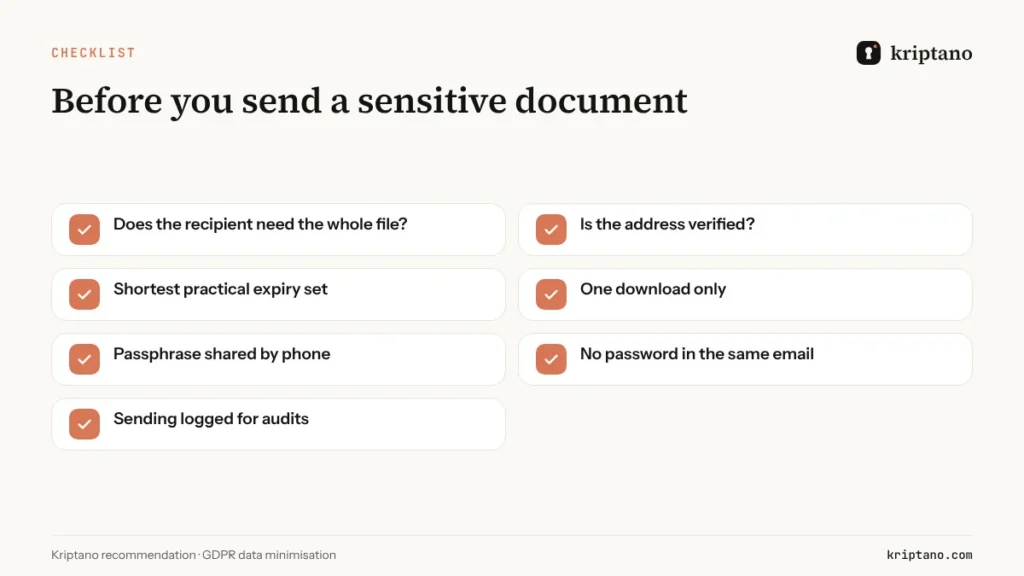
Data minimisation is the most underrated way to send sensitive documents securely: redact what the recipient does not need, and send only the pages that matter. For the regulatory background, including NIS2 obligations for suppliers, see the guide on NIS2 and GDPR compliance. If your partners insist on encrypted email, the guide on sending encrypted email compares S/MIME, PGP and one-time links.
Free
For the occasional password, no sign-up.
$0€0
forever
Try for free- 8 secrets per month per IP address
- Lifetime up to 7 days
- 1 view per link
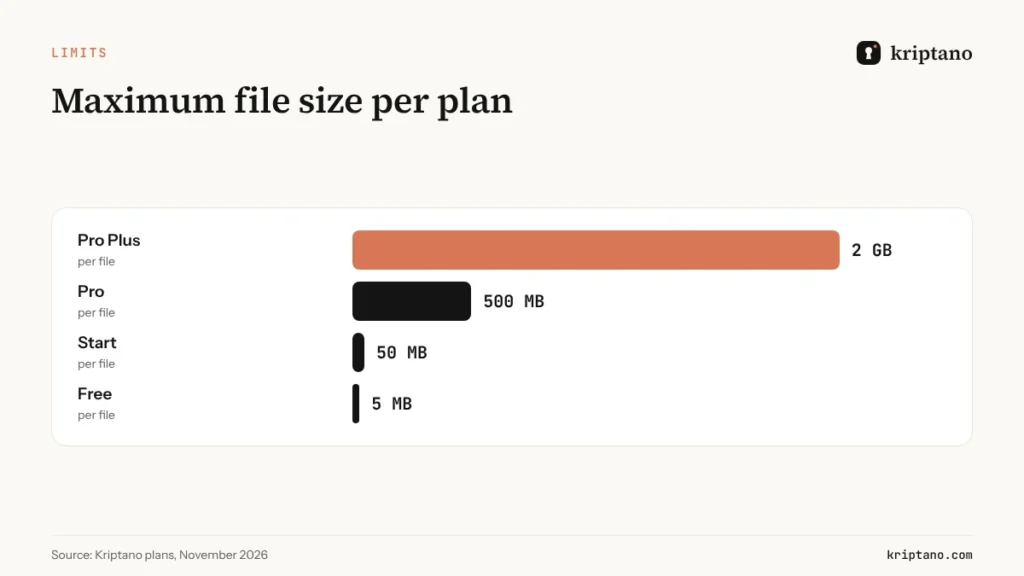
- Encrypted attachments up to 5 MB
- Extra passphrase to open
- QR code for the link
- Password generator + generator API
- SSO login: Google + Microsoft
Start
For freelancers and small offices.
$6€6 $4.80€4.80 / mo
billed monthly billed yearly: $57.60€57.60
Choose Start- 2,000 secrets per month
- Lifetime up to 30 days
- Up to 10 views per link
- Encrypted attachments up to 50 MB
- 2 GB attachment storage
- Email notification when a secret is opened
- Password generator + generator API
- SSO login: Google + Microsoft
- Two-factor login (authenticator app)
- Up to 10 secret requests (clients send data to you)
Most popular
Pro
For agencies, IT and accounting teams.
$24.90€24.90 $19.90€19.90 / mo
billed monthly billed yearly: $238.80€238.80
Choose Pro- 30,000 secrets per month
- Lifetime up to 90 days
- Up to 50 views per link
- Encrypted attachments up to 500 MB
- 20 GB attachment storage
- Email notification when a secret is opened
- Password generator + generator API
- SSO login: Google + Microsoft
- Two-factor login (authenticator app)
- Up to 1,000 secret requests (clients send data to you)
- Automatic delivery of secrets and requests by email
- API access and integrations
- Your logo and colors
- Team of up to 5 members
- Audit log with CSV export
- Webhooks (up to 10) with HMAC signatures
- Team roles and enforced 2FA
Pro Plus
Your domain, your brand and larger teams.
$62.90€62.90 $49.90€49.90 / mo
billed monthly billed yearly: $598.80€598.80
Choose Pro Plus- Unlimited secrets
- Lifetime up to 365 days
- Up to 100 views per link
- Encrypted attachments up to 10 GB
- 1,000 GB attachment storage
- Email notification when a secret is opened
- Password generator + generator API
- SSO login: Google + Microsoft
- Two-factor login (authenticator app)
- Unlimited secret requests
- Automatic delivery of secrets and requests by email
- API access and integrations
- Your logo and colors
- Team of up to 50 members
- Audit log with CSV export
- Unlimited webhooks with HMAC signatures
- Team roles and enforced 2FA
- Unlimited custom domains (e.g. secrets.your-company.com)
- Send email from your own domain
- Your own SMTP server
- Geo-blocking and IP allowlist
- No Kriptano branding (white label)
All prices include VAT or sales tax. Bank transfer offers are at the same final price. Subscription by card, PayPal, Apple Pay or Google Pay via Paddle – or bank transfer against an offer. Cancel anytime.
Frequently asked questions
How do I send sensitive documents securely?
Encrypt the file before it leaves your computer, send it through a link that expires and allows one download, and share an optional passphrase through a second channel. That way no readable copy remains in mailboxes or cloud drives.
Is a password-protected ZIP file secure enough?
Only if the password travels through a different channel and is strong. In practice the password is often sent by email to the same address, which defeats the purpose.
Can I use encrypted file transfer for files larger than 25 MB?
Yes. Kriptano encrypts files in chunks and uploads them directly to EU storage – up to 50 MB on Start, 500 MB on Pro and 10 GB on Pro Plus.
Does the recipient need an account or software?
No. The recipient only needs a modern browser. The file is decrypted locally and saved straight to disk.
How do I send medical results to a patient securely?
Send them as an encrypted one-time link with a short expiry, one download and a passphrase the patient knows. The audit log records when the result was sent and opened.
How long are files stored?
Until they are downloaded or the expiry you chose runs out – whichever comes first. Then the encrypted file is deleted from storage.
Send your first encrypted document
Encrypted in your browser and deleted after download – no account needed for the recipient.