Encrypted Text Message Guide: SMS, RCS, iMessage, WhatsApp and Signal After Salt Typhoon
After the Salt Typhoon telecom hacks, US agencies told people to stop relying on plain SMS. Which texts are actually encrypted in 2026 – including the new iPhone-to-Android RCS encryption – how to send a secure text, and why even an encrypted text message is the wrong place for a password.
For decades, a text message felt private simply because it was personal. That assumption broke in late 2024, when US agencies confirmed that a China-linked hacking group called Salt Typhoon had been inside several major telecom networks – and the FBI and CISA told Americans to prefer an encrypted text message app over plain SMS. Searches for “secure text” and “encrypted text message” have stayed high ever since, with thousands of people a month trying to work out whether their own chats are protected.
This guide explains which texts are actually encrypted in 2026 (including the new end-to-end encryption between iPhone and Android), ranks six ways to send a secure text, covers what encryption still doesn’t fix, and shows why a password doesn’t belong in any chat – encrypted or not.
Contents
- Why plain SMS isn't private
- Which texts are encrypted in 2026?
- 6 ways to send a secure text, ranked
- Business SMS, reminders and "text us" services
- Families, travelers and journalists: a few extra habits
- What an encrypted text message doesn't fix
- Passwords don't belong in any chat – even an encrypted one
- Secure texting for businesses
- A 60-second secure text check-up
- Frequently asked questions
Why plain SMS isn’t private
SMS was designed in the 1980s as a side channel of the phone network. Messages travel and are stored in readable form across carrier systems. Normally only the carrier and lawful-interception systems can see them – which is exactly what Salt Typhoon targeted.
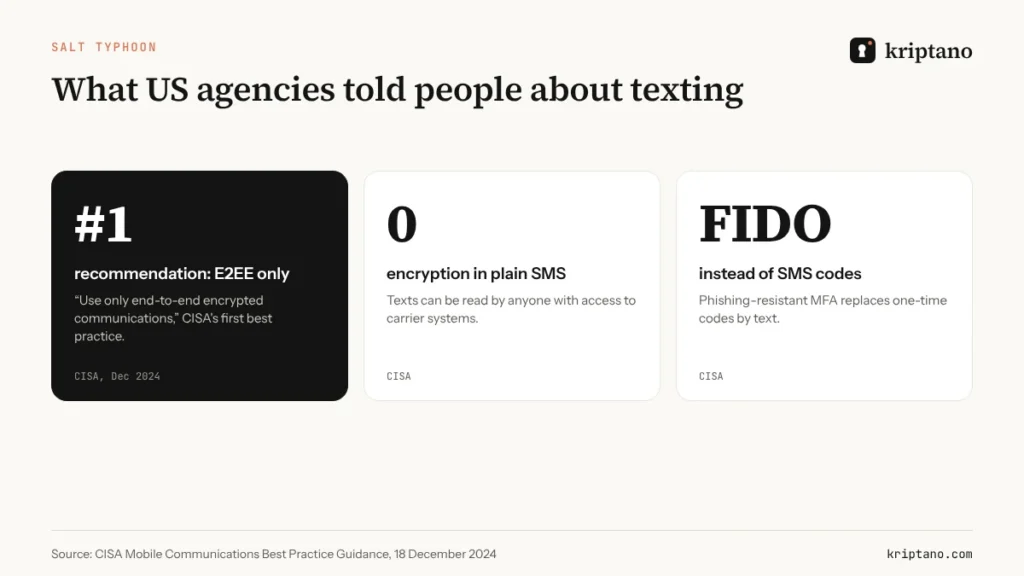
CISA’s Mobile Communications Best Practice Guidance, published on 18 December 2024, is blunt. Its first recommendation for highly targeted people is to “use only end-to-end encrypted communications”, with Signal given as an example. It also advises moving away from SMS-based multi-factor authentication, because codes sent by text can be intercepted by anyone with access to telecom infrastructure.
Which texts are encrypted in 2026?
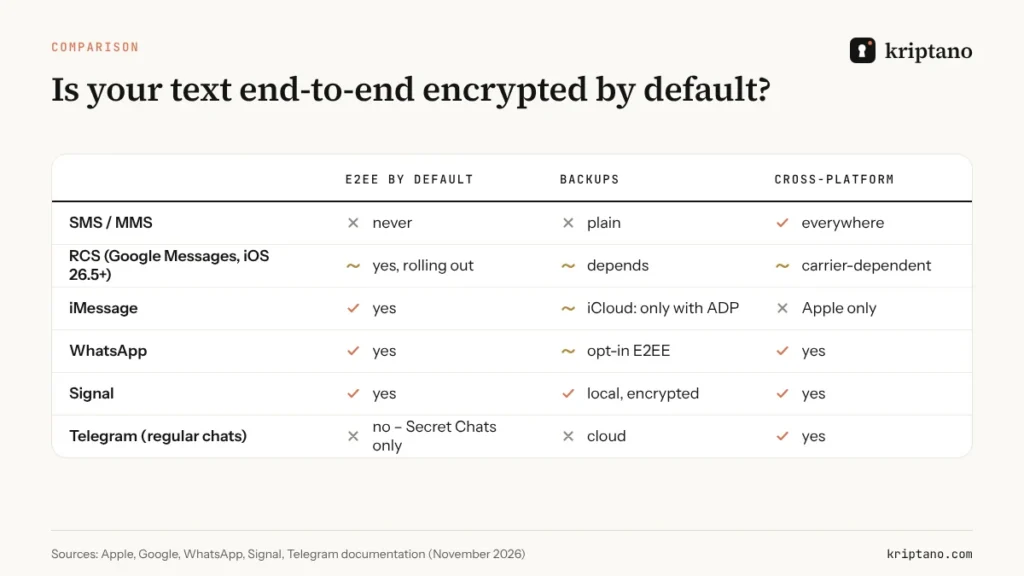
The short answer: it depends on the app, on who you’re texting, and sometimes on your carrier. An encrypted text message in one chat can turn into an unencrypted one in the next, simply because the other person uses a different phone or network.
- iMessage (blue bubbles) between Apple devices has always been end-to-end encrypted.
- Google Messages has encrypted RCS chats between Android users for years; a lock icon shows when a chat is protected.
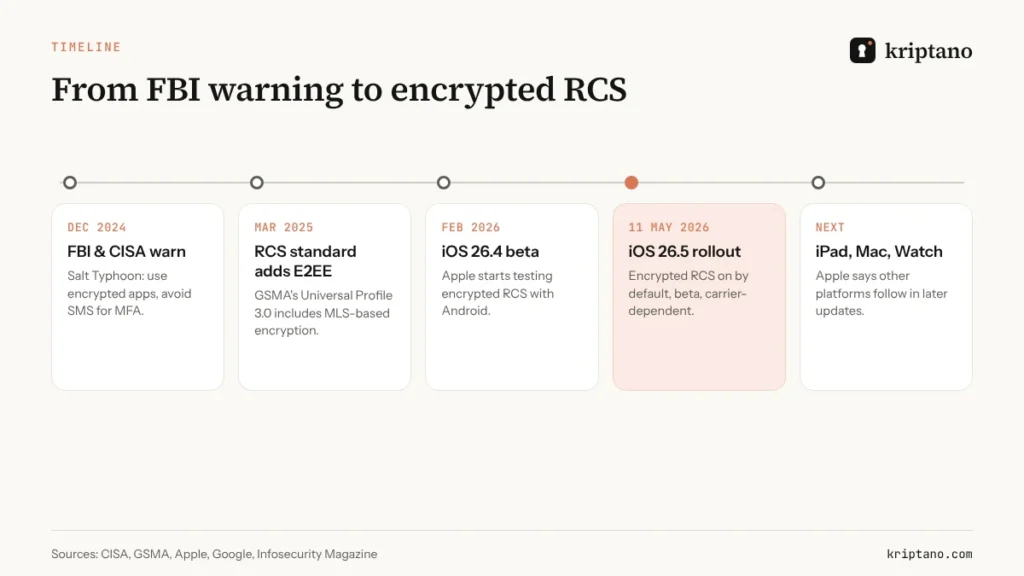
- iPhone to Android used to fall back to unencrypted RCS or SMS. Since iOS 26.5 in May 2026, encrypted RCS between the two is rolling out in beta – on by default, but only with supported carriers and the latest Google Messages, as 9to5Google reported.
- WhatsApp, Signal and Facebook Messenger send end to end encrypted messages by default for personal chats.
- Telegram encrypts regular “cloud” chats only between your device and its servers; end-to-end encryption applies to Secret Chats you start separately.
- Plain SMS and MMS are never end-to-end encrypted – including when an RCS or iMessage chat silently falls back to SMS because of poor coverage.
For the mechanics behind all of this – public keys, private keys and the MLS protocol used in encrypted RCS – see our explainer on end-to-end encryption.
6 ways to send a secure text, ranked
A secure text needs two things: encryption on by default, so you don’t have to remember it, and an app the other person actually uses. Ranked by how well they deliver an encrypted text message to the widest group of people:
- Signal – end-to-end encrypted by default, open source, minimal metadata, encrypted local backups. The tool CISA names.
- WhatsApp – the same Signal protocol, used by billions; switch on end-to-end encrypted backups.
- iMessage – strong encryption between Apple devices; turn on Advanced Data Protection if it’s available in your country so iCloud backups are encrypted too.
- Google Messages / encrypted RCS – good for Android-to-Android and, increasingly, iPhone-to-Android; check for the lock icon.
- Messenger – encrypted by default for personal chats since December 2023.
- Plain SMS – only for things you’d be happy to see on a postcard.
Switching someone to end to end encrypted messages
Ask which app they use, then switch. If you must use SMS, send only a one-time link – and share any passphrase in a call.
Business SMS, reminders and “text us” services
Many companies text customers – appointment reminders, delivery updates, two-factor codes, “reply YES to confirm”. These automated texts go out as ordinary SMS, so the same rule applies: they are not a secure text channel. Keep them free of anything sensitive:
- no account numbers, diagnoses, balances or full names with personal details;
- no passwords or reset links that stay valid for days;
- a short, consistent sender name so customers can spot fakes;
- a line such as “We will never ask for your password or code by text.”
If you need to send something confidential to a customer’s phone, text a one-time link and let the content live behind it. The SMS itself then reveals nothing, even if the phone is lost or the carrier is compromised.
Families, travelers and journalists: a few extra habits
- Families: agree on one app with end to end encrypted messages for the family group, and teach older relatives that a “new number” text from a child asking for money is a classic scam – call the old number first.
- Travelers: roaming SIMs and hotel Wi-Fi don’t change what end-to-end encryption protects, but they do raise the chance of a lost phone. Set a strong device passcode and turn off lock-screen previews before you go.
- Journalists and activists: prefer Signal with disappearing messages for sources, verify safety numbers in person, and keep a separate device for sensitive work where you can.
What an encrypted text message doesn’t fix
End-to-end encryption protects the message in transit and on the provider’s servers. It doesn’t protect it everywhere else:
- Backups. WhatsApp backups are only end-to-end encrypted if you enable it. iCloud backups of iMessage are end-to-end encrypted only with Advanced Data Protection – which Apple stopped offering to new users in the UK in February 2025.
- Lock screens. Message previews show content to anyone holding the phone.
- Other members. In a group, every participant’s device holds a copy, and anyone can screenshot or forward it.
- Time. Encrypted chats keep history indefinitely unless you set disappearing messages.
- The law. Messages can still be evidence. Our case studies on text messages as evidence and disappearing messages in the FTX case show how chats end up in court, and the Lockdown Files show how a trusted recipient can leak a whole archive.
Passwords don’t belong in any chat – even an encrypted one
This is the mistake that survives every upgrade to end to end encrypted messages. People move to Signal or WhatsApp precisely because they’re encrypted, then use them to send Wi-Fi keys, bank logins, door codes and API tokens. The encryption works – and the password sits in two chat histories, two sets of backups and possibly a group of thirty people, for years.
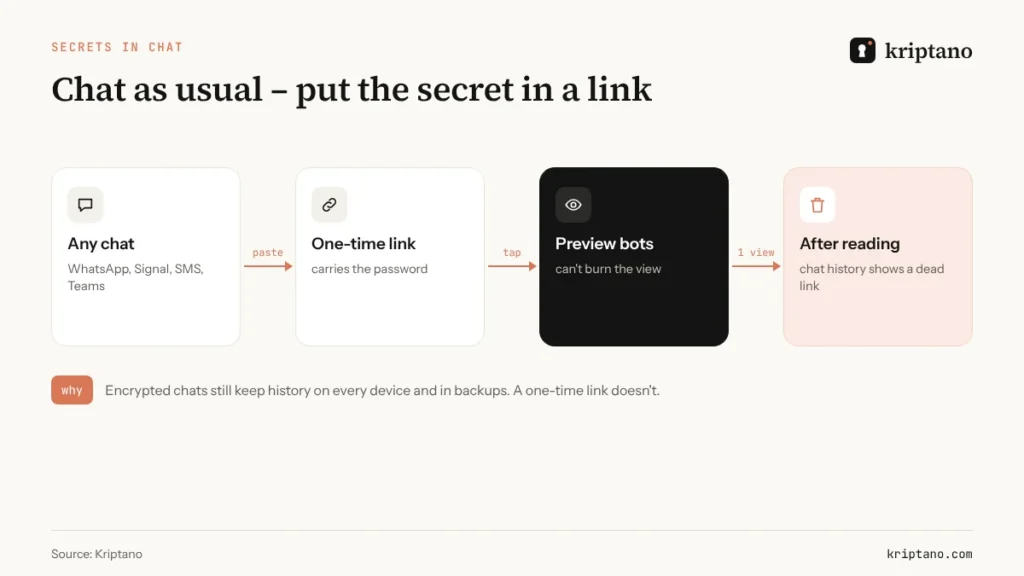
The better pattern is to send the encrypted message as usual, but put the secret itself in a one-time link. The link is encrypted in your browser, opened once, then deleted. Afterwards, the chat history contains nothing but a dead link.
There’s a detail that matters in chats: link previews. Messaging apps fetch links to build previews, and with some one-time tools that preview “opens” the secret before your contact ever sees it. Kriptano requires the decryption key – which only exists in the part of the link after # – to open a secret, so preview bots can’t burn the view.
Kriptano also has share buttons for WhatsApp, Viber and SMS, plus a QR code for handing a secret over in person. For more on how these links work, read about one-time secret links; for choosing between tools, see our Privnote alternative comparison.
Secure texting for businesses
Companies face two opposite risks with texting: sensitive data in apps they don’t control, and business records disappearing from apps they can’t archive. US regulators have fined financial firms well over a billion dollars for “off-channel” business communication on personal WhatsApp and texts. A sensible policy covers both sides:
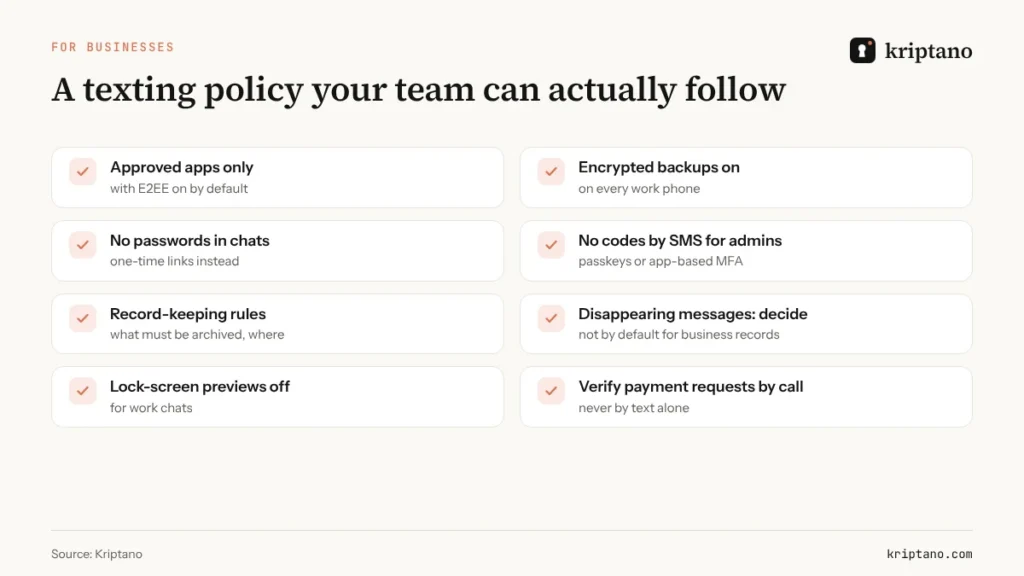
Even when every employee already uses end to end encrypted messages, the policy still matters, because encryption decides who can read a chat – not what belongs in it or how long it must be kept. Three points matter most in practice. First, pick the approved channels and switch on encrypted backups for them. Second, take secrets out of chat entirely – passwords, codes and ID numbers go through one-time links, which also keeps them out of whatever you archive. Third, verify money by voice: a text or chat message asking to change bank details should always be confirmed by calling a known number.
If your team uses SMS codes for logins, read our guide to the one time password (OTP) – CISA’s advice to move away from SMS-based MFA applies to businesses as much as to officials. And for clients who insist on sending documents by WhatsApp, offer them a better route: a secret request, as explained in our secure password sharing tool guide.
A 60-second secure text check-up
Update your phone
iOS 26.5 or later on iPhone, the latest Google Messages on Android.
Check for the lock
Open a chat with an iPhone or Android contact and look for the encryption indicator.
Turn on encrypted backups
WhatsApp: Settings → Chats → Chat backup → End-to-end encrypted backup.
Hide previews
Turn off message previews on the lock screen for sensitive chats.
Clean out old secrets
Search your chats for “password”, “PIN” and “code” – delete, then change what you find.
That last step takes a few minutes and often turns up years of forgotten credentials. It’s also the best argument for the habit this guide recommends: an encrypted text message for the conversation, a one-time link for the secret – so the next secure text you send leaves nothing behind. Move anything worth keeping into a password manager – our guide to the best place to keep passwords explains the options – and make the next handover a one-time link.
Frequently asked questions
How do I send an encrypted text message?
Use an app that encrypts end to end by default – Signal, WhatsApp, iMessage between Apple devices, or Google Messages with the lock icon. Plain SMS is never end-to-end encrypted.
Are texts between iPhone and Android encrypted now?
Since May 2026, RCS chats between iOS 26.5 and the latest Google Messages are being end-to-end encrypted in a gradual beta rollout that depends on carrier support. Look for the lock icon; if a chat falls back to SMS, it isn’t encrypted.
What is the most secure text app?
Signal is widely regarded as the most secure option for everyday use: end-to-end encryption by default, minimal metadata and open-source code. CISA used it as its example after Salt Typhoon.
Is WhatsApp an encrypted text message app?
Yes. WhatsApp encrypts messages and calls end to end by default. Enable end-to-end encrypted backups so your chat history in the cloud is protected too.
Can I send a password in an encrypted chat?
It’s safer than SMS, but the password stays in both chat histories and backups. Send it through a one-time link that self-destructs after reading, and share any passphrase separately.
How do I send an encrypted message to someone who only uses SMS?
Text them a one-time encrypted link and share the passphrase in a phone call. The SMS then contains only a link that stops working after one view.
Keep chatting – just keep secrets out of the history
Paste a password into a one-time link and share it in any app. Free, no sign-up.