How to Send a Social Security Number Securely: SSNs, W-9s, Bank Details and Passport Scans
Your new employer, accountant or landlord wants your Social Security number – "just email it over". Why that's risky, five safer ways to send an SSN, W-9 or bank details, what HR and payroll teams should do instead, and what to do if your SSN was already emailed.
It usually happens at the worst moment: you’ve accepted a job, signed a lease or hired an accountant, and an email arrives – “Could you send over your Social Security number and bank details so we can set things up?” Replying takes ten seconds. The problem is everything that happens afterwards. A Social Security number in an email sits in two mailboxes, two providers’ servers and every backup, for years, waiting for the day one of those accounts is compromised.
This guide explains why sending sensitive information via email is so risky – and why a Social Security number is the worst thing to send that way – gives you five safer options (from best to acceptable), shows HR and payroll teams how to collect SSNs, W-9s and bank details properly, covers the UK equivalents, and ends with what to do if your SSN has already been emailed.
Contents
- Is it safe to email your Social Security number?
- Who actually needs your SSN – and who doesn't
- 5 safer ways to send a Social Security number
- Step by step: sending an SSN with a one-time link
- For HR, payroll and accountants: stop asking people to email it
- In the UK: National Insurance numbers, passports and bank details
- If your Social Security number was already emailed
- A reply you can copy when someone asks for your Social Security number
- Sending sensitive information via email: a simple rule
- Frequently asked questions
Is it safe to email your Social Security number?
Not in plain email. Modern email is encrypted in transit, but it is stored readable at both ends, synced to phones and laptops, forwarded, archived and backed up. Your SSN doesn’t expire, so a copy from 2026 is just as useful to a criminal in 2034.
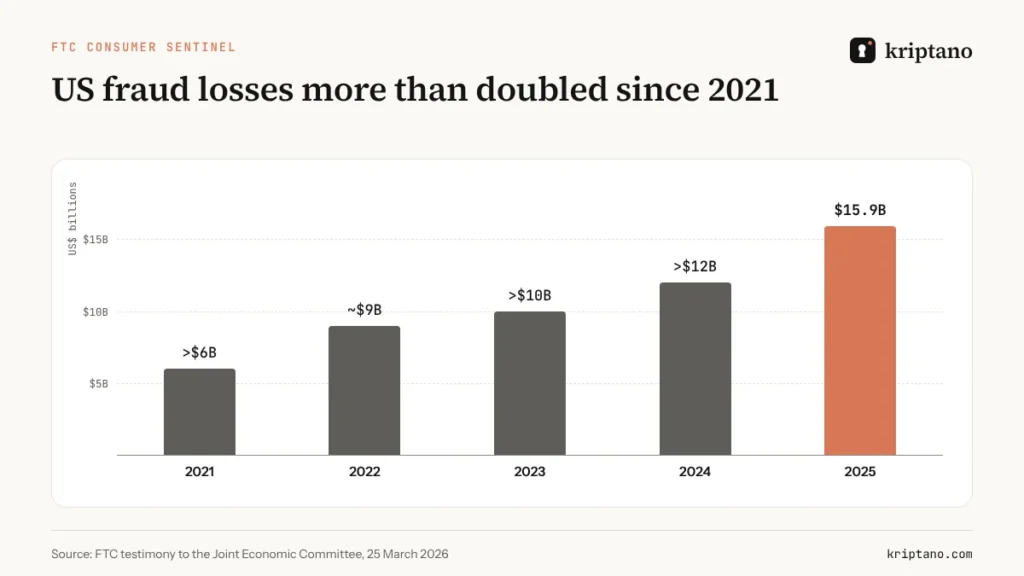
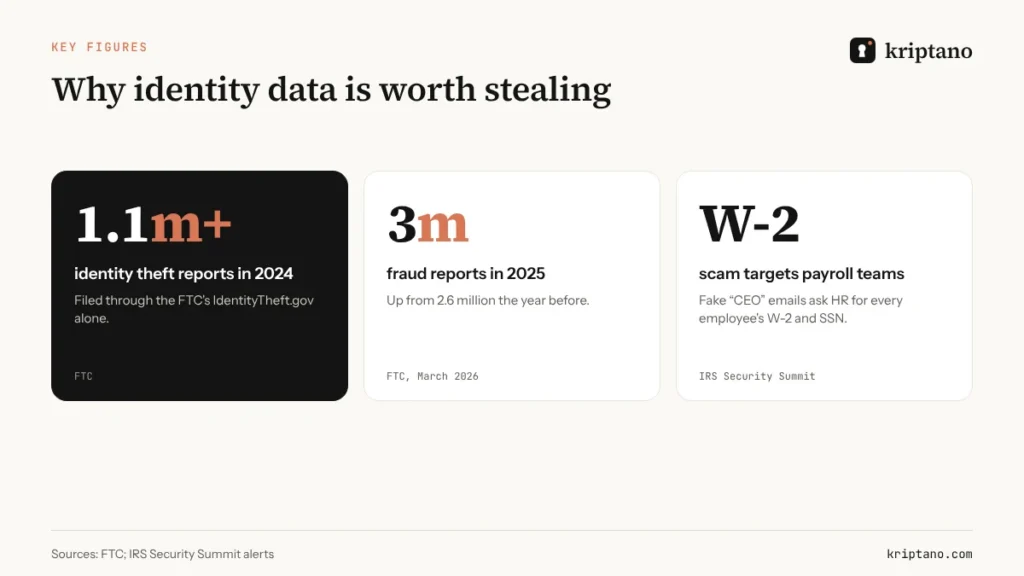
Identity data is valuable because it unlocks everything else: new credit cards, loans, tax refunds, benefit claims. The US Federal Trade Commission received more than 1.1 million identity theft reports through IdentityTheft.gov in 2024, and reported fraud losses keep rising – consumers reported $15.9 billion in losses in 2025, according to FTC testimony to Congress.
Email is also the attacker’s favorite way to *ask*. The IRS and its Security Summit partners have warned employers for years about the W-2 scam, in which a criminal impersonates a CEO and asks payroll for every employee’s W-2 – names, Social Security numbers and salaries in one PDF. The IRS asks organizations that receive such an email to forward it to phishing@irs.gov with “W2 Scam” in the subject line.
The IRS won't email you for it
The IRS does not start contact by email, text or social media to ask for personal or financial information. Neither do legitimate banks. If a message asks for your SSN and creates urgency, verify by calling a number you already know.
Who actually needs your SSN – and who doesn’t
Before you think about *how* to send it, check *whether* to send it:
- Employers need it for payroll and tax reporting once you’re hired.
- Clients paying you as a contractor collect it (or an EIN) on Form W-9.
- Banks, brokers and lenders need it to open accounts and run credit checks.
- Landlords may ask for it for a credit check – you can often ask whether a different screening option works.
- Doctors, gyms, schools and most shops rarely need it at all. Ask why, and offer an alternative.
Often the last four digits are enough to identify you. Ask before you send the full number.
5 safer ways to send a Social Security number
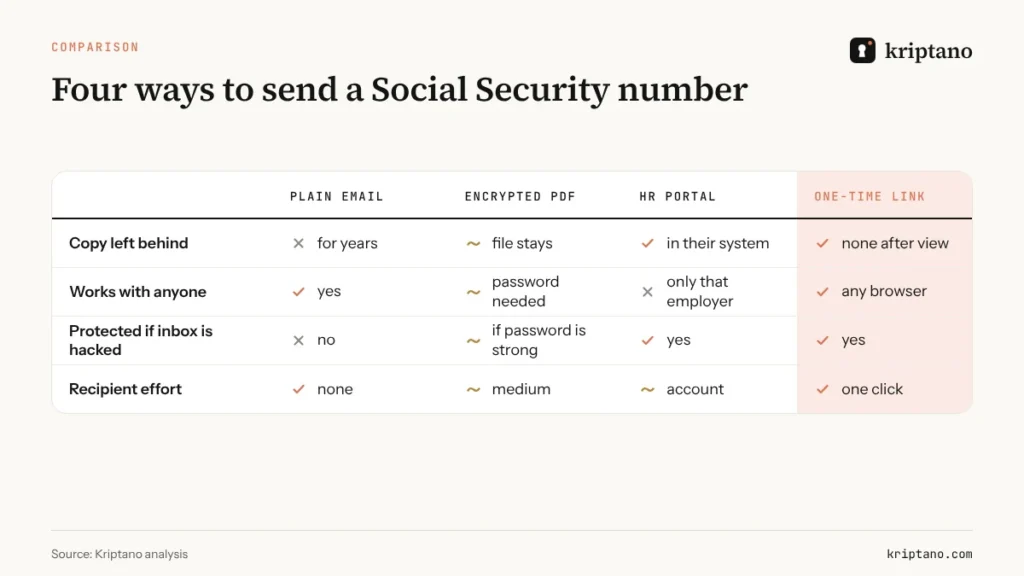
Ranked from best to acceptable. Each one is a more secure way to send Social Security number information than typing it into an email.
1. The organization’s own secure portal
If your employer, bank or accountant has a portal – an HR onboarding system, a tax-preparation client portal – use it. The data goes straight into the system that needs it, and nothing lands in email.
2. In person or by phone, after verifying who you’re talking to
Reading the number to a verified person on a call you initiated leaves no written copy. It’s slow and doesn’t scale, but it’s hard to beat for a one-off.
3. A one-time encrypted link
Paste the number into a one-time link, send the link by email or text, and share a passphrase by phone. The recipient opens it once; afterwards the inbox holds a dead link instead of your SSN. Kriptano encrypts the data in your browser, so we never see it either.
4. A secret request from the other side
If you’re the one collecting data – HR, payroll, an accountant – send a secret request instead of asking people to email. It’s the most secure way to send Social Security number details that you can offer someone who isn’t technical. They type the SSN into an encrypted form in their browser, and you read it once. More on this below.
5. An encrypted PDF with the password sent separately
If someone insists on a document, encrypt the PDF and send the password through a different channel. It’s better than plain email, but the file stays in the inbox, so a weak password can be cracked later. Our guide to file encryption shows how to do it properly.
Step by step: sending an SSN with a one-time link
Verify the request
Call the person on a number you already have, not one from the email.
Send only what’s needed
Last four digits if they suffice; the full SSN only when it’s required.
Create the link
Paste the number, choose one view and a short expiry – a day is plenty.
Add a passphrase
Tell it on the phone, never in the same email as the link.
Confirm and clean up
Ask them to confirm receipt; delete any drafts or notes on your side.
The same routine works for bank account and routing numbers for direct deposit, a passport number for travel bookings, a driver’s license scan for a rental, or tax documents for your accountant. For larger files, see how to send sensitive documents securely.
For HR, payroll and accountants: stop asking people to email it
If your process asks new hires or clients to email Social Security numbers, you are collecting a breach. Every inbox that receives those emails becomes a target – and as the W-2 scam shows, criminals know exactly which inbox to target.
A better onboarding flow takes minutes to set up:
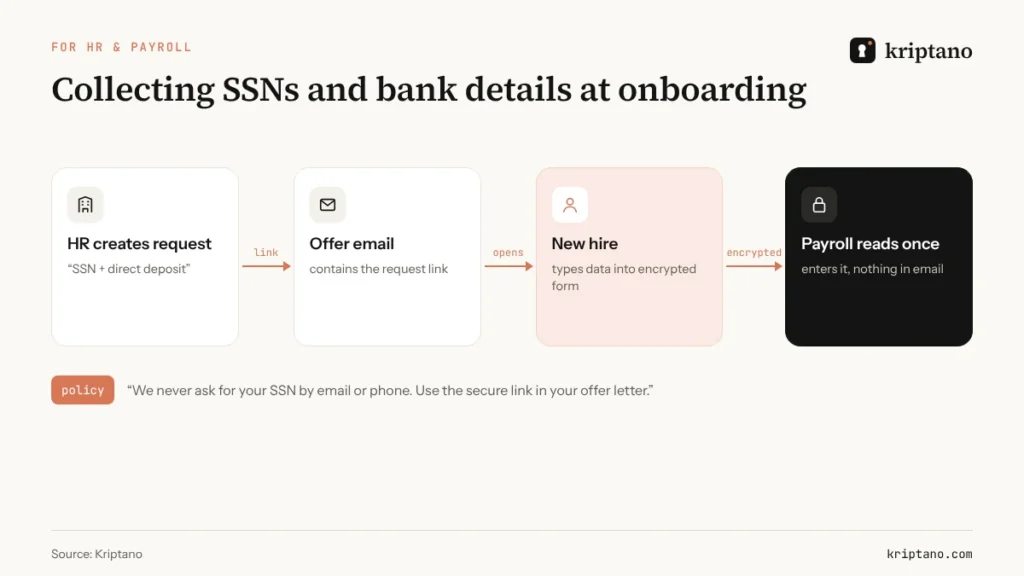
- Create a secret request for each new hire or client – “SSN and direct deposit details”.
- Put the link in your offer letter or engagement email, with one line of policy: “We never ask for your SSN by email or phone.”
- Read the data once and enter it into payroll or tax software.
- Keep the audit log, not the data: who submitted what, and when you opened it.
Tax and accounting firms have an extra reason. The FTC’s Safeguards Rule – which the IRS says applies to tax professionals – requires covered businesses to encrypt customer information in transit and at rest. A documented, encrypted intake process is much easier to defend than a shared inbox full of W-9s. For teams that exchange credentials and data with many clients, our guide to the secure password sharing tool covers the operational side.
In the UK: National Insurance numbers, passports and bank details
British readers face the same problem with different documents. A new employer needs your National Insurance number and bank details for payroll and usually a passport or right-to-work evidence; a letting agent may want ID and proof of address; an accountant wants your UTR and tax documents. HMRC warns that it won’t ask for personal or financial information through unexpected emails or texts – so treat such requests as suspicious and verify them first.
The same five options apply: the employer’s portal first, then a one-time link with a passphrase for anything that must travel by email. Under UK GDPR, the organization collecting your data is responsible for protecting it – it’s fair to ask how they want it sent before you send it.
If your Social Security number was already emailed
Don’t panic – a copy in an inbox is a risk, not an incident. The FTC’s IdentityTheft.gov walks you through recovery if the number is ever misused. Reduce it today:
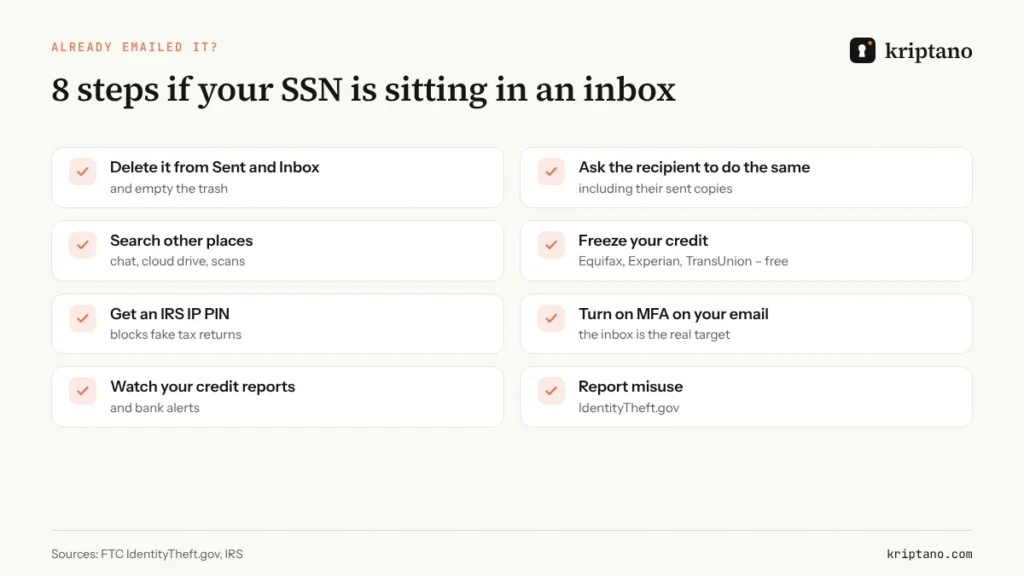
Two steps on that list deserve emphasis. Freezing your credit at Equifax, Experian and TransUnion is free and stops new accounts being opened in your name; you can lift it temporarily when you apply for credit. And an IRS Identity Protection PIN is available to any taxpayer who verifies their identity, and prevents someone else from filing a return with your SSN. Finally, protect the place where most of these copies live: your email account, with a long passphrase and a passkey or app-based one time password.
A reply you can copy when someone asks for your Social Security number
Asking for a safer channel can feel awkward, so here is a short reply that works with employers, landlords and accountants alike:
“Happy to send my Social Security number – I don’t send it by email, though. I’ll send you a one-time secure link in a minute, and I’ll give you the passphrase when we speak. If you have a client portal, I can use that instead.”
Most people respond well; many will start using the same approach themselves. If the other side refuses any alternative and insists on plain email, that tells you something about how they’ll store your data, too.
If you’re on the receiving end and want people to stop sending sensitive information via email, add one sentence to every form, offer letter and welcome email: “Please never email us your Social Security number or bank details – use the secure link below.” Then make the link the easiest option on the page.
Sending sensitive information via email: a simple rule
Email is fine for the conversation. It’s the wrong place for anything that stays sensitive for years. A simple rule covers almost every case: context by email, secrets by one-time link. It applies to Social Security numbers, bank details, passport numbers, passwords and medical results alike. If you want to understand what different email providers can and can’t protect, our comparison of secure email providers goes deeper.
Frequently asked questions
What is a secure way to send social security number details to an employer?
Use your employer’s HR onboarding portal if it has one. If not, a one-time encrypted link with a passphrase shared by phone is a secure way to send Social Security number details, because nothing remains in email afterwards.
Is it safe to email my Social Security number?
Not in a plain email. The number stays readable in both mailboxes, on servers and in backups for years. Use the organization’s portal, a phone call to a verified number, or a one-time encrypted link.
What is the most secure way to send a Social Security number?
The most secure way to send a Social Security number is through the recipient’s own secure portal. If there isn’t one, use a one-time encrypted link with a passphrase shared by phone, so no copy remains in email.
Can I text my SSN?
Plain SMS is not encrypted and stays on both phones. If you must use your phone, send a one-time link by text and share the passphrase in a call.
Does the IRS ask for my SSN by email?
No. The IRS does not start contact by email, text or social media to request personal or financial information. Treat such messages as phishing.
How should HR collect Social Security numbers from new hires?
Use an onboarding portal or a secret request: the new hire types the SSN into an encrypted form and HR reads it once. Don’t ask people to email it, and don’t keep copies in shared inboxes.
What should I do if I already emailed my SSN?
Delete the message from sent and inbox folders, ask the recipient to do the same, freeze your credit with the three bureaus, consider an IRS Identity Protection PIN and secure your email with MFA.
Your SSN deserves better than an inbox
Send it once through an encrypted link that self-destructs. Free, no sign-up.