How to Email Medical Records Securely: Discharge Summaries and Test Results Without the Risk
Patient portals cover a lot, but not every document and not every recipient. When a clinic can email medical records, how to do it with encryption and an SMS code instead of a plain attachment, and how patients can send a discharge summary to a new doctor safely.
Contents
- Where discharge summaries and test results already live
- What the rules expect when you email medical records
- Why you shouldn't email medical records as plain attachments
- Email medical records in 4 safe steps
- For patients: sending a discharge summary to a new doctor
- Records for family members and carers
- Records for insurers, lawyers and treatment abroad
- Clinics: teams, audit logs and your own domain
- Checklist: email medical records without the risk
- Frequently asked questions
A discharge summary is one of the most sensitive documents a patient ever receives: diagnoses, procedures, medication and often family history, all on a few pages. Test results are hardly less personal. So “can we email medical records?” is one of the most common questions in private clinics, dental and physio practices, and among patients who need their records outside the system they were treated in.
This guide covers where medical records are already available electronically, what the GDPR, UK GDPR and HIPAA expect, and how to replace the plain attachment with an encrypted link and an SMS code. The second half is for patients who need to send their records to a new doctor, an insurer or a clinic abroad.
Where discharge summaries and test results already live
Many health systems now give patients digital access. In England, the NHS App and GP online services show much of the GP record; in the US, patient portals are widespread; across Europe, national e-health records are expanding. Where a document is already in a portal, emailing a copy only duplicates it – and creates a copy that then needs protecting.
Even so, plenty of cases fall outside the portal:
- The recipient isn’t connected – an insurer, a doctor or clinic abroad, a lawyer, a translator.
- The document isn’t in the system – private clinic reports, imaging from abroad, older paper records.
- The patient can’t use the portal, or a relative is helping an elderly parent who hasn’t granted proxy access.
In all of these, clinics email medical records as ordinary attachments – test results and discharge letters included. That is where it pays to intervene.
What the rules expect when you email medical records
EU and UK. Under the GDPR and UK GDPR, patients have a right of access to their records (Article 15), normally free of charge and within one month. The EU Court of Justice confirmed in case C-307/22 that the first copy of a patient’s record must be provided free. Health data is special category data (Article 9), and Article 32 names encryption as an appropriate safeguard. A patient may make a request by email, and the response can be electronic – the question is how securely.
United States. HIPAA’s right of access lets patients receive copies in the form they request, including email. The HHS guidance on email says providers may use email with reasonable safeguards, and a patient who has been warned about the risks may still ask for unencrypted email. For everything else, encryption is the expected default.
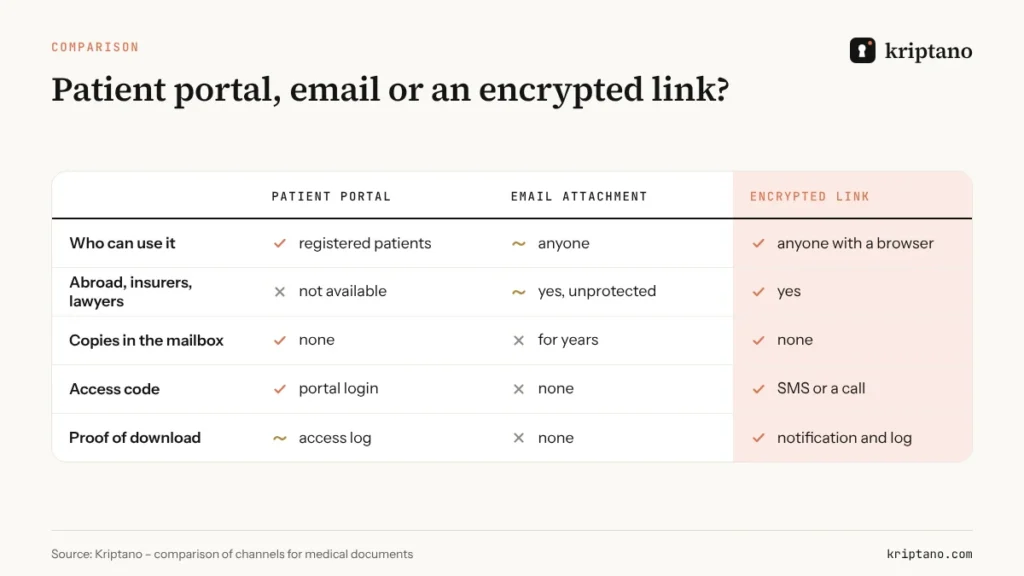
The common thread: you may email medical records, but a plain attachment is the weakest way to do it.
Why you shouldn’t email medical records as plain attachments
An email can go to the wrong address, sits in the clinic’s sent folder, the patient’s inbox, two mail servers and their backups. If the patient uses a shared family address, others can read it too. Even with TLS between servers, the attachment is stored readable at both ends.
Never put a diagnosis in the subject line
Even when the document itself is protected, the subject and body of an email remain readable. Write “Your document is ready”, not “Your oncology results”.
An encrypted link solves three problems at once: the document is encrypted in the clinic’s browser before it leaves the computer, the key is only in the part of the link after the # sign, and the encrypted record is deleted after download. A passphrase sent by SMS protects against a mistyped address – without it the link opens nothing, and after five wrong attempts the secret is destroyed.
Email medical records in 4 safe steps
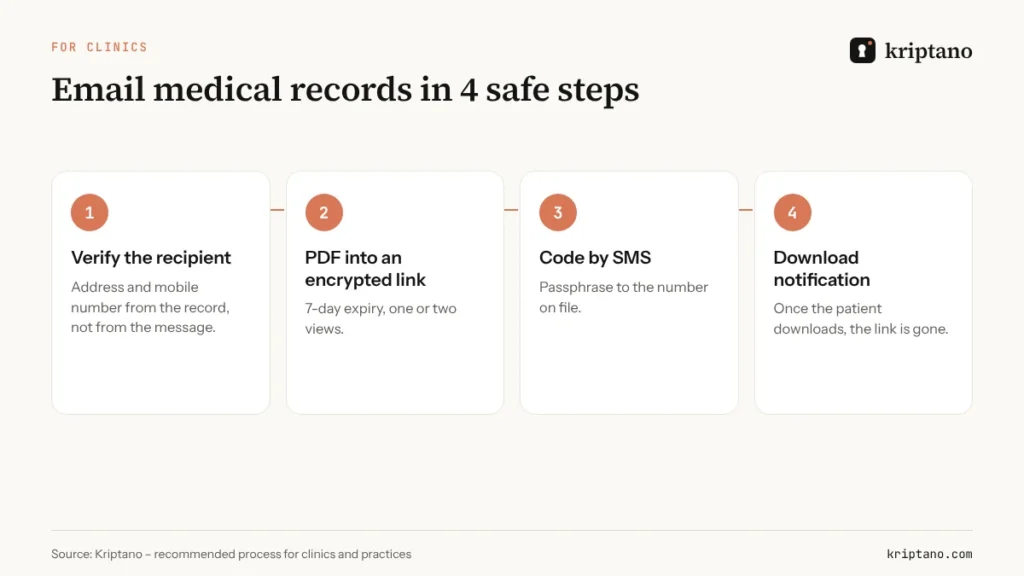
When a document isn’t in the portal, or the recipient is outside it, a clinic can replace the attachment with four steps:
Verify the recipient
Use the email address and mobile number on the patient record, not an address someone gives in a message or on the phone.
Put the PDF into an encrypted link
7-day expiry, one or two views; 50 MB on Start covers even long reports and scans.
Send the code by SMS
The passphrase goes to the number on file, never in the same email.
Wait for the notification
When the patient downloads the document you get a notification, and the link stops working.
The email itself should only say that a document is ready, how long the link is valid and that the code will arrive by SMS. Even if someone else reads it, it gives nothing away.
For patients: sending a discharge summary to a new doctor
Patients often need the opposite direction: sending a hospital discharge summary to a private specialist, a physiotherapist, an insurer or a clinic abroad. The safest option is a secret request from the clinic – a link where the patient adds the PDF or photos, and the browser encrypts them before upload.
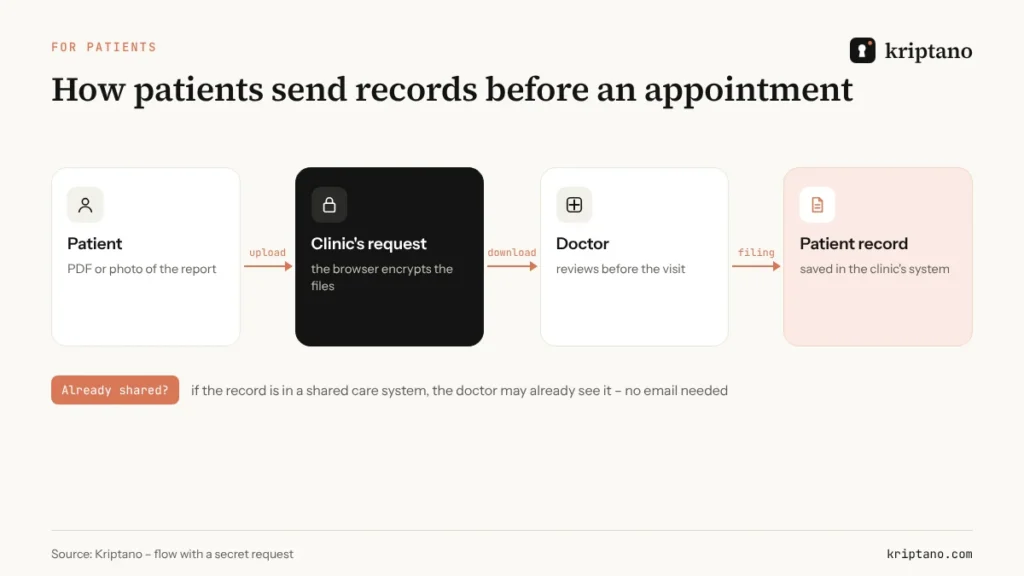
The patient needs no account or app. If the clinic doesn’t have a request link, the patient can create an encrypted link with an attachment and send the code by SMS.
Photo or PDF?
A PDF from the portal or the hospital is always better than a photo: it’s readable, keeps every page and carries no location metadata. If all you have is paper, use a scanning app that produces a PDF and check that stamps, signatures and page edges are visible.
What not to send, and to whom
- Don’t send your employer a discharge summary – a fit note or sickness certificate is enough.
- Don’t send your entire record when the recipient needs one set of test results.
- Don’t use generic addresses like info@; ask the clinic which address handles records.
- Don’t post reports in social-media groups, even when looking for advice.
Records for family members and carers
A lot of medical paperwork is handled by someone other than the patient. A daughter collects her father’s discharge summary for a specialist, parents send a child’s test results to a clinic, a carer manages records for someone who can’t. The rule is the same in every case: the document should reach only someone entitled to it.
- Adult relatives need the patient’s consent or formal proxy access; without it, the clinic sends the records to the patient.
- Children – parents usually act for young children, but older children may be entitled to decide for themselves.
- Carers and attorneys should give the clinic proof of their authority in advance so requests move quickly.
Once the right is clear, sending works the same way: an encrypted link, an SMS code to the representative’s number and a short expiry. The discharge summary doesn’t end up in a shared family inbox or in the photo gallery of a phone several people use.
Records for insurers, lawyers and treatment abroad
When test results are needed outside the country, the process gets longer: documents often need translating, sometimes certifying, and sending to a clinic or insurer. Every step is another chance for a copy to linger in a mailbox. If you send records to a translator, read our guide to certified translation.
Insurers and lawyers usually need only part of the record. Send what was requested, with a few days’ expiry and a code by another channel – and ask how they will store it.
Clinics: teams, audit logs and your own domain
A larger practice shouldn’t email medical records from one personal account. On Pro, up to 5 members, and on Pro Plus up to 25, work from a shared account with roles, mandatory two-factor authentication and team policies – such as a mandatory passphrase and a maximum expiry. The activity log records when each link was created and opened, without the content.
On Pro Plus links can sit on the clinic’s domain, such as records.clinic.example, and notifications can go out through your own SMTP server. Patients get messages they recognise, which reduces the risk of confusing them with phishing. The setup is described in our guide to the secret sharing API and webhooks, and plans are compared on the Pricing page.
Checklist: email medical records without the risk
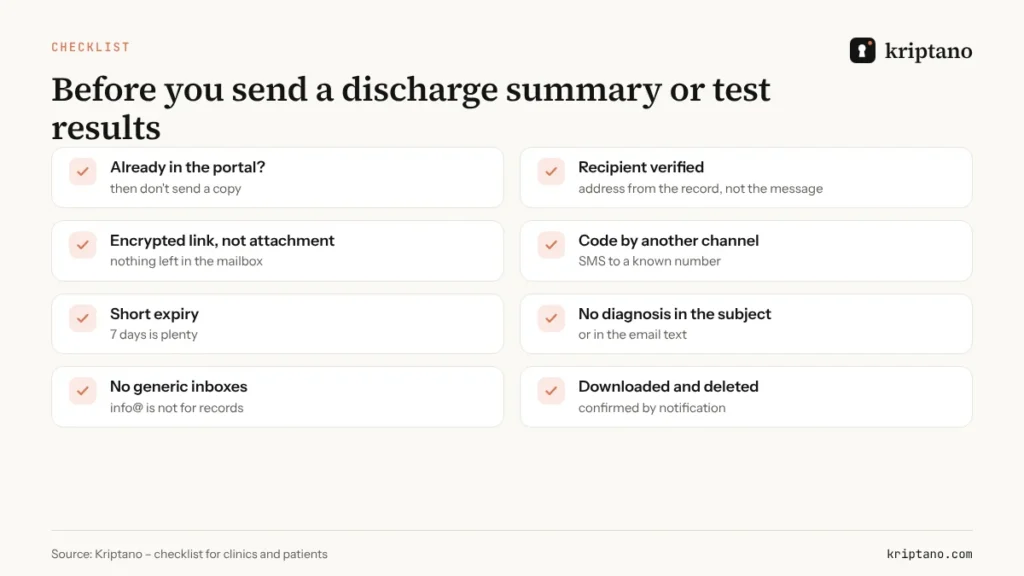
- Check whether the document is already in the patient portal – if so, don’t send a copy.
- Verify the recipient against the record, not the message.
- Use an encrypted link instead of an attachment.
- Send the code by SMS to a known number.
- Set a short expiry, for example 7 days.
- Keep diagnoses out of the subject and body.
- Don’t use generic inboxes for records.
- After the download notification, confirm the link is gone.
The technical background is in Send sensitive documents securely, and when encrypted email makes sense is covered in How to send an encrypted email.
Frequently asked questions
Is it legal to email medical records to a patient?
Yes, in most jurisdictions – the GDPR, UK GDPR and HIPAA all allow electronic copies. They also expect appropriate security, and a plain attachment is the weakest option, so an encrypted link with an SMS code is the safer choice.
How should a clinic send a discharge summary?
If it isn’t in the patient portal, put the PDF into an encrypted link with a short expiry, send the link to the email on file and the passphrase by SMS to the number on file.
How do I send my test results to a new doctor?
Ideally through a secret request from the new practice. If they don’t have one, create an encrypted link with the attachment and send the code by SMS or tell them by phone.
Does the patient need a Kriptano account?
No. The patient opens the link or request in a browser, with no sign-up and no app.
What if the wrong person opens the link?
Without the passphrase the link reveals nothing, and after five wrong attempts the secret is destroyed. Send the patient a fresh link.
Medical records without attachments
Create your first link for free. For secret requests, a team and an audit log, choose the plan that fits your practice.