One Time Password (OTP) Explained: SMS, Authenticator Apps, Passkeys – and How an OTP Differs From a One-Time Link
Every bank, email provider and work app now asks for a one time password. How OTPs work (HOTP and TOTP), six methods ranked from SMS to passkeys, why SIM swaps and Salt Typhoon made text codes the weakest link – and why a one-time password is not the same as a one-time link.
You type your password, and a moment later a six-digit code arrives: that’s a one time password, or OTP. It is the most familiar form of two-factor authentication, used by banks, email providers, payroll systems and almost every work app. Searches for “1 time password”, “onetime password” and “one time passcode” run into the thousands every month – often from people trying to work out why a code didn’t arrive, or whether the one their “bank” just asked for on the phone was safe to share.
This guide explains how OTPs work, ranks six methods from weakest to strongest, shows why SMS codes became the weak link after a wave of SIM swaps and the Salt Typhoon telecom hacks, and clears up a common confusion: a one time password is not the same thing as a one-time link.
Contents
- What is a one time password?
- 6 OTP methods, ranked from worst to best
- Why the SMS one time passcode is the weakest link
- One time password vs one-time link
- Rolling out MFA in a business: a practical plan
- If your business sends one time passcodes to customers
- Recovery codes and the "break-glass" account
- Do you still need a strong password if you have an OTP?
- Troubleshooting: when the code doesn't work
- Frequently asked questions
What is a one time password?
A one time password is a code that’s valid for a single login or a short time window. Because it changes every time, a stolen OTP is useless a few minutes later – unlike a regular password, which works until someone changes it.
There are two main families, both standardized by the Internet Engineering Task Force:
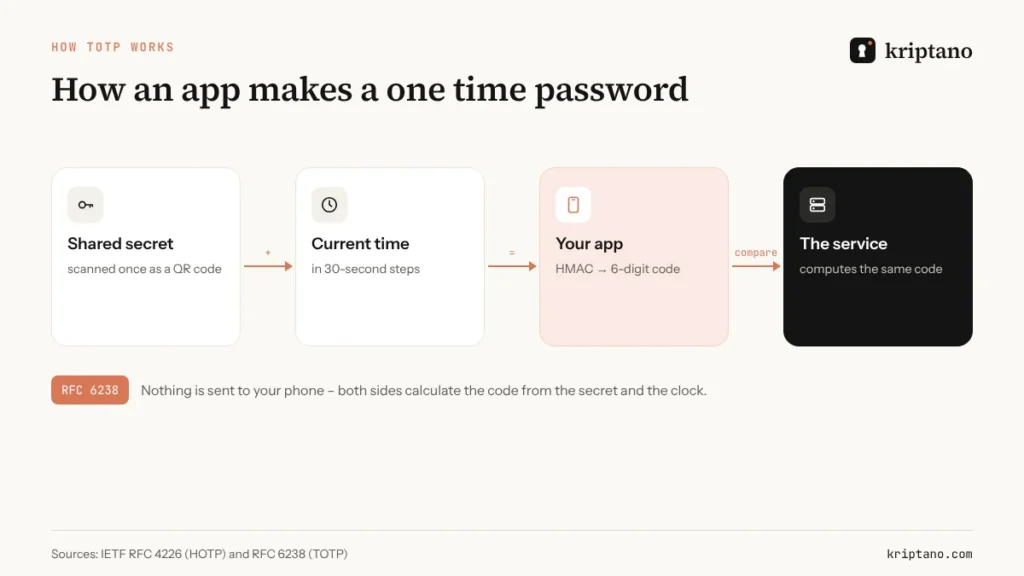
- HOTP (HMAC-based, RFC 4226) – each code is derived from a shared secret and a counter that moves forward with every use. Hardware tokens often work this way.
- TOTP (time-based, RFC 6238) – each code is derived from the shared secret and the current time, usually in 30-second steps. This is what Google Authenticator, Microsoft Authenticator, Authy and password managers generate.
Codes sent by SMS, voice call or email are also called OTPs, but they work differently: the service generates a random code and *sends* it to you, which means the code can be intercepted, redirected or phished on the way.
6 OTP methods, ranked from worst to best
Not all second factors are equal. The two questions that matter are: can a phishing site trick you into handing it over? and can someone steal it by taking over your phone number?
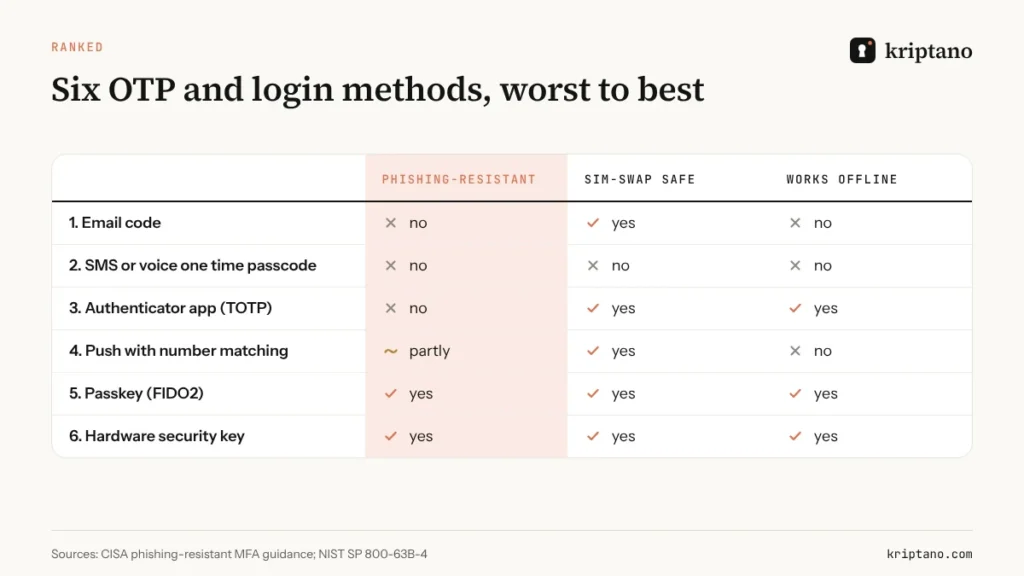
- Email codes – only as strong as your email account, which is often the account being attacked.
- SMS or voice one time passcode – vulnerable to SIM swaps, interception and phishing. NIST treats SMS and voice as a “restricted” authenticator for this reason.
- Authenticator app (TOTP) – survives SIM swaps and works offline, but you can still be tricked into typing the code into a fake site.
- Push approval with number matching – convenient, and number matching blocks “MFA fatigue” spam, but it can still be relayed by a sophisticated phishing kit.
- Passkeys – built on the FIDO2 standard; the browser only uses the key on the genuine website, so phishing sites get nothing.
- Hardware security keys – the same phishing resistance as passkeys, in a physical key you carry. The gold standard for administrators.
The US Cybersecurity and Infrastructure Security Agency (CISA) calls the last two phishing-resistant MFA and recommends them for anyone likely to be targeted.
Why the SMS one time passcode is the weakest link
SIM swapping
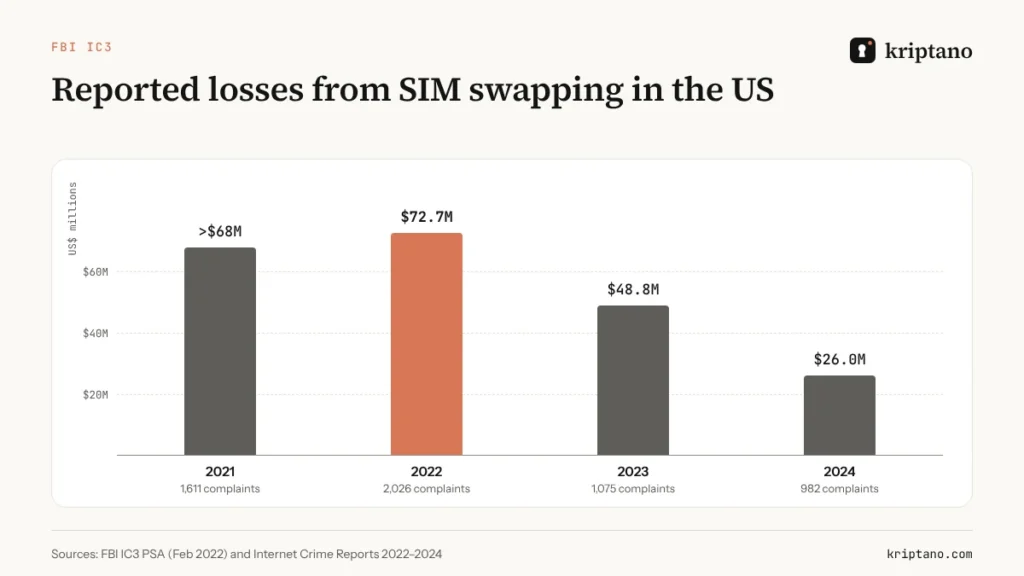
In a SIM swap, a criminal convinces or bribes a mobile carrier to move your number to their SIM card. Every SMS code then goes to them. The FBI’s Internet Crime Complaint Center counted 1,611 SIM-swapping complaints with more than $68 million in losses in 2021 alone, after just 320 complaints across 2018–2020. Reported losses have fallen since the 2022 peak, helped by new carrier rules from the US Federal Communications Commission, but they remain in the tens of millions.
Salt Typhoon and unencrypted texts
In late 2024, US agencies confirmed that a China-linked group known as Salt Typhoon had broken into several American telecom networks. CISA’s mobile communications guidance from December 2024 told highly targeted people to stop using SMS for MFA, because text messages aren’t encrypted and can be read by anyone with access to carrier systems. Our encrypted text message guide covers what that means for everyday texting.
Real-time phishing
Modern phishing kits sit between you and the real website, passing your password and your OTP through in real time. A six-digit code can’t tell the difference between the genuine site and a perfect copy. Passkeys can.
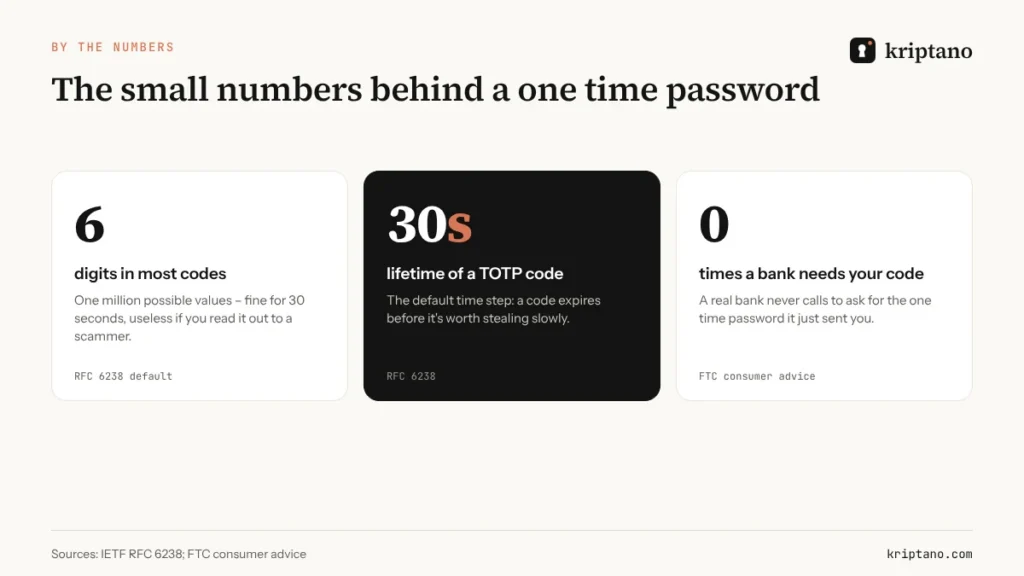
Nobody legitimate asks for your OTP
Banks, the IRS, HMRC, delivery companies and IT departments never need the one time password they just sent you. If someone asks for it on the phone or in a chat, it’s a scam – hang up and call back on a number you trust.
One time password vs one-time link
The names are confusingly similar, but they solve different problems:
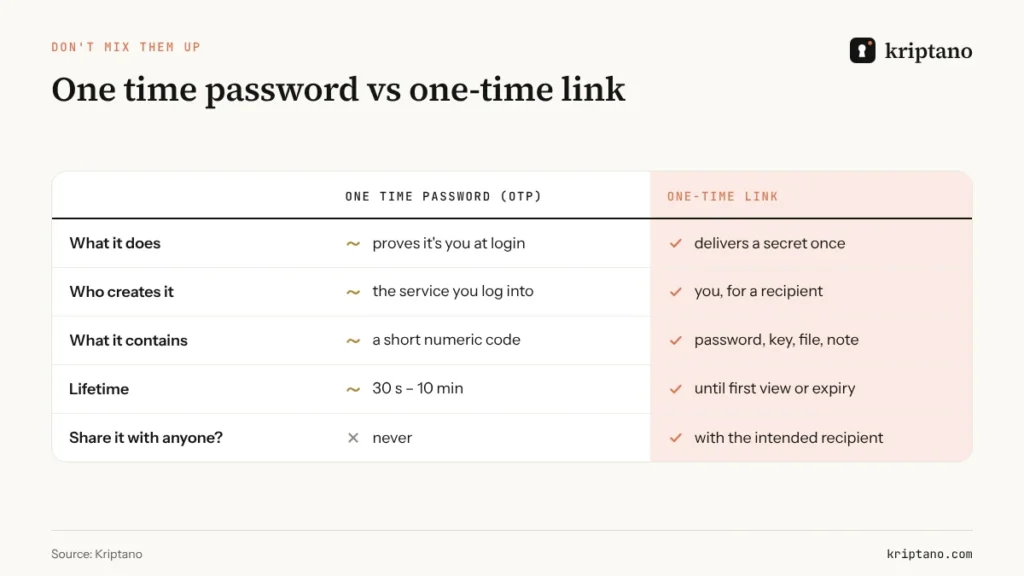
- A one time password proves *who you are* when you log in. The service creates it; you should never share it with anyone.
- A one-time link delivers *a secret to someone else* – a password, an API key, a document – and self-destructs after the first view. You create it for a specific recipient.
The two meet in practice more often than you’d think. When you set up an authenticator, the service shows a QR code containing the shared secret, plus a set of backup codes. Both are effectively master keys for your second factor. Sending them to a colleague by email or chat – “here’s the team account’s 2FA, just in case” – undoes the whole point. If an authenticator secret or backup codes must be handed over, use a one-time link with a passphrase, and prefer giving each person their own second factor instead.
For more on how one-time links work under the hood, see our guide to one-time secret links, or compare tools in our Privnote alternative roundup.
Rolling out MFA in a business: a practical plan
Turn MFA on everywhere, starting with email
Whoever controls email can reset everything else.
Prefer passkeys and authenticator apps
Use SMS only as a temporary fallback – and never for administrators.
Enforce it for the whole team
Optional MFA protects the people who need it least.
Store backup codes safely
In the password manager or a sealed envelope – never in a shared inbox.
Hand over credentials once
First passwords and recovery codes go through one-time links, then get changed.
Two details often trip companies up. First, shared accounts – a social media login used by five people – tempt teams to share one authenticator secret. A business password manager that supports shared TOTP codes, or separate user accounts where the platform allows, is safer. Second, new hires: the first password and the MFA enrolment link are the most sensitive messages you’ll ever send them. Our guide to temporary passwords and login credentials walks through that first day.
In Kriptano itself, two-factor authentication is available on every paid plan and can be enforced for a whole team, alongside Google and Microsoft sign-in.
If your business sends one time passcodes to customers
Many companies don’t just use OTPs – they send them, for logins, payments and account changes. A few design choices make the difference between a code that protects customers and one that helps scammers:
- Say what the code is for and who will never ask for it. “Your code to approve a $250 transfer to J. Smith. We will never call you to ask for it.” Context lets people spot a scam in progress.
- Keep codes short-lived and single-use, and rate-limit requests so attackers can’t flood a phone with messages.
- Don’t put the code in an email subject line or a push preview on a lock screen, where anyone holding the phone can read it.
- Offer something stronger than SMS – an authenticator app or a passkey – and nudge customers towards it.
- Treat a phone number change as a high-risk event. Add a delay or an extra check before codes start going to a new number.
These measures cost little and reduce the most common OTP fraud: social engineering, where a caller persuades a customer to read out a one time passcode.
Recovery codes and the “break-glass” account
Every MFA rollout needs a plan for the day someone loses their phone. Most services issue backup codes at enrolment; treat them like a spare house key. Print them or store them in a password manager, never in the same mailbox the codes protect. Companies should also keep at least one break-glass administrator account with a hardware key locked in a safe, so a single lost device can’t lock everyone out. Document who may use it, and log every use.
Do you still need a strong password if you have an OTP?
Yes. A one time password protects you when your password leaks; it doesn’t make a weak password acceptable. NIST still requires a minimum length and a breached-password check even when MFA is in place, and many attacks target the password reset flow, where the OTP may be the only remaining barrier. Pair a long, unique password from a generator – our strong password generator guide explains how long – with the strongest second factor each service supports, and keep both in a password manager. Our guide to the best place to keep passwords compares the options.
Troubleshooting: when the code doesn’t work
- Authenticator codes rejected? Check your phone’s clock is set automatically – TOTP depends on time.
- SMS code never arrives? Wait a minute before requesting another; several requests can invalidate earlier codes. Never accept “help” from someone who contacts you about it.
- New phone? Move authenticator accounts *before* wiping the old one, or use backup codes. Many password managers sync TOTP codes across devices.
- Lost everything? Account recovery is deliberately slow. That’s the price of keeping attackers out – and the reason to store backup codes before you need them.
Frequently asked questions
What is a one time password (OTP)?
A one time password is a code that works for a single login or a short time window, usually 30 seconds to a few minutes. It’s used as a second factor alongside your regular password.
Is an SMS one time passcode safe?
It’s better than no second factor, but it’s the weakest common option: SIM swaps, interception and phishing can all steal SMS codes. Use an authenticator app or passkey where you can.
What is the difference between HOTP and TOTP?
HOTP codes are based on a counter that increases with each use; TOTP codes are based on the current time, usually in 30-second steps. Most authenticator apps use TOTP.
Should I ever share an OTP?
No. No legitimate bank, government agency or IT team will ask for the code they just sent you. Anyone asking for your OTP is trying to log in as you.
Is a one-time link the same as a one time password?
No. An OTP proves your identity at login. A one-time link delivers a secret, such as a password or file, to someone else and self-destructs after the first view.
Are passkeys better than OTP codes?
Yes, for phishing resistance. Passkeys only work on the genuine website, so a fake login page can’t capture anything useful.
Never paste backup codes into a chat again
Send recovery codes and first passwords through a one-time link. Free, no sign-up.