Secret Sharing API and Webhooks: Teams, Custom Domain and Custom SMTP
When a company sends hundreds of passwords and documents a month, doing it by hand becomes a bottleneck. How to connect Kriptano to your HR system, help desk and CRM through the API, how webhooks tell you a secret was opened, and how teams, a custom domain and custom SMTP work.
Contents
Creating one one-time link takes half a minute. A hundred a month – for new starters, password resets, clients and vendors – is a job someone has to do by hand. For companies and engineering teams, Kriptano offers five building blocks: a secret sharing API, webhooks, teams with roles, a custom domain and custom SMTP. This guide explains what each one does, how to connect it to your systems, and how everything stays encrypted in the browser.
If you’re new to Kriptano, start with One-time secret links. Full technical documentation with examples is on the API page.
Overview: what’s included in which plan
Every feature uses the same encryption: AES-256-GCM, with the key only in the link after the # sign. Plans differ in scope and business features:
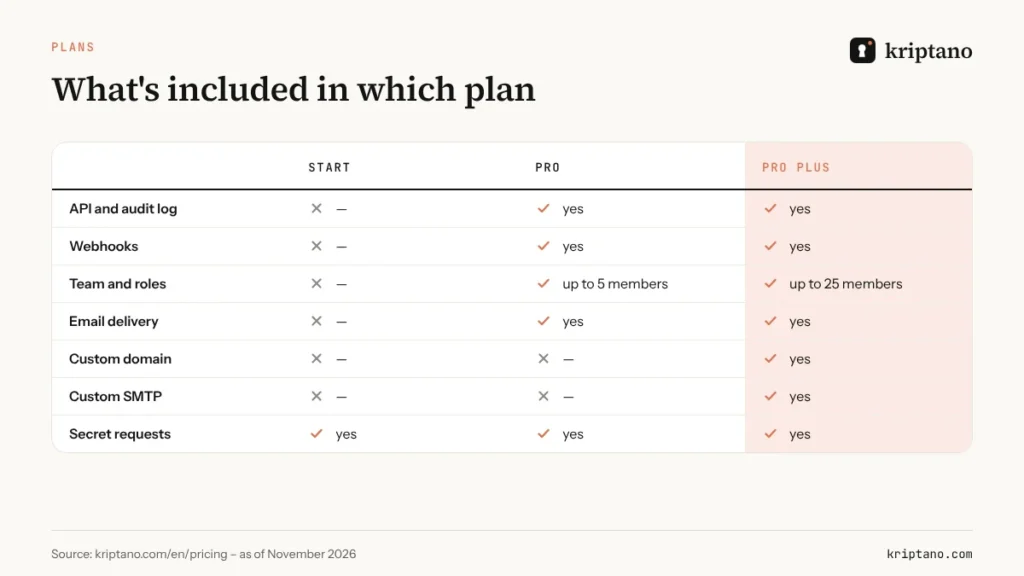
Current prices and limits are always on the Pricing page. If you only need secret requests and encrypted attachments, Start is enough.
The secret sharing API: secrets from your own systems
The secret sharing API lets your systems create a one-time link on their own – when HR opens a new account, when the help desk resets a password, or when the CRM sends login details to a client. Authentication uses an API key in the Authorization header. You create keys in your account settings, and they are stored only as hashes.
The API works in two modes:
- Pre-encrypted content – your code encrypts the secret in the same format as the browser, and the server never sees plaintext. This is the recommended mode for sensitive integrations.
- Plaintext – the API encrypts the secret in the same format and doesn’t store the key. The key exists only in the link returned in the response, so your system must pass it to the recipient right away.
POST https://kriptano.com/wp-json/kriptano/v1/api/secrets
Authorization: Bearer <your API key>
Content-Type: application/json

{ "secret": "Temporary password: …", "expires": 86400, "passphrase": "…" }

→ 201 Created – the response contains a one-time link with the key after #
Other options – number of views, a label for the log, attachments – are covered in the documentation. A typical example is handing a temporary password to a new starter, described in our guide to temporary passwords and login credentials. The activity log is available through the secret sharing API too, so you can pull it into your own monitoring.
Webhooks: events in real time
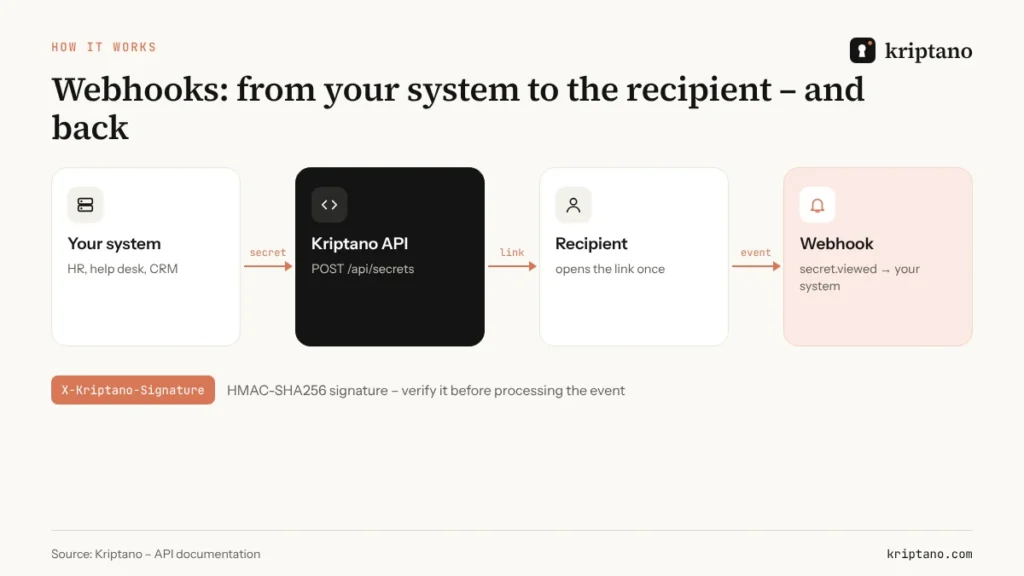
A webhook is an endpoint on your server to which Kriptano sends an HTTPS POST with JSON when something happens – for example, when a recipient opens a secret. Your help desk can then close the ticket automatically, your SIEM can record the event and a Slack channel can get a notification. Webhooks never carry the secret’s content, the key or the ciphertext – only the ID, label and state – so the zero-knowledge model stays intact.
| Event | When it fires |
|---|---|
| secret.created | a new secret was created |
| secret.viewed | the recipient opened the secret |
| secret.burned | the secret was destroyed after the last view or wrong passphrases |
| secret.expired | the expiry passed and the secret was never opened |
| secret.deleted | the sender deleted the secret |
| request.created / request.answered | a secret request was sent or answered |
| team.member_joined / team.member_removed | a team change |
How webhooks are delivered
Kriptano sends the message immediately after the event. If your server doesn’t answer with a 2xx status, retries follow after 1, 5, 30, 120 and 720 minutes. After 15 consecutive failures the endpoint is disabled automatically, and you’ll see that in your account. Only HTTPS endpoints are accepted, with no redirects and no private or local IP addresses – a guard against using webhooks to attack internal networks. The number of endpoints depends on the plan, and the “Send test” button delivers a ping event.
Verifying the signature
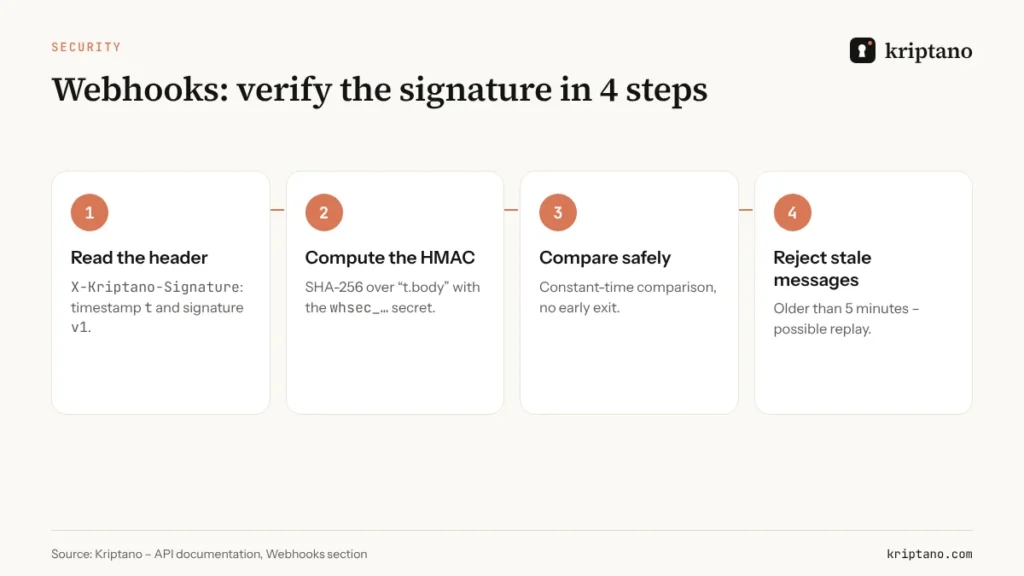
Every message carries an X-Kriptano-Signature header with a timestamp and a signature. Your server computes HMAC-SHA256 over the timestamp and the raw request body using the webhook secret (whsec_…) you received once, when you added the endpoint:
# Python – signature verification
import hmac, hashlib, time
t, v1 = (p.split("=", 1)[1] for p in request.headers["X-Kriptano-Signature"].split(","))
expected = hmac.new(SECRET.encode(), f"{t}.{raw_body}".encode(), hashlib.sha256).hexdigest()
if not hmac.compare_digest(expected, v1) or abs(time.time() - int(t)) > 300:
    abort(400)
For idempotent processing, use the event ID from the body or the X-Kriptano-Delivery header: a retry carries the same event, so don’t process it twice.
Three real-world examples
- Help desk – an agent resets a password, the system creates a link through the API and adds it to the reply. When secret.viewed arrives, the ticket closes itself; if secret.expired arrives, the agent gets a reminder.
- HR and IT onboarding – a new starter is entered in the HR system, an IT script creates their accounts and sends the temporary password by one-time link. Webhooks report when the starter opened it, so IT knows the handover worked.
- Agencies and clients – the CRM sends every new client a secret request for their hosting login. The request.answered event moves the project to the next stage, and the password never passes through email.
Teams and roles: who can do what
Teams have up to 5 members on Pro and up to 25 on Pro Plus. Roles separate responsibilities:
- Owner manages the plan and billing.
- Admin invites and removes members, enforces two-factor authentication for the whole team and manages webhook endpoints.
- Member sends secrets and requests and sees only their own events in the log.
Team policies apply the same rules to everyone: a mandatory passphrase, maximum expiry and views, form defaults and mandatory sign-in with Google or Microsoft. A new member follows company rules from day one, and an auditor can see in the log that the rules were applied.
Custom domain: links under your own name
Recipients are rightly suspicious of links from unfamiliar domains. On Pro Plus a custom domain makes links look like secrets.company.com/…, and the secret page carries your logo and colours. It also helps with staff awareness: “our links are always on secrets.company.com” is a simple rule against phishing.
Setup takes a few minutes:
- In your account settings (My account → Brand & domain), enter a subdomain such as secrets.company.com.
- At your DNS provider, add a CNAME record pointing to
domains.kriptano.comand a TXT record to verify ownership. - Click “Verify”. The certificate is issued automatically on the first visit.
A custom domain works only while the plan is active and ownership is verified, so nobody can point someone else’s domain at your secrets. Public bodies and clinics that warn recipients about phishing find it especially useful – see Confidential tender documents for an example.
Custom SMTP and sending from your mail domain
On Pro and Pro Plus Kriptano can deliver the link to the recipient by email itself – up to five recipients per secret. The key passes through the server once to send the message and isn’t stored. That’s why we recommend a passphrase shared by another channel with email delivery: then neither the server nor any mail provider can open the secret.
On Pro Plus messages can go out under your name in two ways:
- Custom SMTP – Kriptano sends through your mail server (ports 25, 465, 587 or 2525). The password is stored encrypted, connections are allowed only to public addresses, and custom SMTP is switched on only after a successful test message.
- Sending from your domain – add the domain, set the SPF, DKIM and MX records shown in your account and click “Verify”. Public domains such as Gmail or Outlook aren’t allowed.
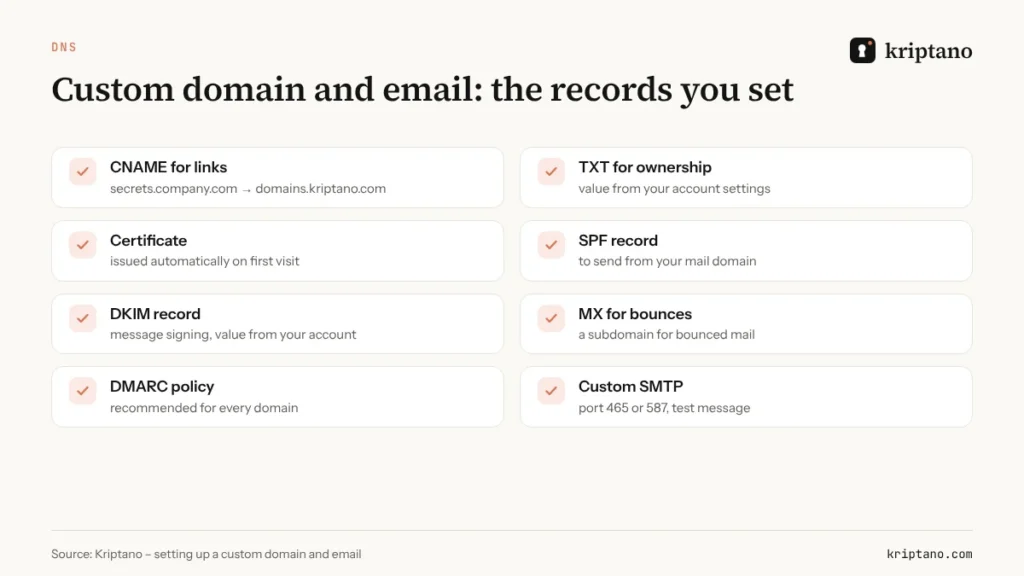
Custom SMTP makes sense when policy requires all outbound mail to pass through your own server, for example for archiving or DLP rules. If you only care that messages come from your address, sending from your domain is the simpler option. Clinics that send records this way are covered in Email medical records securely.
Integration security checklist
- Keep API keys and the webhook secret in a secrets manager, never in code or a repository.
- Rotate keys when someone leaves the team or a leak is suspected.
- Verify the webhook signature before any processing.
- Respond to webhooks quickly and handle slow work asynchronously.
- Never write links containing the key to your application logs.
- For sensitive data, use pre-encrypted content and a passphrase.
An integration like this is also a concrete NIS2 measure: an audit log, access control and real-time notifications show that you supervise how confidential data is exchanged. More in NIS2 and GDPR compliance and on the Security page. For the HMAC specification see RFC 2104, and for SPF and DKIM RFC 7208 and RFC 6376.
Frequently asked questions
What are webhooks?
Webhooks are endpoints on your server that Kriptano notifies when something happens, for example when a recipient opens a secret. The message contains the secret’s ID and state, never its content.
Can Kriptano read my secrets through the API?
Not if you send pre-encrypted content – the server never sees plaintext. If you pass plaintext to the secret sharing API, it encrypts it and doesn’t store the key; the key exists only in the link you receive.
How do I set up a custom domain?
On Pro Plus, enter a subdomain in your account settings, add a CNAME to domains.kriptano.com and a TXT record for verification, then click Verify. The certificate is issued automatically.
When do I need custom SMTP?
When company policy requires all outbound mail to go through your own server. If you just want messages to come from your address, sending from your domain is enough.
What if my server is down when a webhook fires?
Kriptano retries after 1, 5, 30, 120 and 720 minutes. After 15 consecutive failures the endpoint is disabled, and you’ll see that in your account.
Connect Kriptano to your systems
The API, webhooks and teams are available from Pro; custom domain and SMTP come with Pro Plus.