Certified Translation: How Translators and Agencies Can Receive and Send Client Documents Securely
Passports, birth certificates, degree transcripts and court papers reach translators by WhatsApp and email – and stay there for years. How to receive scans encrypted, send a draft certified translation for review, and keep your workflow in line with the GDPR and your duty of confidentiality.
Contents
- What lands on a translator's desk
- What "certified translation" means in practice
- Confidentiality and the GDPR
- Why WhatsApp, Viber and email aren't the answer
- Receiving documents from clients: the secret request
- How to send documents for translation in 5 steps
- Extra care: health, criminal records and children
- Draft translations for review – without attachments
- How long to keep scans after a certified translation
- Translation agencies and law firms
- Checklist: certified translation and the GDPR
- Frequently asked questions
A certified translation almost always starts with a document people normally keep in a drawer: a passport, a birth or marriage certificate, a degree transcript, a court judgment, a police certificate or a medical report. Clients send these the way that is easiest for them – a photo on WhatsApp or an email attachment. And there they stay, long after the translation has been delivered.
This guide explains what is expected of translators and a translation agency under the GDPR and professional confidentiality, why chat apps and email are a poor place for identity documents, and what a secure way to send documents for translation looks like – from the request to the client to the draft sent back for review. It is useful for freelance translators, agencies, law firms and clients alike.
What lands on a translator’s desk
The list is long, and nearly every item contains personal data:
- Identity and civil status – passports, ID cards, birth, marriage and death certificates, name-change documents.
- Education and work – degree certificates, transcripts, diploma supplements, employment references and contracts.
- Legal documents – judgments, court orders, powers of attorney, company register extracts.
- Health – medical reports, discharge summaries and insurance forms for treatment abroad.
- Criminal records – police certificates, which the GDPR protects with specific rules (Article 10).
A certified translation is usually needed for a visa or immigration application, recognition of qualifications, a job abroad, a wedding or a court case. That means the client is in a hurry and the document is sensitive – the perfect combination for shortcuts like “just snap it and WhatsApp it to me”.
What “certified translation” means in practice
Certified translation requirements differ by country, which matters for how you handle the source documents:
- United Kingdom – there is no single state register. Government guidance on certifying a document expects a statement that the translation is true and accurate, the date, and the translator’s or agency’s name and contact details. Translations are routinely produced from a scan.
- United States – for immigration, 8 CFR 103.2(b)(3) requires a full English translation certified as complete and accurate by a translator who certifies their competence. Copies of the source documents are generally submitted.
- Many EU countries – sworn or court-appointed translators certify translations under national law, and the certification is often tied to the original or a certified copy.
In every case, the scan is what moves around – and the scan is what needs protecting. Whatever the destination, the safest way to send documents for translation is one that leaves no copies behind.
Confidentiality and the GDPR
Every certified translation involves trust. Professional codes treat confidentiality as a core duty, and clients reasonably expect that their passport scan won’t end up in a group chat. The GDPR (or UK GDPR) adds concrete obligations:
- A freelance translator working for their own clients is a controller and is responsible for where personal data is kept and for how long.
- A translator working for a translation agency or law firm is usually a processor and needs a contract under Article 28.
- Personal data must not be kept longer than necessary (Article 5), and security must match the risk – Article 32 explicitly mentions encryption.
If a phone full of passport scans is lost or stolen, that is a personal data breach that must be assessed and, in many cases, reported to the supervisory authority – in the UK, the ICO.
Why WhatsApp, Viber and email aren’t the answer
WhatsApp and Viber encrypt messages in transit, but the scan lives on afterwards: in the phone gallery, in a Google Drive or iCloud backup, on any computer running the web client. Email is worse – the attachment stays with the sender, with the recipient, on two mail servers and in their backups.
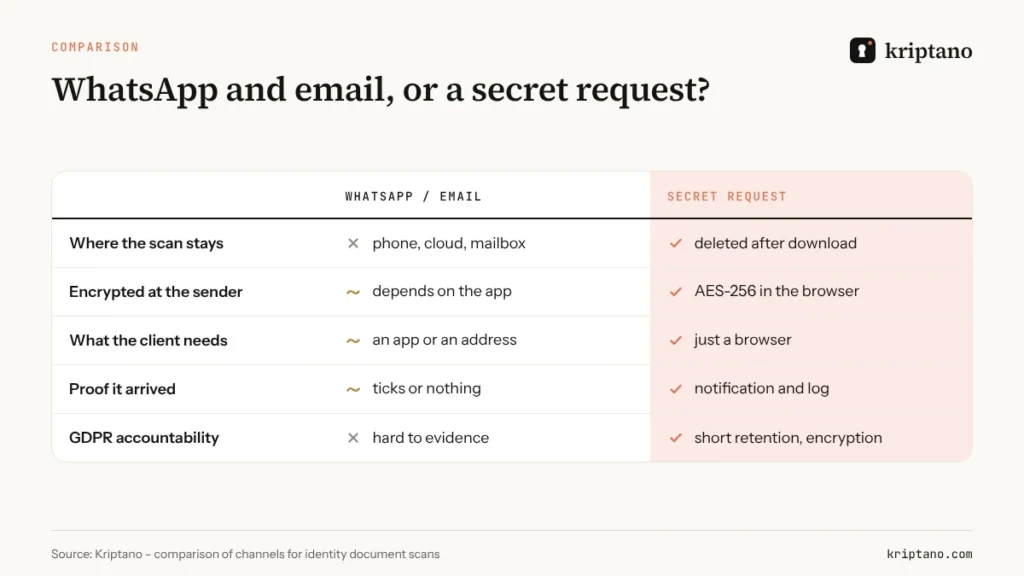
The problem isn’t only technical. A translator handling dozens of clients a month can hardly prove where all the scans are and when they were deleted – and that is exactly what a regulator asks after an incident.
Receiving documents from clients: the secret request
A secret request reverses the direction of sending. The translator creates a request link and sends it to the client – or puts it on their website and in their email signature. The client opens the link, adds the scans and a short note, and their browser encrypts everything before upload. The translator downloads the files once, after which the encrypted record is deleted from the server.
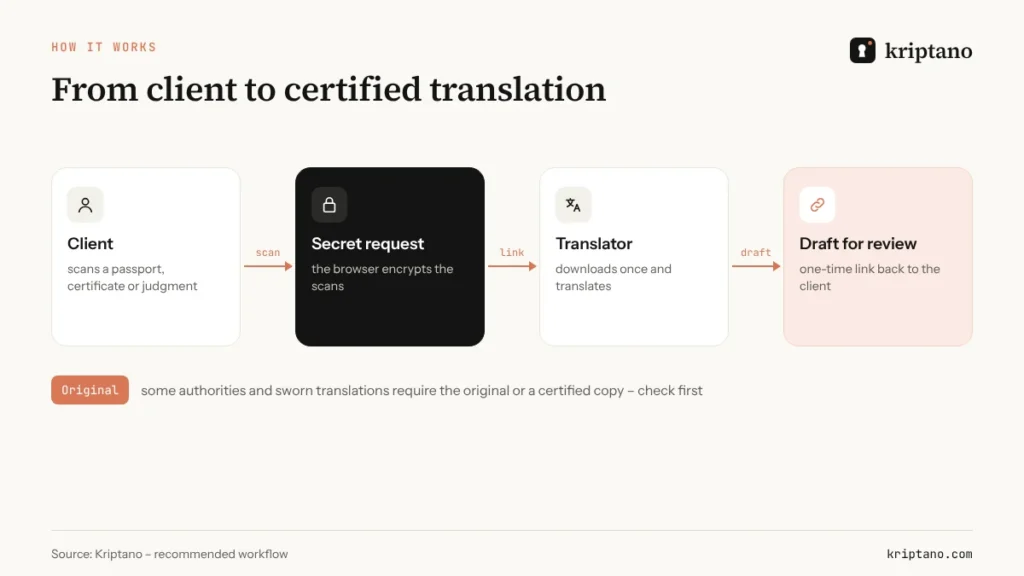
The client needs no account or app – just a browser on a phone or computer. It is the simplest way to send documents for translation without leaving copies. Secret requests are available from the Start plan, and attachments up to 50 MB cover even multi-page judgments scanned at high resolution.
What to tell the client
A short, clear message cuts down on questions. For example: “To prepare your quote and translation, please upload your documents through this secure link. Files are encrypted in your browser and deleted once I’ve downloaded them. If the authority needs the original, I’ll let you know.”
How to send documents for translation in 5 steps
If you are a client, a law firm or a translation agency, sending documents for translation can look like this:
Scan legibly
A PDF or full-size photo; check that stamps, signatures and page edges are visible.
Use the translator’s request
Or create an encrypted link with an attachment yourself if the translator doesn’t have one.
Add a short note
Target language, purpose (visa, court, university) and deadline – no extra personal data.
Share the code by another channel
If you set a passphrase, send it by SMS or say it on the phone.
Agree on originals
Ask whether the authority or a sworn translation requires the original or a certified copy.
Paper or electronic signature?
Whether the certified translation is delivered on paper with a stamp or as an electronically signed PDF depends on the authority receiving it. Check before ordering – the scans are for preparation, not a substitute for any required certification.
Extra care: health, criminal records and children
Some documents deserve stricter handling. Medical reports and discharge summaries are special category data (GDPR Article 9), police certificates fall under criminal-offence data (Article 10), and children’s certificates involve minors. For these, a translator can set tighter defaults:
- the link expires quickly, say after 24 hours, and opens only once;
- a passphrase is mandatory and reaches the client by SMS;
- after download the file goes straight into a protected folder, not the Downloads folder.
On Pro and Pro Plus the account owner can enforce default and maximum expiry times for the whole team. How clinics and patients exchange medical documents is covered in our guide to emailing medical records securely.
Draft translations for review – without attachments
A typo in a name or date of birth is expensive once the certified translation has been filed with an embassy. That’s why many translators send the client a draft to check before certifying. The draft contains the same personal data as the source, so don’t send it as an email attachment.
Send it by a one-time link that is valid for a few days: the client opens the draft, confirms or sends corrections, and the link stops working. Add a read notification if you like – you’ll know the client has seen the draft before you call.
How long to keep scans after a certified translation
Keep whatever records your professional body, insurer or accounting rules require, but identity scans don’t need to stay in email and on your phone. Once the job is delivered and paid, delete the scans or move them into a protected archive with a clear retention period.
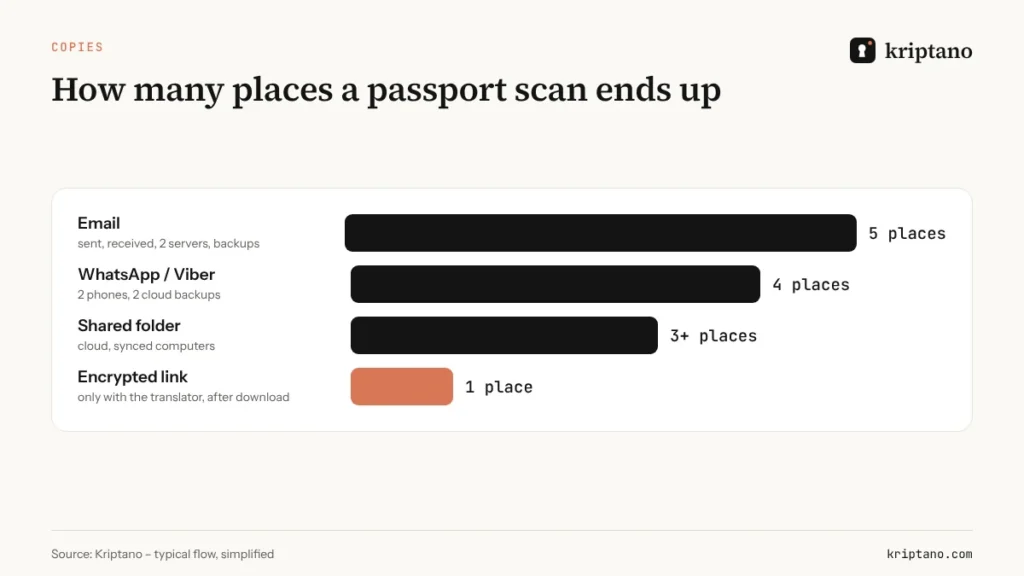
When clients send documents for translation by encrypted link, it helps twice over: scans never enter a mailbox, and whatever the translator downloads sits in one known place. That workflow is easy to describe in your record of processing activities.
Translation agencies and law firms
A translation agency working with many freelancers forwards documents again and again – and every hop creates a new copy. On Pro a team of up to 5, and on Pro Plus up to 25 members, send secrets and requests from one account, with roles and mandatory two-factor authentication. The activity log shows when each link was created and opened, without the content.
A translation agency with its own client portal can create requests and links automatically through the API, and a webhook reports when the client has uploaded the documents. See our guide on the secret sharing API and webhooks. If you translate bid documents, read Confidential tender documents as well.
Checklist: certified translation and the GDPR
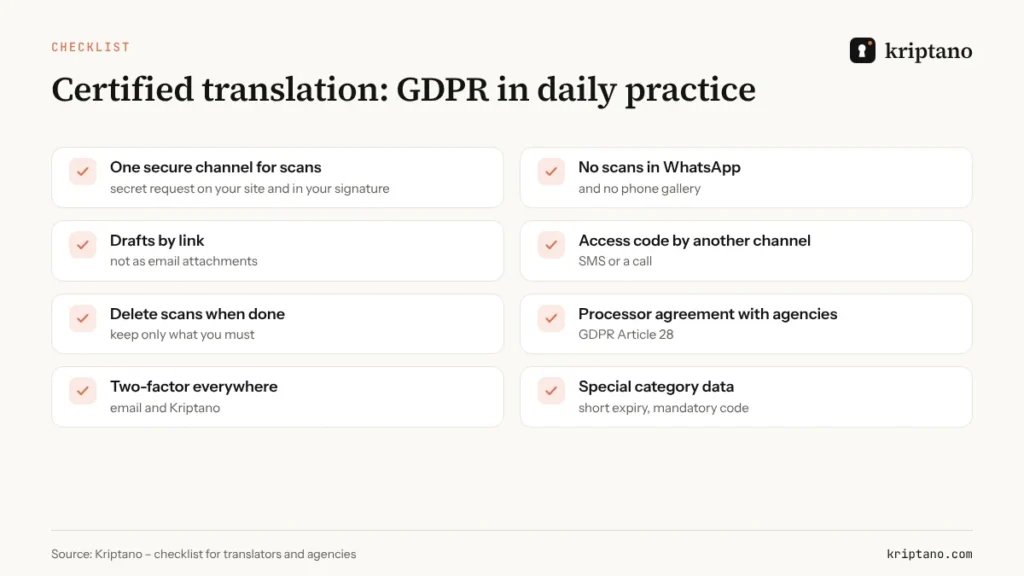
- Offer clients one secure channel for scans – a secret request on your website and in your email signature.
- Don’t accept scans in WhatsApp, and switch off automatic saving to the photo gallery.
- Send drafts by link, not as attachments.
- Share access codes by another channel.
- Delete scans when the job is done; keep only what you must.
- Sign an Article 28 processor agreement with every translation agency you work for.
- Turn on two-factor authentication for email and your Kriptano account.
The basics of sharing passwords and access codes are in How to share passwords securely, and the technical background in One-time secret links.
Frequently asked questions
Can a translator accept documents via WhatsApp?
No rule explicitly forbids it, but translators must keep client information confidential and protect personal data. Scans in WhatsApp remain in the gallery and cloud backups, so an encrypted secret request is the safer choice.
Can a certified translation be made from a scan?
In the UK and for US immigration, certified translations are routinely made from scans or copies. Sworn translations in many EU countries are tied to the original or a certified copy, so check what the receiving authority needs.
How do I send a draft translation to the client securely?
Use a one-time link with a short expiry and, if needed, a passphrase sent by SMS. Once read, the draft is deleted from the server.
Does the client need a Kriptano account?
No. The client opens the secret request or link in a browser, with no sign-up and no app.
Which plan does a translator need?
To receive scans through secret requests, Start with attachments up to 50 MB is enough. A translation agency with several linguists usually picks Pro for the team features and audit log.
Scans without WhatsApp
Create your first link for free, and turn on secret requests and encrypted attachments with the Start plan.