How to Send an Encrypted Email: S/MIME, PGP, Gmail, Outlook or a One-Time Link?
What "encrypted email" really means, how TLS, S/MIME, PGP and the built-in options in Gmail and Outlook differ, and when a one-time encrypted link is the simpler way to send something confidential by email.
Contents
- Encryption in transit vs. end-to-end encryption
- Option 1: send encrypted email with S/MIME
- Option 2: send encrypted email with PGP / OpenPGP
- Option 3: send encrypted email from Gmail and Outlook
- Option 4: send encrypted email content with a one-time link
- Comparison: which way to send encrypted email should you choose?
- How to send encrypted email with a one-time link in 4 steps
- Sending from your own domain and automating delivery
- Compliance perspective
- Frequently asked questions
“Can you send it encrypted?” sounds like a simple request, but encrypted email means very different things depending on who you ask. Your email is probably already encrypted in transit – and the content is still readable by your provider, the recipient’s provider and anyone who gets into either mailbox. This guide explains the levels of protection, compares S/MIME, PGP, Gmail and Outlook options, and shows when the easiest way to send encrypted email content is not to put the secret in the email at all.
If what you need to send is a password, the core guide on how to share passwords securely has a step-by-step process.
Encryption in transit vs. end-to-end encryption
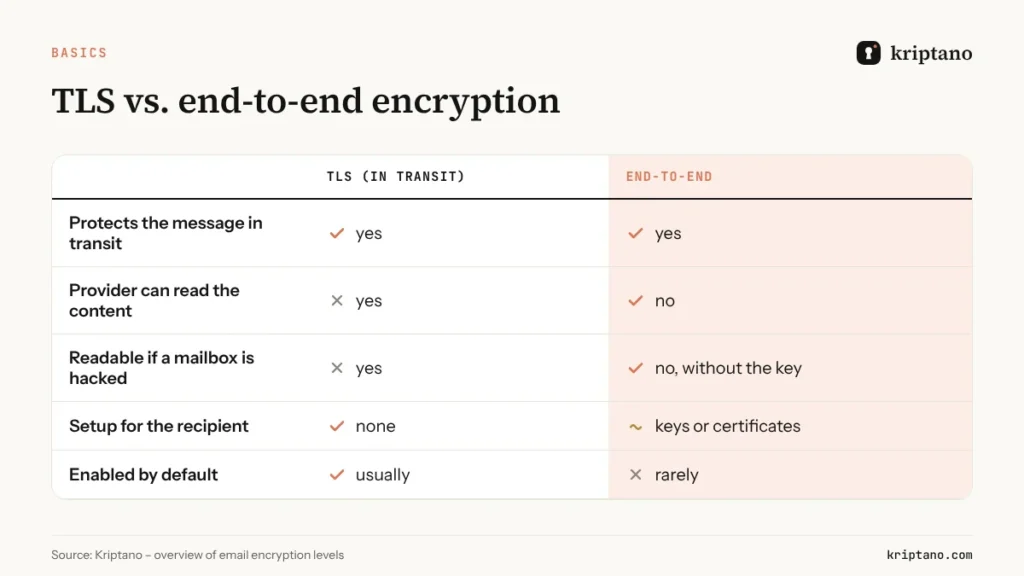
Before you send encrypted email, know that two very different things are both called “encrypted email”:
- Encryption in transit (TLS) protects the message while it moves between mail servers. Almost all major providers use it by default. Once the message arrives, it is stored readable on the servers and in the mailbox.
- End-to-end encryption encrypts the content on the sender’s device so that only the intended recipient can decrypt it. Providers and anyone with access to the mailbox see only ciphertext.
Most regulatory and contractual requirements for “encrypted email” are really asking for the second – or for an equivalent level of protection.
Option 1: send encrypted email with S/MIME
S/MIME (RFC 8551) uses certificates issued by a certificate authority. It is built into Outlook, Apple Mail and many enterprise mail systems, which makes it popular for communication between companies.
- Pros: integrated into common clients, signatures prove the sender’s identity, widely accepted in regulated industries.
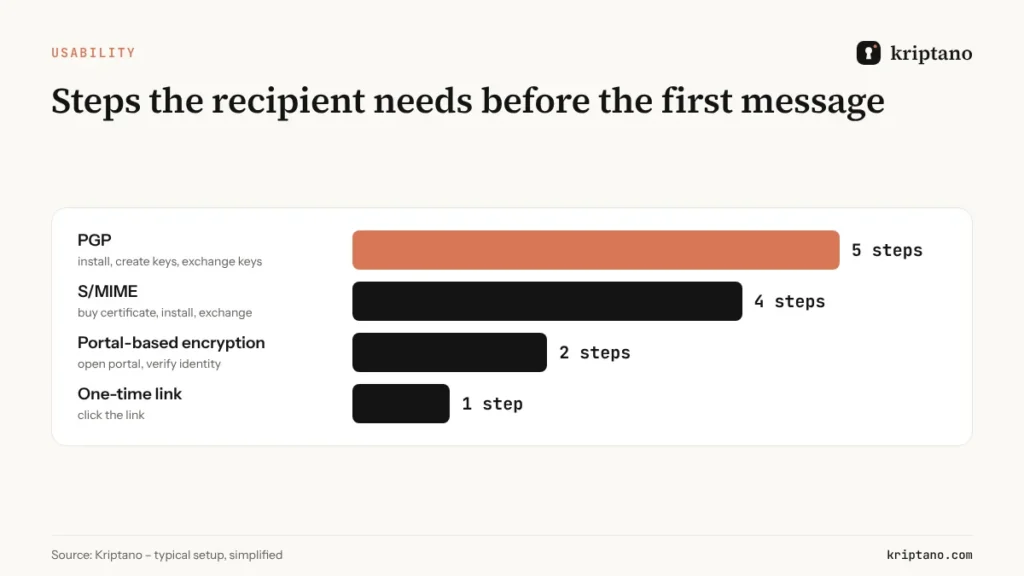
- Cons: both sides need certificates, which cost money and expire; you must exchange certificates before the first encrypted message; webmail and mobile support varies.
Option 2: send encrypted email with PGP / OpenPGP
PGP (the OpenPGP standard, RFC 9580) relies on key pairs that users create themselves, without a central authority. It is common among journalists, developers and security teams.
- Pros: free, strong, independent of providers.
- Cons: key management is hard for non-technical users, recipients must install software or plug-ins, and a lost private key means lost access to old messages.
Option 3: send encrypted email from Gmail and Outlook
– Gmail confidential mode lets you set an expiry and block forwarding, but it is not end-to-end encryption – Google can still read the content. Google Workspace offers client-side encryption on certain plans, which requires admin setup and identity provider integration. – Microsoft Outlook / Microsoft 365 offers “Encrypt” and “Do Not Forward” options through Microsoft Purview Message Encryption on eligible plans. Recipients outside Microsoft 365 receive a link to a portal and must verify themselves.
Both are good inside their ecosystems and with the right licences; they are less convenient when the recipient uses a different provider.
Option 4: send encrypted email content with a one-time link
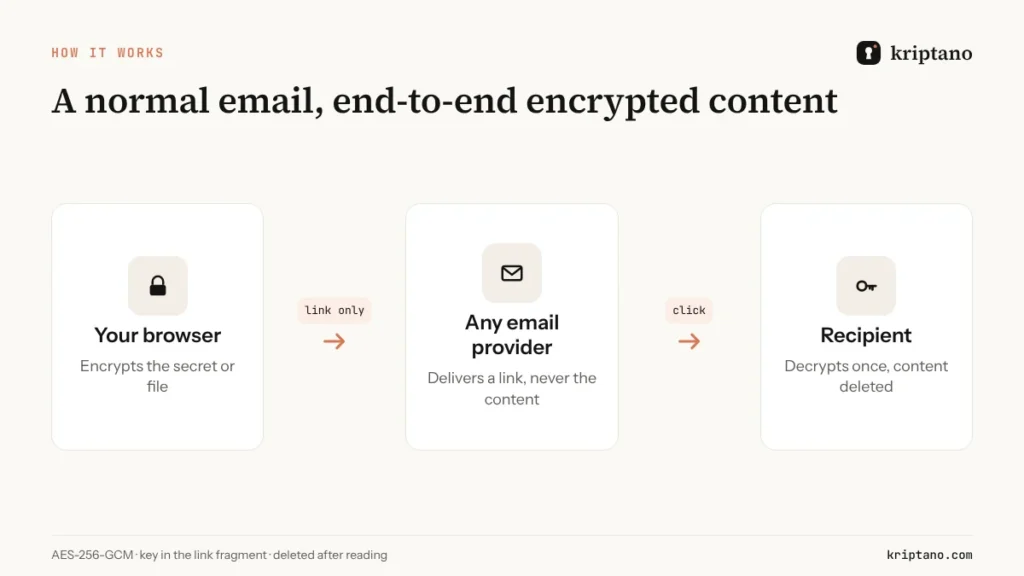
For most real-world situations – sending a password, a PIN, a bank detail or a contract to someone outside your organisation – there is a simpler pattern: write a normal email, but put the confidential part into an encrypted one-time link.
- The secret or file is encrypted in your browser with AES-256-GCM.
- Only a link goes into the email. The key sits in the link fragment after # and never reaches any server.
- The recipient clicks, reads once, and the content is deleted.
The inbox ends up holding a link that no longer reveals anything. No certificates, no keys, no plug-ins – and it works with every email provider. How the link itself works is explained in the guide on one-time secret links.
Comparison: which way to send encrypted email should you choose?
| Option | End-to-end | Recipient setup | Works with any provider | Best for |
|---|---|---|---|---|
| TLS only | no | none | yes | everyday mail without secrets |
| S/MIME | yes | certificate | partly | regular partners in regulated industries |
| PGP | yes | keys and software | yes, with plug-ins | technical teams, journalists |
| Gmail confidential mode | no | none | partly | expiry and no-forward inside Gmail |
| Microsoft Purview encryption | provider-managed | portal sign-in | partly | Microsoft 365 organisations |
| One-time encrypted link | yes | none | yes | passwords, documents, external recipients |
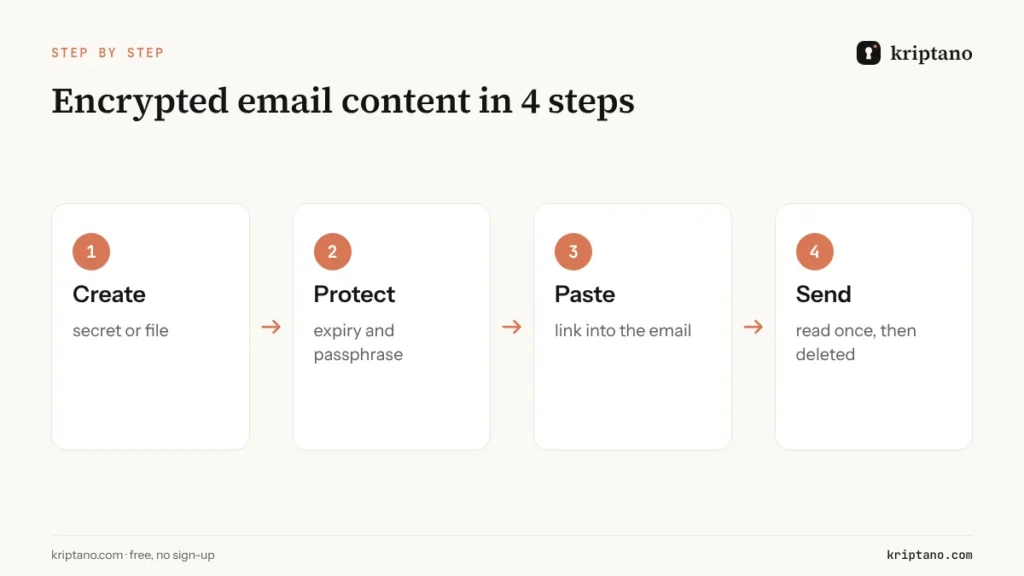
How to send encrypted email with a one-time link in 4 steps
Create the secret
Paste the confidential text or attach the file in Kriptano.
Set expiry and a passphrase
Short expiry, one view; passphrase by phone for sensitive content.
Paste the link into your email
Write the rest of the email as usual.
Send
The recipient clicks, reads once, and the content is gone.
Sending from your own domain and automating delivery
In Pro and Pro Plus, Kriptano can deliver the link by email for you – automatically, right after the secret is created. Pro Plus can send those emails from your own domain or through your own SMTP server, so recipients see your company name. With the API and webhooks, your applications can create secrets and react when they are opened. See the API documentation.
Compliance perspective
Whichever way you send encrypted email, remember that regulations such as GDPR and NIS2 ask for encryption and limited retention, not for a specific protocol. An inbox full of plain-text attachments fails storage limitation even when TLS was used. One-time links help on both fronts and, with the audit log, give you evidence for audits – more in the guide on NIS2 and GDPR compliance. For large files and medical or legal documents, read sending sensitive documents securely.
Free
For the occasional password, no sign-up.
$0€0
forever
Try for free- 8 secrets per month per IP address
- Lifetime up to 7 days
- 1 view per link
- Encrypted attachments up to 5 MB
- Extra passphrase to open
- QR code for the link
- Password generator + generator API
- SSO login: Google + Microsoft
Start
For freelancers and small offices.
$6€6 $4.80€4.80 / mo
billed monthly billed yearly: $57.60€57.60
Choose Start- 2,000 secrets per month
- Lifetime up to 30 days
- Up to 10 views per link
- Encrypted attachments up to 50 MB
- 2 GB attachment storage
- Email notification when a secret is opened
- Password generator + generator API
- SSO login: Google + Microsoft
- Two-factor login (authenticator app)
- Up to 10 secret requests (clients send data to you)
Most popular
Pro
For agencies, IT and accounting teams.
$24.90€24.90 $19.90€19.90 / mo
billed monthly billed yearly: $238.80€238.80
Choose Pro- 30,000 secrets per month
- Lifetime up to 90 days
- Up to 50 views per link
- Encrypted attachments up to 500 MB
- 20 GB attachment storage
- Email notification when a secret is opened
- Password generator + generator API
- SSO login: Google + Microsoft
- Two-factor login (authenticator app)
- Up to 1,000 secret requests (clients send data to you)
- Automatic delivery of secrets and requests by email
- API access and integrations
- Your logo and colors
- Team of up to 5 members
- Audit log with CSV export
- Webhooks (up to 10) with HMAC signatures
- Team roles and enforced 2FA
Pro Plus
Your domain, your brand and larger teams.
$62.90€62.90 $49.90€49.90 / mo
billed monthly billed yearly: $598.80€598.80
Choose Pro Plus- Unlimited secrets
- Lifetime up to 365 days
- Up to 100 views per link
- Encrypted attachments up to 10 GB
- 1,000 GB attachment storage
- Email notification when a secret is opened
- Password generator + generator API
- SSO login: Google + Microsoft
- Two-factor login (authenticator app)
- Unlimited secret requests
- Automatic delivery of secrets and requests by email
- API access and integrations
- Your logo and colors
- Team of up to 50 members
- Audit log with CSV export
- Unlimited webhooks with HMAC signatures
- Team roles and enforced 2FA
- Unlimited custom domains (e.g. secrets.your-company.com)
- Send email from your own domain
- Your own SMTP server
- Geo-blocking and IP allowlist
- No Kriptano branding (white label)
All prices include VAT or sales tax. Bank transfer offers are at the same final price. Subscription by card, PayPal, Apple Pay or Google Pay via Paddle – or bank transfer against an offer. Cancel anytime.
Frequently asked questions
Is Gmail end-to-end encrypted?
Not by default. Gmail uses TLS in transit, and confidential mode adds expiry and blocks forwarding, but Google can still read the content. End-to-end encryption in Google Workspace requires client-side encryption on eligible plans.
How do I send an encrypted email in Outlook?
On eligible Microsoft 365 plans, choose Options → Encrypt. Recipients outside your organisation get a link to a portal. Alternatively, put the confidential part into a one-time encrypted link that works with any provider.
What is the easiest way to send encrypted email to someone outside my company?
Paste a one-time encrypted link into a normal email. The recipient needs no certificate, key or account – just a browser.
Is S/MIME better than PGP?
S/MIME is easier inside companies because it is built into common clients; PGP is free and independent but harder to manage. Both require setup on both sides.
Can I send a password in an encrypted email?
You can, but the password will remain decryptable in the mailbox. A one-time link is better: after it is read, nothing usable remains in the inbox.
Send encrypted content by email – to anyone
Free and without sign-up. Encrypted in your browser and deleted after it is read.